

Summarize this article with AI
Read an old SEO audit that says to nofollow your footer and login links? Stop before you edit anything. The idea behind PageRank sculpting was simple: nofollow the unimportant internal links, and more link juice ends up on the pages you want ranking. Google rewrote the counting rules, and the trick quit working. The nofollowed link's share now vanishes. It doesn't shift to your priority pages, and across a whole site every page can end up with less than it started with.
Here's what you'll get in this guide. The mechanism in plain words. The arithmetic Google published in 2009 as a before-and-after table. And the same change run across a 12-page model site, with numbers you can compare. After that, the moves that still shape internal PageRank today. You'll also get a quick workflow for telling whether a linking change actually did anything.
What is PageRank sculpting (or link sculpting)?
Call it PageRank sculpting or link sculpting. Both names describe the same SEO tactic. The idea is to redirect PageRank across your own site so your priority pages pick up a bigger share. Older guides nickname this flow "link juice." That's the chunk of ranking value a page hands off through each outgoing link. Old-school sculptors would drop rel="nofollow" on anything they wrote off: login, contact, privacy, tag archives. That attribute was the HTML signal for the job. It told search engines to skip the link.
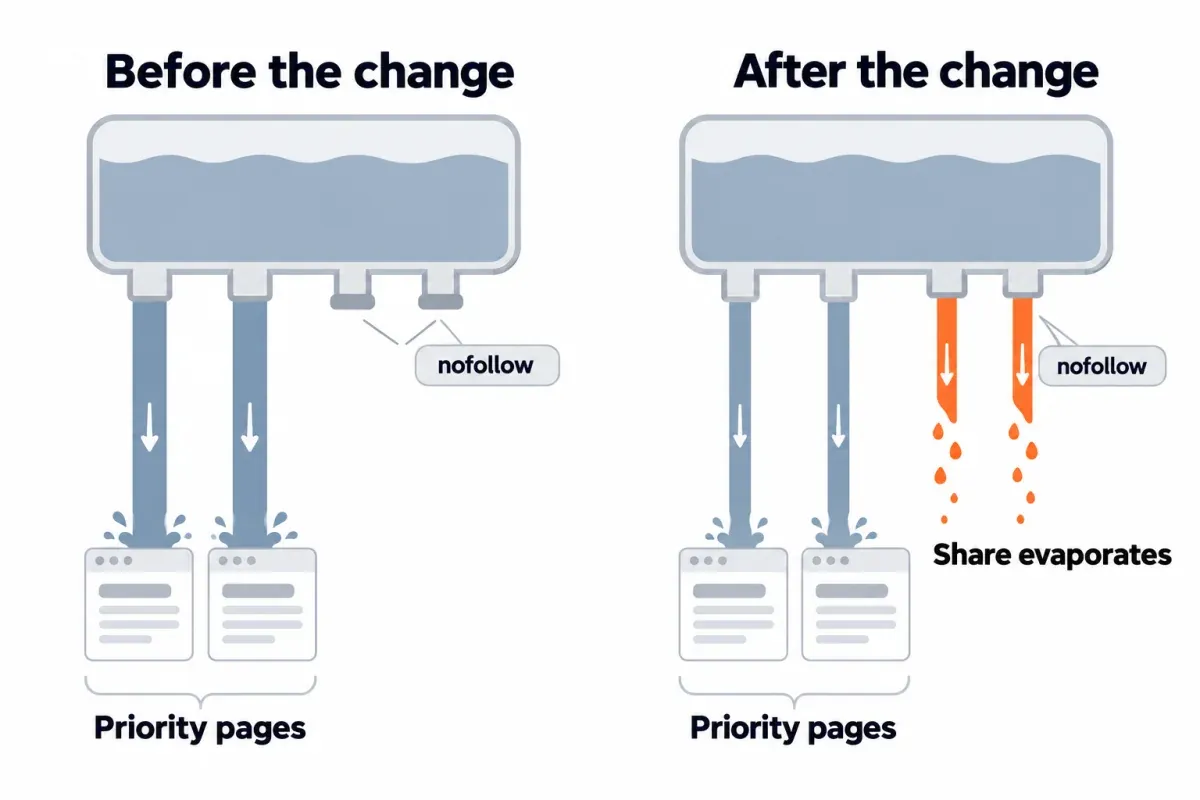
The verdict, in two sentences. Google tweaked the counting around 2008. Then came June 2009. Matt Cutts, running Google's webspam team at the time, laid it out plain. When PageRank gets split across a page's links, a nofollowed one still takes a slice. Its share just goes nowhere. The other links don't pick up extra, and site-wide, every page can end up with less than it had.
What still counts as sculpting today is choosing which specific pages your templates and your strong pages link to. That's what the rest of this article covers. If an audit tells you to nofollow your footer links, skip that line. The nofollow trick doesn't work the way those older audits assume.
How PageRank flows through your internal links
Every page has its own PageRank score. The score comes from two things. The count of pages linking in, and the PageRank each linking page carries. Larry Page and Sergey Brin wrote it up at Stanford in 1998.1 That's the same year they founded Google. So Google's founders invented it before Google existed as a company. And yes, it's still around, as one signal among many in Google's ranking systems.
What's gone is the public score. The toolbar PageRank number that site owners used to look up was retired years ago, so there is nothing official to check anymore. Domain Rating, Domain Authority and Authority Score are each a vendor's own estimate; none of them is PageRank.
The PageRank flow between pages comes down to two steps. A decay takes a slice off the top first (the damping factor, usually 0.85, so roughly 15% of the score doesn't flow onward).1 What's left gets divided evenly across the counted links on the page. A page's score? Add up every slice it receives from the pages pointing at it. One pie, split by however many links sit on the page. More links, smaller slices.
The formula under all that, in one line:
PR(p) = (1 - d) / N + d × Σ PR(q) / L(q)
PR(p) is the score of page p, d is the damping factor (0.85), N is the number of pages in the graph (in our model, the site's 12), and L(q) is the number of counted outgoing links on each page q that links to p. That L(q) is the term the 2008 change was about, and it is the same formula our model below runs.
One honest caveat from Cutts himself: Google's link computation was already more sophisticated than the classic papers when he joined in 2000. The model that follows shows the mechanism of the published formula, not the ranking math it has grown into.
How nofollow sculpting worked, and what Google changed
The nofollow attribute showed up in 2005. Several search engines backed it. In Google, it meant "don't pass PageRank or anchor text through this link." Cutts' June 2009 post lays out the arithmetic on one page. Take a page with 10 points of PageRank to pass and 10 outgoing links, 5 of them nofollowed. Here is what the counting looked like before and after the change.
| Before the change | After the change | |
|---|---|---|
| Links counted when splitting | 5 (nofollowed ones left out) | 10 (all of them) |
| Each followed link passes | 2 points | 1 point |
| Each nofollowed link passes | 0 | 0 (its share evaporates) |
| Total passed on | 10 | 5 |
Cutts' example sets the damping factor aside; a real split would take its slice either way.
Why did Google make the change? Because websites that sculpted PageRank ended up cutting off sections that held high-quality content. Cutts named user forums as the example. Why did few people notice? He said Google expected site owners running tests to spot it, and they didn't. The news came out at SMX Advanced 2009 when someone asked him directly.
His recommendation at the time was plain: let PageRank flow freely within your site. Sculpting had always been a second or third-order lever. The first-order ones are content that earns links in the first place, and a site architecture people and bots can click through.
A correction, since some of the pages ranking for this term get it wrong. The 2008 move was a change to how ranking algorithms count links, applied to every nofollowed link, not a sculpting detector and not a penalty for manipulation. A nofollowed internal link isn't flagged or punished. Its share just goes nowhere.
One more update. In 2019 Google added rel="sponsored" and rel="ugc" and said nofollow would be treated as a hint for ranking, and from March 2020 as a hint for crawling and indexing too.2 So nofollow isn't even a guaranteed "don't count this" instruction anymore. For links between sections of your own site, our SEO silo structure vs topic clusters guide answers that question on its own.
What the change does to a whole site: a 12-page model
Cutts' table shows what happens on one page. None of the pages ranking for this term show what happens when the same markup sits on every page's template. So we ran the published 1998 formula on a 12-page toy site to see.
Setup, briefly:
- The 1998 formula, iterated with damping factor 0.85 until the numbers held steady.
- 12 pages total: Home, two categories (Guides, Tools), About, four posts, Contact, Privacy, Login, plus Newsletter signup.
- Every page shares one header nav (Home, Guides, Tools, About). Same footer too (Contact, Privacy, Login).
- Home lists the four posts and Newsletter. Each category lists its two posts. Each post links to its sibling post and to Newsletter.
- Post 1 is the one we're trying to push.
Five setups. One line each:
- A. Baseline: every link followed.
- B.
rel="nofollow"on the three footer links, scored the pre-2008 way (nofollowed links dropped from the split). - C. The same nofollow, scored the post-change way Google described (nofollowed links still count, but their share vanishes).
- D. The three footer links removed from the footer and kept only on Home.
- E. Baseline, plus two in-body links to Post 1 coming from Posts 3 and 4.
Change against the baseline, selected pages:
| Page | B | C | D | E |
|---|---|---|---|---|
| Home | +38.5% | -63.1% | +39.7% | -0.7% |
| Post 1 | +75.7% | -40.2% | +59.7% | +16.5% |
| Newsletter | +88.1% | -32.2% | +65.5% | -0.7% |
| Login | -89.0% | -89.0% | -77.6% | -0.7% |
In B, C and D, all four posts shift by exactly the same amount, because the model treats them identically. Only E singles out Post 1.
A few plain readings:
Why sculpting caught on. Under the old counting (B), nofollowing three footer links lifted every post by about 76% and Home by 38%. The utility pages lost almost everything, and that score moved to the pages people care about. On paper, it worked.
What the change did (C). The same markup, counted the new way, leaves every page below where it started. Posts drop 40%, Home drops 63%. The nofollowed links' share is thrown away rather than reassigned, and the utility pages, which used to hold PageRank and pass it back through the nav, now have almost nothing left to pass back.
Removing links still works (D). Dropping the three links from the footer, instead of nofollowing them, gave the posts +59.7% and Home +39.7%, close to B. "Fewer links on a page," not "nofollowed links," is the version of sculpting that the post-change formula still rewards.
Contextual links are the smaller, safer lever (E). Post 1 picked up two extra in-body links and jumped 16.5%. Every other page? 1.4% or less.
Treat the numbers as directional, not as a prediction of rankings or traffic. A few limits:
- This is a model of the published 1998 formula on a 12-page toy site, not a measurement of Google's current ranking.
- Every link on a page gets an equal share. Google's "reasonable surfer" patent describes weighting links by how likely they are to be clicked (a patent isn't proof of use), so a real footer link probably carries less than this model gives it, and the swings would be smaller on a real site.3
- The site is closed, with no links in from other sites and no links out. In the wild, incoming links feed PageRank back in and damp all these percentages.
- The percentages show mechanism, not a ranking change.
Want to reproduce it? Under 100 lines of Python, iterating the formula to convergence. The setup list above is enough to rebuild the whole thing.
What still works: sculpting without nofollow
The useful idea behind sculpting PageRank survives. Point your internal links where they help the pages that matter, and the person doing the clicking. What changed is the tool. Cutts put it this way himself: a better form of sculpting PageRank is choosing which things you link to from your home page.
One table. The old trick, how it behaves today, and what to reach for in your internal linking instead:
| Old trick | What it does now | Do this instead |
|---|---|---|
rel="nofollow" on links to login, contact, privacy, tag pages |
The share evaporates; pages that linked back lose what they used to return (model C) | Leave them followed, or drop the link from templates where readers don't need it (model D) |
| Nofollow on links between sections of the site | Same as above | Link where it helps the reader; see our silo guide |
Links hidden from Google with JavaScript (onclick handlers, links without an href) |
Google can follow only <a> elements with an href, so to Google the link is gone: the same effect as removing it, with more code to maintain |
If a link isn't worth counting, take it out of the template; keep the ones readers use as plain links |
| Noindex on thin pages so they "keep" PageRank for the rest of the site | Google has said a page left on noindex for a long time is eventually treated as noindex, nofollow, so its own links stop counting | Improve, merge or remove the page (see our content audit guide) |
robots.txt disallow to stop PageRank reaching a page |
The blocked URL still receives PageRank through the links pointing at it, but Google can't read the page's own links, so nothing flows back out, and the URL can still be indexed without its content | Use robots.txt for crawl control, not for PageRank (see our "Indexed, though blocked by robots.txt" guide) |
| Hundreds of links in a mega-menu or footer | Each link's share shrinks with every link added | Trim and group template links; link deep pages from their hub instead |
Below, four H3s turn that table into actual moves.
Choose what your home page and templates link to
Headers, footers and sidebars show up on every page. A link in any of them is a site-wide decision. Walk through every link. One question per link. Is this link something a reader needs on every page, or just a few?
Rarely used links? Last year's campaign, every tag archive, five social profiles. Each belongs on the page where readers actually use it. Put it there. Legal, contact and account pages still need to be reachable. Google and readers expect them to exist. Version D of the model kept Contact, Privacy and Login linked from Home. A priority page that matters to the business? Give it a slot in the nav, or in the home page body. The home page tends to pull in more inbound links than anything else on the site. So a link from there outweighs one from a deep post.
Add contextual links from pages that already earn links
The smaller lever is contextual. Drop an in-body link from a page already pulling external backlinks to your priority page. Open Search Console's Links report and look at the "Top linked pages" table under external links.4 Or check your backlink tool. Either way, you're looking for the pages with the most inbound links. From those strong pages, add one or two in-body links to the priority page. Place each one in a sentence where the link belongs.
Use descriptive anchor text, and keep the link inside the body copy instead of some "related posts" widget. No need to pull the other links out to make room. Scenario E in the model shifted every page except Post 1 by 1.4% or less, so you can add without rebalancing anything.
Don't bury priority pages
A page reached only through deep pagination, a site search box or a filter gets little PageRank, and Google may be slow to find it in the first place. Cutts' retail example was blunt: put products front and center rather than deep in the site. Same idea for a priority guide stuck on page 3 of a category.
Check click depth and orphan pages with a crawler, then link orphans from a relevant hub. Our "Discovered - Currently Not Indexed" guide covers internal links as a discovery tool, and our pagination SEO guide covers what to do with pages that only sit behind page 2.
Nofollow internal links: the few places they still fit
Almost nowhere. Cutts named the exceptions in the same 2009 post: a tiny number of pages, such as links to a shopping cart or a login page. On his own site, the only link he deliberately nofollowed was the feed. And even that, he said, wasn't strictly necessary. Want to sculpt PageRank today? Do it by picking what you link to, and how often. For internal links, nofollow adds nothing you can count on anymore.
Leaving those pages followed doesn't hurt them either. If crawl budget is your real reason to reach for nofollow, Google points to robots.txt instead. Paid links take rel="sponsored", user-generated links take rel="ugc"; that is outbound linking, not sculpting.5 For links between sections of your own site, read our SEO silo structure guide before you change anything.
Faceted navigation is a crawl problem, not a PageRank one
Filters and sort orders can create millions of URLs on a product or listings site. The right tool here is crawl control, not sculpting: a robots.txt disallow for the filter parameters you don't want crawled, or filters that don't create crawlable URLs at all. Canonicals and nofollow are weaker in the long run (our alternate page with proper canonical tag guide covers that).
And a correction some older guides get wrong: robots.txt stops crawling, not indexing.6 A blocked URL can still show up in results with no snippet (see our "Indexed, though blocked by robots.txt" guide).
How to audit internal links and measure the change
The last piece is the workflow. Find where internal links point, change one batch, and read the result in clicks, week by week.
- List your priority pages. The handful of pages that bring in leads or sales. And any pages already sitting near the top of page one for queries you care about. Short list. Short enough that you'll actually revisit each page every week.
- See where internal links point today. Search Console's Links report shows the top internally linked pages (sampled, up to 1,000 rows per table) and which pages link to a given page.4 A crawler fills in the rest. Pull in-link counts, click depth, and some kind of internal link score (Screaming Frog's Link Score, for example).
- Find the mismatches. Template links on every page to pages nobody needs. Priority pages with few in-links, or buried several clicks from the home page. Links pointing at redirects or noindexed pages. Also any leftover nofollowed internal links from an old sculpting pass (a crawler surfaces them). That's housekeeping, not a lift.
- Change one batch and note the date. Nothing shifts until Google recrawls the pages you edited. A handful that matter most? Request indexing on those through URL Inspection in Search Console.
- Measure clicks, not a score. Compare the priority pages' weekly clicks for several weeks before and after, side by side with the pages that lost links. Search Console's Performance report filtered to each page works. SEO Heatmap's Pages heatmap shows every URL's clicks by week in one grid (free for one Search Console property), so a priority page warming up, or a demoted page cooling, is visible at a glance.
One honest closing note. Rankings move for lots of reasons. Read a change across several weeks and several pages at once, not one page in one week. Our SEO quick wins checklist counts internal link changes as a quick win, and walks through how to verify them.
If you're cleaning up internal linking and want a fast read on whether a batch of changes did anything, SEO Heatmap puts every URL's weekly clicks in one grid for a single Search Console property, free. You can see which priority pages are warming up and which demoted pages are cooling off, without trusting a modeled "link equity" number.
Frequently asked questions
Does PageRank still exist?
Yes, as one signal among many in Google's ranking systems. What's gone is the public toolbar score that site owners used to look up, which was retired years ago. Vendor metrics like Domain Rating, Domain Authority and Authority Score are each a vendor's own estimate, not PageRank.
Did Google invent PageRank?
Google's founders did, before Google was a company. The idea traces to Larry Page and Sergey Brin's 1998 Stanford paper. Google itself got founded the same year. Inside the published formula sits a damping factor, usually 0.85. That's the exact formula our model runs here.
Is PageRank sculpting a Google penalty?
No. Google's 2008 move changed how nofollowed links are counted. It applies to every nofollowed link. It's not a sculpting detector. No flag, no penalty lands on a nofollowed internal link. The share it carried just vanishes. You don't redirect that PageRank, you drop it.
Should you nofollow internal links to login, contact or privacy pages?
Almost never. Back in 2009, Matt Cutts called out a tiny set of exceptions: shopping cart, login. The only link he deliberately nofollowed on his own site was the feed. Leaving utility pages followed doesn't hurt anything. Crawl budget bugging you? Robots.txt is what Google points to, not nofollow.
What's the difference between rel="nofollow", rel="sponsored" and rel="ugc"?
Google added two more attributes in 2019. sponsored covers paid links; ugc covers user-generated content. All three became hints for ranking. From March 2020 on, hints for crawling and indexing too. Use sponsored on paid links and ugc on comment or forum links. None of them is a tool for internal PageRank sculpting. That's outbound linking.
Does noindex on a page keep its PageRank for the rest of the site?
Not for long, no. Google has said that a page sitting on noindex long enough eventually gets treated as noindex, nofollow. At that point the links on it stop counting. A page thin enough to deserve noindex gets the treatment our content audit guide prescribes. Your options: rewrite it, fold it into another page, or kill it.
How long until internal link changes show up in Search Console?
Weeks, not days, before you can call the result. Google has to recrawl the linking pages before internal PageRank shifts can spread. And rankings move for plenty of other reasons too. Read the change across several weeks and several pages at once, by comparing the priority pages' weekly clicks with the pages that lost links.
Can I check my site's PageRank anywhere?
No, there is no public PageRank score anymore. The toolbar number is long retired. Google doesn't surface a per-page value in Search Console either. The practical substitute? Measure what you actually care about. Weekly clicks for your priority pages, which you can read in Search Console's Performance report (average position lives in there too) or in SEO Heatmap's Pages heatmap.
PageRank itself stays invisible. Its effects, though, show up in clicks. Just moved links around? SEO Heatmap lays out each page's clicks week by week, so you can tell whether your priority pages picked up anything. It's free for one Search Console property.
Sources (6)
SEO Heatmap Knowledge relies on primary sources: Google's documentation, web standards, peer-reviewed research, and vendors' own pages for their pricing and features. Our editorial standards
- Brin and Page, Computer Networks and ISDN Systems 1998. “The Anatomy of a Large-Scale Hypertextual Web Search Engine.”
- Google Search Central Blog. “Evolving nofollow: new ways to identify the nature of links.”
- US Patent and Trademark Office, Google Inc.. “US 7,716,225 B1: Ranking documents based on user behavior and feature data.”
- Google Search Console Help. “Links report.”
- Google Search Central. “Qualify Outbound Links to Google.”
- Google Search Central. “Introduction to robots.txt.”

