

Summarize this article with AI
Search "pagination SEO" and the top guides argue with each other. One says never noindex a paginated page; another lists noindex as a core method. One tells you to de-optimize titles on page two, another to put the page number in the title, description and H1. Even the rel=next/prev story changes from post to post.
Google's current pagination guide, read next to its canonicalization, crawl budget, robots and Page indexing docs, settles most of it. What it leaves open (how to lay out the page-number links, when View All makes sense, how to audit paginated URLs when Search Console won't group them by pattern) is practitioner territory, and I'll flag it as such.
You'll get a default setup you can ship, separate rules for sort and filter URLs, a counted click-depth example on a 50-page catalog, a one-line test for out-of-range pages, and an audit that answers three questions with one tool each.
What pagination SEO is, and why guides contradict each other
Pagination splits a long list or content set across multiple URLs, so users see part of the total on each page instead of everything at once.1 Google's reasons for showing a subset are a faster first load, less network traffic (which it calls particularly important on mobile), less load on your database, and reliability: lists that run too long can hit resource limits in the browser and on the server. Its examples are category pages, lists of blog posts or newsletters, product reviews and blog comments. Google's pros and cons table credits pagination with one user experience benefit: it "Gives users insight into result size and current position."
Google's own documentation describes three patterns for this: paginated pages (numbered links, one page of results per URL), "Load More" (a button that extends the current page), and infinite scroll (content loads automatically as the user scrolls).1
So why the contradictions? The guides treat three jobs as one: linking a sequence of pages, controlling sort and filter URLs, and deciding whether a short list should be a single page. Ask one question of any URL. Does it show the next set of items, or the same list sorted or narrowed? The next set is its own page. A sorted or narrowed copy is a different problem with different rules. Google's canonicalization docs even list "the results of sorting and filtering functions of a category page" as a source of duplicate content.
| Topic | What guides say | What Google says |
|---|---|---|
| Titles on later pages | Semrush and Search Atlas say de-optimize; Gray Dot says put the page number in the title, description and H1; SEOclarity says optimize | "You can use the same titles and descriptions for all pages in the sequence" |
| Sitemaps | Twaino and SEOclarity say leave paginated pages out; Web Tonic says add the first 5 to 10 | Include the URLs you want to see in search results; no Google page says to leave paginated URLs out |
| Noindex on paginated pages | Semrush, Web Tonic and Gray Dot say don't; SE Ranking lists it as one of three methods | Noindex or robots.txt is the advice for sort and filter variants, not for the numbered pages |
| Items per page | Web Tonic and ClickRank say 24 to 48 (Web Tonic says "per Google"); Intellar says 16 to 24 | No number. Googlebot reads only the first 2MB of an HTML file (see View All, below) |
The default setup: unique URLs, self-canonicals, real anchors
Four things cover most sites. Get the pagination SEO basics right and the rest of this guide is tuning.
1. Give every page its own URL. Google's example is a query parameter: "include a ?page=n query parameter, as URLs in a paginated sequence are treated as separate pages by Google."1 A path such as /products/page/2/ is a unique URL too, and this blog's CMS, Ghost, paginates that way. Pick one format per site, and give page one a single address: serve /products/ and redirect or canonicalize /products/?page=1 to it.
2. Put a self-referencing canonical on every page.
<!-- Page 1 -->
<link rel="canonical" href="https://example.com/products/" />

<!-- Page 2 -->
<link rel="canonical" href="https://example.com/products/?page=2" />

<!-- Page 3 -->
<link rel="canonical" href="https://example.com/products/?page=3" />
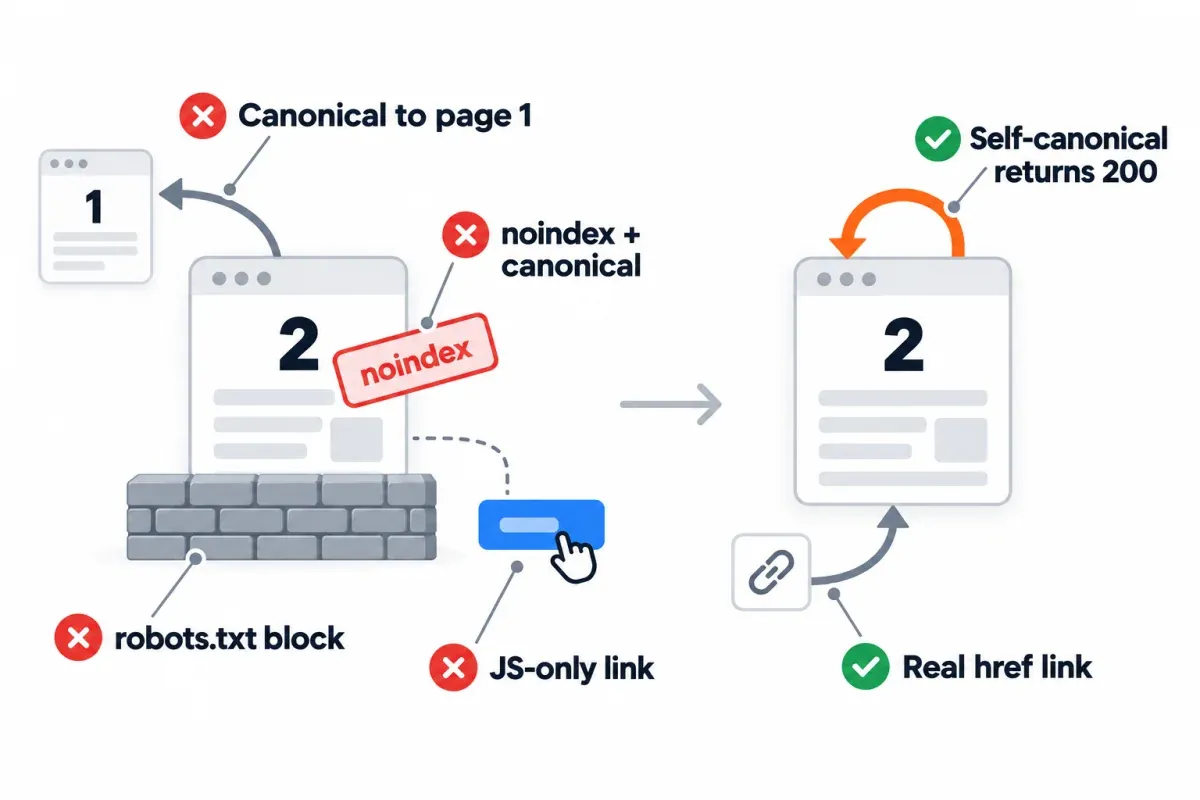
Google is blunt here: "Don't use the first page of a paginated sequence as the canonical page. Instead, give each page its own canonical URL." Never point page 2's canonical back to page 1.1 Page 2's items aren't on page 1, so the tag claims a duplicate that doesn't exist, and since a canonical is "a hint, not a rule", you can't predict what Google will do with it.
Check this after migrations and plugin changes. Google's canonical troubleshooting page warns that CMS plugins can "make incorrect use of canonicalization techniques to point to undesired URLs", and a template that stamps the category URL as the canonical on every page is a textbook case. View source on page 2 to check: on this blog, /knowledge/page/2/ carries its own URL as the canonical.
3. Use real, crawlable links. Googlebot follows href attributes on <a> tags.1
<!-- Recommended: Google can parse -->
<a href="https://example.com/products/?page=3">Page 3</a>

<!-- Not recommended: Google may not parse these -->
<span href="https://example.com/products/?page=3">Page 3</span>
<a onclick="goToPage(3)">Page 3</a>
Google's own wording is hedged: it "generally crawls URLs found in the href attribute of <a> elements," and other link formats sit under "Not recommended (but Google may still attempt to parse this)". An onclick handler sitting on a real <a href>? No problem. A <span>, or an <a> with no href, is the risk.
4. Keep page numbers out of fragments. example.com/products#page=3 doesn't work as a page URL because "Google ignores fragment identifiers." RFC 9110 states that fragment identifiers are not sent in HTTP requests.2 The server never sees #page=3 either. The pagination case is in Google's guide. When a next-page link differs only after the #, Googlebot "may not follow the link, thinking it has already retrieved the page."
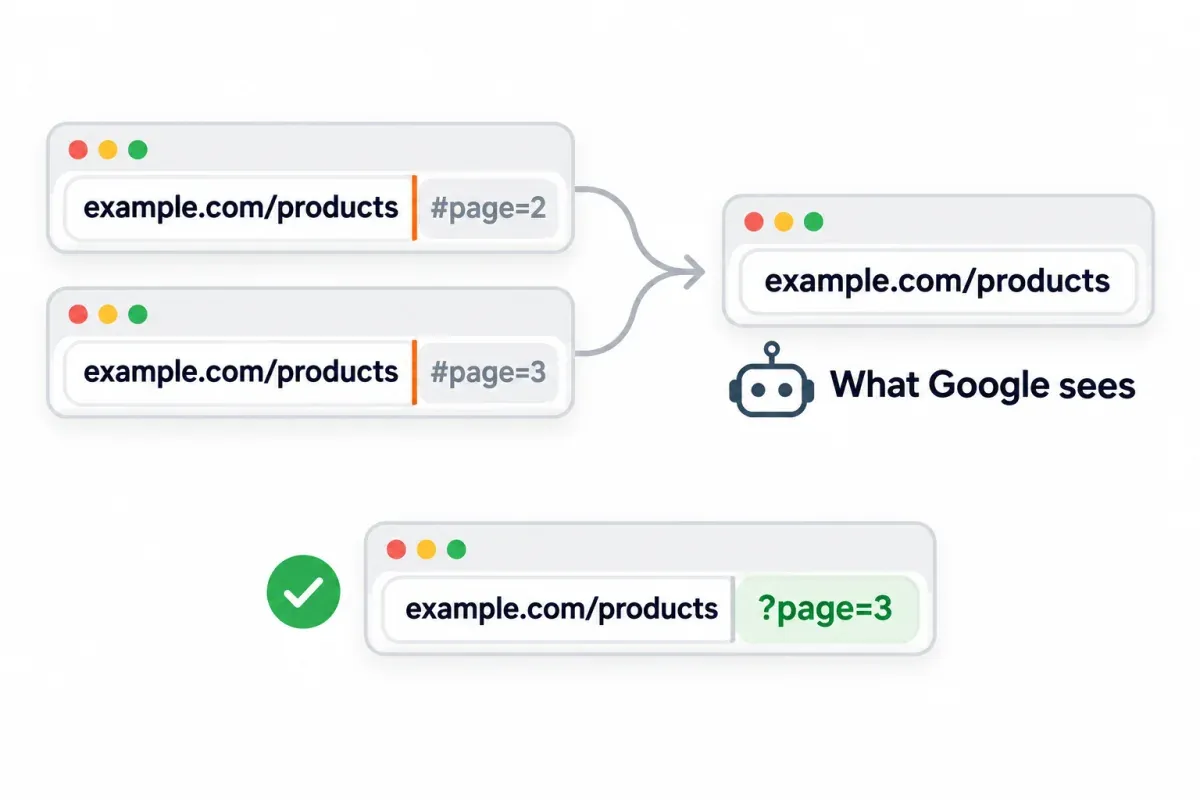
Two cheap extras from the same guide. First, "consider linking from all individual pages in a collection back to the first page of the collection to emphasize the start of the collection to Google." Google says this can hint that page one "might be a better landing page", which makes it the sanctioned way to favor page one without canonicalizing anything to it. Second, "Consider using preload, preconnect, or prefetch to optimize the performance for a user moving to the next page."
Page-number links and click depth
Page 25 is how many clicks from page one? That depends on the links you print under the list, and Google says little about it. Its rules stop at "Every page you care about should have a link from at least one other page on your site" and at linking each page to the next with <a href>. Google publishes no click-depth limit, so the rest of this section is practitioner advice.
Here's a counted example of pagination links on a 50-page catalog, starting from page one, with the fewest clicks to each page. We worked the numbers out for illustration; they aren't crawl measurements.
| Links on each page | Clicks to page 25 | Farthest page | Good for |
|---|---|---|---|
| Previous and next only | 24 | Page 50, 49 clicks | A few pages |
| First, last, and two pages either side of the current one | 12 | Pages 26 and 27, 13 clicks | Medium sequences |
| The same, plus every tenth page (10, 20, 30, 40, 50) | 4 | 4 clicks | Long catalogs |
Watch the middle row. A "last" link puts page 50 one click away, but now the middle of the catalog is the hardest part to reach. Jumps by tens fix that for a handful of extra links. Go wider (five pages either side plus the tens) and nothing is more than two clicks away, at the price of about 15 links in the pager.
Why care, if Google doesn't set a limit? In a previous/next-only pager every page is found through the one before it, so a single broken link leaves every deeper page without internal links to it (a sitemap can still list them). That's the case against a previous/next-only pager. The Google-backed part stays simple: <a href> links, every page you care about linked from at least one other, and a link back to page one from each page.
Pagination isn't filtering: rules for sort and filter URLs
Sort and filter URLs need their own rules. Google's pagination guide gives them one paragraph: "You may choose to support filters or different sort orders for long lists of results on your site." Its advice is to "block unwanted URLs from being indexed with the noindex robots meta tag or discourage crawling of particular URL patterns with a robots.txt file."1 That's two options. Google's faceted navigation guide leads with robots.txt when filtered URLs don't need to be indexed: "Oftentimes there's no good reason to allow crawling of filtered items".3
Sort them into three groups:
- Filter pages people search for. Say you care about women's running shoes as a filter combination. That page can be a landing page on its own: a stable URL, a self-canonical, and real links pointing in. If those filtered URLs need to stay indexable, Google's faceted navigation guide calls for
&between parameters, with the filter order locked in. - Sort orders and filter states with no search value (
?sort=price, or?in-stock=trueon top of a category). Pick one: noindex, or a robots.txt disallow. Not both. A disallow saves the crawl, and Google's crawl budget guide names "differently sorted versions of the same page" as an example to block; a disallowed URL can still be indexed without its content if other pages link to it, though. Noindex keeps the URL off the results pages. But Google still fetches the HTML to read the tag. Put both on one URL and Google never sees the noindex. - Combinations that match nothing. Return a 404, as Google's faceted navigation guide asks. The 404 section below has the test.
What about noindex, follow? Google's robots meta tag doc lists the valid rules, and follow isn't among them. The default is all, which "has no effect if explicitly listed", so noindex, follow works the same as plain noindex. Links on a crawlable page stay usable either way: without a nofollow rule, "Google may use the links on the page to discover those linked pages."
One more mixed signal to avoid is noindex on a page whose canonical points somewhere else. Google publishes no order of precedence between the two. Its only nearby line: "We don't recommend using noindex to prevent selection of a canonical page within a single site, because it will completely block the page from Search." Use a canonical to consolidate and noindex to keep a URL out, and don't put both on one page.
When a View All page fits (and the 2MB catch)
Google's current pagination guide doesn't mention View All. Its only advice on it sits in old Search Central blog posts that now carry Google's "may be outdated" banner. The 2011 post said "searchers much prefer the view-all, single-page version" and allowed a rel="canonical" from the component pages to the View All page, with a warning: "High latency can make the view-all less preferred." The 2014 faceted navigation post repeated the canonical advice, as long as the page stays a good searcher experience ("for example, the page loads quickly").
So treat View All as a pattern Google once allowed for fast pages, not one it recommends today. In my view it fits a category of a few dozen items that loads quickly on a phone. A catalog of thousands is another matter.
The newer limit is size. Google's "Inside Googlebot" post of March 31, 2026 says: "Googlebot currently fetches up to 2MB for any individual URL (excluding PDFs). This means it crawls only the first 2MB of a resource, including the HTTP header." Bytes past the cutoff aren't fetched, rendered or indexed.4 A View All page with heavy per-item markup can pass 2MB of HTML, and its tail then never reaches the index. Lazy-loading the images won't help. They're fetched separately, and the limit only covers the HTML.
If you ship one, trim the HTML and move the head up. That same post wants the title, meta tags, canonicals, link elements and the essential structured data near the top. Point component pages at it only while it stays fast.
Infinite scroll and Load more: what crawlers can and can't reach
Google's crawlers "don't 'click' buttons and generally don't trigger JavaScript functions that require user actions to update the current page contents." The lazy-loading doc puts it plainer: "Google Search does not interact with your page." If content only shows up after a click or scroll, you need a second route in: its own URL, with <a href> pointing at it.
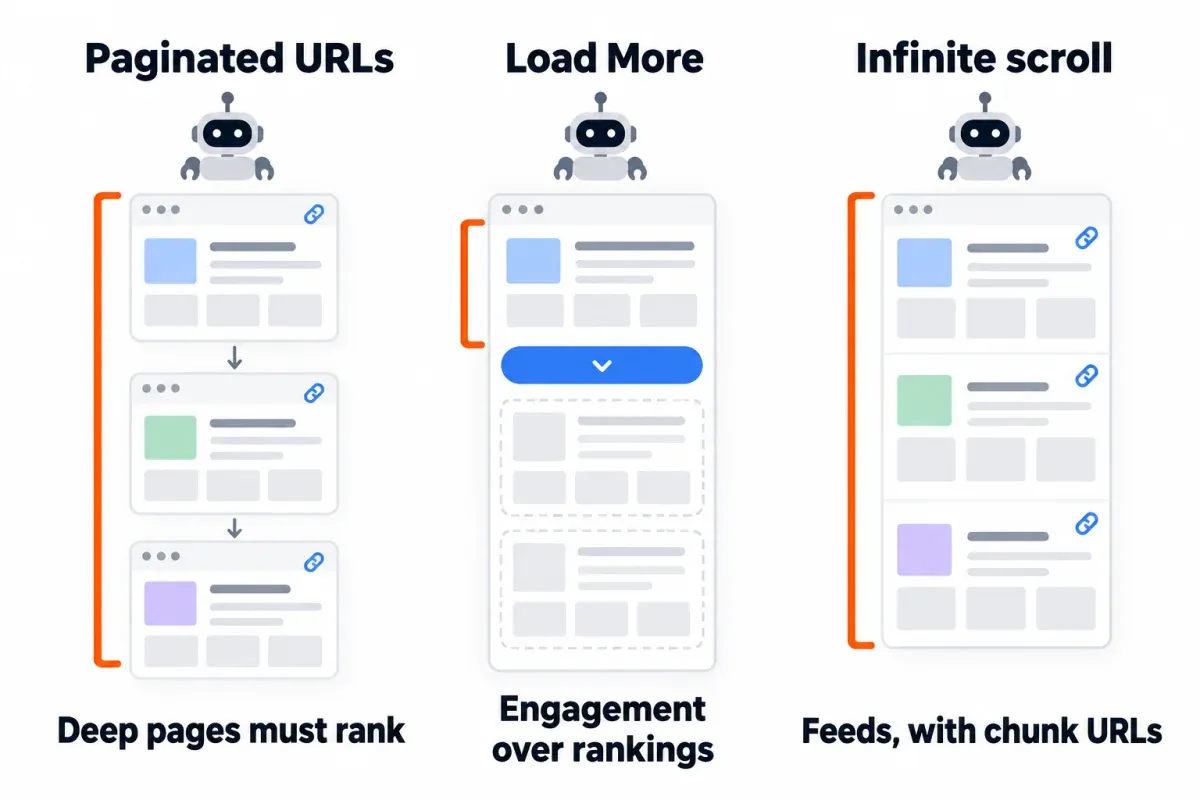
The lazy-loading doc lists Google's infinite-scroll recipe:
- Every chunk needs a persistent, unique URL of its own.
- Each URL should return the same content on every load. Absolute page numbers (
?page=12), not relative values (?date=yesterday). - Chain them in order with
<a href>links so search engines pick up the full set. - When a new chunk becomes the main visible element, update the displayed URL with the History API.
A caution on that last step. Google added "back button hijacking" to its spam policies on April 13, 2026 and has enforced it since June 15, 2026: pages inserted into a user's history "that prevents them from using their back button to immediately get back to the page they came from." The policy doesn't mention infinite scroll, but if your scroll adds a history entry per chunk, test that the back button still takes a reader straight back to where they came from.
Load more is the weaker choice for big lists. Google's own pros and cons table says it "Can't handle very large numbers of results as all of the results are included on a single web page." On a short list where the second page doesn't need to rank, Load more is fine. Deep catalogs need numbered pages.
Nonexistent pages: return a real 404
A page number past the end should return a 404. Google's faceted navigation guide asks for exactly that: "Return an HTTP 404 status code when a filter combination doesn't return results ... This should also be the case if the URL contains duplicate filters or otherwise nonsensical filter combinations, and nonexistent pagination URLs."3 An empty listing served with a 200 is the classic soft 404 setup, and our soft 404 guide covers how Search Console reports it.
Testing takes one command per URL pattern:
curl -s -o /dev/null -w "%{http_code}\n" "https://example.com/products/page/999/"
You want a 404. Test the pattern your templates actually link to, though. On this blog, which runs on Ghost, /knowledge/page/999/ returns a 404, while /knowledge/?page=999 returns a 200: Ghost ignores the parameter and serves the home page, canonicalized to /knowledge/. That 200 isn't a pagination bug. It's the home page at a URL none of our templates link to.
Filter combinations that match zero items get the same treatment. The faceted navigation guide names the cost of letting those URL spaces grow: overcrawling, and slower discovery of the pages you actually want crawled.
Auditing paginated URLs: crawling, indexing, clicks
A pagination SEO audit answers three questions about your paginated URLs, and each has its own tool. Swap the tools and you end up with a worksheet column no report can fill.
Which paginated URLs does Google crawl? Server logs answer this. Take the last 30 days of requests, keep the ones that verify as Google (a reverse DNS lookup plus a forward lookup back to the same IP, or a match against Google's published IP ranges), group them by pattern (?page=, /page/, ?p=) and count requests. Our log file analysis guide covers the parsing and the verification.
Pull the Crawl Stats report in Search Console (Settings → Crawl Stats).5 It gives totals, response codes, file types and host status, and a click on any row lists example URLs. It's "available only for root-level properties" (a Domain property, or a URL-prefix property at the root), and it can't be grouped by path. Google says so itself: "Search Console doesn't provide a crawl history for your site that can be filtered by URL or path, but you can inspect your site logs to see whether specific URLs have been crawled by Googlebot."
Does crawl budget even matter here? Googlebot has a limited amount of attention for your site.6 But Google's crawl budget guide is written for "very large and frequently updated sites": roughly 1 million+ unique pages that change about weekly, 10,000+ pages that change daily, or sites with a large share of URLs in "Discovered - currently not indexed". If that isn't you, Google says "you don't need to read this guide," and that keeping your sitemap current and checking the Page indexing report "is adequate."
Which paginated URLs are indexed? That's the Page indexing report. Google's Page indexing report shows affected URLs and the history of each indexing issue.7 Filter to one sitemap at a time, then open the pagination-relevant statuses. Example lists cap at 1,000 rows. On a big site, that's a sample, not every URL.
| Search Console status | What it means | What to check |
|---|---|---|
| Duplicate without user-selected canonical | Google sees the URL as a duplicate of another page, and the page declares no preferred canonical. Google calls this "not an error" | Does every numbered page serve a self-referencing canonical? Our guide to this status has the full workflow |
| Alternate page with proper canonical tag | The URL is marked as an alternate of another page (Google's examples are AMP and mobile/desktop pairs) | On page 2 and beyond, check whether the canonical points to page one. More in our alternate page guide |
| Crawled - currently not indexed | Google crawled the page and didn't index it; it "may or may not be indexed in the future" | Do the page's items differ from its neighbors? See our guide to this status |
| URL marked 'noindex' | A noindex rule keeps the URL out of the index | Expected on sort and filter variants you noindexed; a problem on numbered pages |
Which paginated URLs earn clicks? That's the Performance report. Filter pages by URL containing ?page= or /page/ and look at clicks over time. You're asking whether the deep pages earn search traffic at all, and whether that changed after a template or canonical change. SEO Heatmap shows the same cut as a heatmap: its URL filter ("contains ?page=" or "/page/") isolates your paginated URLs, with clicks per page by month for 16 months or by week for 16 weeks. It's free for one Search Console property.
When page 2 outranks page 1
If a search for your category keyword lands on ?page=2 instead of the clean category URL, check the signals you control:
- Page one's canonical points to the clean URL (
/products/), not to?page=1. - Every paginated page links back to page one by that same clean URL. Google calls this a hint "that the first page of a collection might be a better landing page than other pages in the collection."
- Navigation, footers and related-category links point to the clean URL too.
- Page one is the better answer for the query, with the category intro and the items people came for.
A canonical is still a hint, so give Google time after the fix, and watch which URL the Performance report credits with the clicks.
Pagination mistakes to avoid
Each of these pagination SEO mistakes breaks one of the rules above.
- Canonicalizing every page to page one. Google: "Don't use the first page of a paginated sequence as the canonical page."
- Blocking paginated URLs in robots.txt and counting on their canonical tags. Google says "Don't use the robots.txt file for canonicalization purposes," and a blocked URL's canonical tag is never read.
- JavaScript-only page links. Without an
<a href>, deeper pages depend on a sitemap or some other link to be found. - Noindex plus a canonical to another URL on the same page. Pick one.
- A 200 for page 999. Serve a 404 for page numbers past the end and for empty filter combinations.
- Fragments for page numbers. Google ignores everything after the
#, so#page=3adds no new URL.
rel=next/prev: the short history
The dates and the scope of this one get garbled, so here they are.
2011. Google began supporting rel="next" and rel="prev" on September 15, 2011, as a "strong hint" to consolidate a series and send users to the most relevant page, usually the first. The link types are older: HTML 4.01, a W3C Recommendation from December 24, 1999, already defined next for "a linear sequence of documents."
2019. Google announced on March 21, 2019 that it was retiring rel=prev/next. John Mueller had said the same morning that Google hadn't used them in indexing "for a number of years." Google's word was indexing, not ranking. Today's pagination guide puts it this way: "Google no longer uses these tags, although these links may still be used by other search engines."
Bing. Bing added support in 2012. Its last public word is a 2019 tweet from Frédéric Dubut, who said Bing used them "as hints for page discovery and site structure understanding" and not in its ranking model. Bing's current Webmaster Guidelines don't mention them.
Accessibility. The accessibility argument doesn't hold up either. The WCAG technique that used these tags, H59, is marked obsolete and notes that "prev and next typically have no effect on browser navigation controls."8 The HTML Standard tells browsers to treat <link rel="next"> like a prefetch-style resource hint, which is a performance detail, not an SEO one.
This blog's CMS still prints them (Ghost's page 2 has both), and there's no reason to strip them out. They just don't do anything for Google rankings anymore, so don't add them expecting an SEO benefit.1
Frequently asked questions
What is pagination in website development?
It's splitting a long list across numbered pages, each at its own URL, with links between them. Google's reasons for the pattern are a faster first load, less network traffic, less database load, and avoiding lists so long they hit resource limits. Its examples include category pages, lists of blog posts, product reviews and blog comments.
Can pagination hurt SEO?
Not when it's built right, because Google treats each URL in a paginated sequence as a separate page. The damage comes from the setup. A canonical back to page one, page links that aren't <a href>, noindex or robots.txt on the numbered pages, and indexable sort or filter copies are the mistakes to look for.
Should paginated pages be indexed?
The numbered pages, yes. Google wants each page carrying its own canonical URL, and that keeps it indexable. The noindex-or-robots.txt advice is aimed at sort and filter variants (?sort=price, ?color=blue), not page 2 or page 3 of a numbered sequence.
Pagination vs. lazy loading: what's the difference?
Pagination splits a list across URLs, and each page is a normal page a crawler can fetch. Lazy loading adds content to one URL as it comes into view. Google doesn't scroll or click. So anything that appears only after a scroll or a click has to live at its own URL too. That's why infinite scroll fits search only when each chunk gets a URL.
Is rel=next/prev still an SEO signal?
Not for Google. Google announced on March 21, 2019 that it was retiring the tags, and its pagination guide says it no longer uses them, though other search engines may. Bing said in 2019 that it used them as hints for discovery and site structure, not for ranking. Already in your CMS? Leave them alone. Just don't bolt new ones on for SEO.
What's the right number of items per paginated page?
Google gives no number. Pick what loads fast on your template and keep the HTML well under 2MB, because Googlebot fetches only the first 2MB of an HTML file and ignores the rest. The 24 to 48 range that some guides attribute to Google isn't in Google's guide.
On a paginated URL, what does "Duplicate without user-selected canonical" mean?
Google is treating the URL as a copy of another page, and this one hasn't declared a preferred canonical. Google calls that status not an error. For a numbered page that should stand on its own, add a self-referencing canonical and check that its items differ from the pages around it.
Changed a pagination template lately? SEO Heatmap shows Search Console clicks for every page, week by week for the last 16 weeks, so you can see whether your paginated URLs kept their traffic after the change. It's free for one Search Console property, with no credit card needed.
Sources (8)
SEO Heatmap Knowledge relies on primary sources: Google's documentation, web standards, peer-reviewed research, and vendors' own pages for their pricing and features. Our editorial standards
- Google Search Central. “Pagination, incremental page loading, and their impact on Google Search.”
- IETF. “HTTP Semantics.”
- Google Crawling Infrastructure. “Managing Crawling of Faceted Navigation URLs.”
- Google Search Central. “Googlebot.”
- Google Search Console Help. “Crawl Stats report.”
- Google Crawling Infrastructure. “Optimize your crawl budget.”
- Google Search Console Help. “Page indexing report.”
- W3C. “H59: Using the link element and navigation tools (Obsolete).”

