

Summarize this article with AI
Google can miss some images on its own. Load them with JavaScript, hide them behind a lightbox trigger or host them on a CDN, and they may not be where the crawler looks: that's what an image sitemap is for. For most sites with plain <img> tags on crawlable pages, it adds little. For the rest, it can be the one way Google learns the images exist.
Google dropped four image sitemap tags in 2022, and the two that are left are both required. Passing Google's schema is only half the job: plenty of mistakes validate anyway. Validation doesn't mean inclusion. A sitemap can pass every check and still leave your images out, and several popular CMS sitemaps do exactly that.
Here's what's ahead. You'll find a decision check, a template run through xmllint, a side-by-side of what each major CMS actually writes, and a Python script you can point at your own page sitemap. The settling check comes first.
Image sitemap: the short answer
Picture a regular XML sitemap with the images added. That's an image sitemap: it lists your pages, and under each one, the image URLs that live on it. Some folks call the same thing an XML image sitemap. Others, a Google image sitemap. Same file. Two shapes work. Ship a dedicated file, or tack the image tags onto the sitemap that's already live. Google puts it this way: it's a way of telling Google about images "that we might not otherwise find (such as images your site reaches with JavaScript code)."1
Two tags do the whole job, and skipping either breaks the file. The outer wrapper is <image:image>, which can repeat up to 1,000 times under one page, while <image:loc> holds the image URL itself.1 The vocabulary stops there.
A minimal template:
<?xml version="1.0" encoding="UTF-8"?>
<urlset xmlns="http://www.sitemaps.org/schemas/sitemap/0.9"
        xmlns:image="http://www.google.com/schemas/sitemap-image/1.1">
  <url>
    <loc>https://www.example.com/products/blue-mug/</loc>
    <image:image>
      <image:loc>https://www.example.com/images/blue-mug.jpg</image:loc>
    </image:image>
  </url>
</urlset>
Checked with xmllint: 01a-minimal.xml validates. The setup is in the validation section below.
Three gotchas before you start writing one. If your <img> elements sit on crawlable pages, Google is already picking most of them up. An image sitemap doesn't earn its keep on every site. Submission is a hint. Google's own words: "it doesn't guarantee that Google will download the sitemap or use the sitemap for crawling URLs on the site."2 Passing the schema doesn't mean passing Google's rules. The XSD will happily accept /images/blue-mug.jpg, but Google only wants absolute ones.
Do you need an image sitemap? Check how Google finds each image
Start with how Google reads a page. On the src attribute of <img>, including the ones sitting inside <picture>, Google picks the image up. CSS background images get skipped. The render runs in a headless Chromium, and the lazy-loading docs are blunt: Google "does not interact with your page." A <picture> element with a src fallback? Fine. A "load more" button that reveals a gallery? Nobody's clicking it.
Group your images by delivery method, then make the call:
| How the image reaches the page | Google finds it without a sitemap? | Image sitemap worth it? | Fix first or alongside |
|---|---|---|---|
Plain <img src> on a crawlable page |
Yes | Little to gain | Nothing |
<picture> or srcset with a src fallback |
Yes | Little | Keep the fallback (Google recommends it) |
srcset or <source> with no src fallback |
Not reliably | Helps | Add a src fallback |
| Lazy-loaded, loads when it enters the viewport | Yes, if it shows in the rendered HTML | Little | Test in URL Inspection |
| Shown only after a click (lightbox, "load more", popup) | Not if it needs a click (Google doesn't click) | Yes | List the full-size URL |
| Injected by JavaScript after load | Maybe, after rendering | This is the case Google names | List it |
| Hosted on a CDN or another domain | Yes, if the <img> is in the HTML |
Helps if your CMS sitemap drops it | See the CDN section below |
CSS background-image |
No, Google doesn't index CSS images | Use an <img> instead |
Move it into markup |
| Image or page blocked by robots.txt | No | A sitemap can't override robots.txt | Fix the block |
Here's the test that ends the argument. In Search Console, pull up URL Inspection, hit Test Live URL, and open View Tested Page. See the image URL inside an <img src> in that rendered HTML? Google doesn't need you. Missing? That's where a sitemap entry pulls its weight, or a markup fix does.
Don't write anything yet. Pull up three sample templates, a product page, a gallery, a blog post, and park view-source alongside the rendered HTML. If plain <img> elements cover you on all three, your effort is better spent elsewhere. Google's own sitemaps overview puts it the same way: you might not need a sitemap if "You don't have many media files (video, image) or news pages that you want to show in search results."
And a sitemap entry doesn't rescue the page an image sits on. If the host page isn't indexed, start there: see our guides on Discovered - currently not indexed and Crawled - currently not indexed.
Check what your CMS sitemap already lists
Before you generate anything, count the image entries your platform already writes. A CMS can declare the image namespace in its sitemaps and still list zero images, so peeking at the header isn't enough. Fetch the file and count the actual tags:
curl -s https://www.example.com/sitemap-posts.xml | grep -o '<image:loc>' | wc -l
Reach for grep -o here, not grep -c. Some CMSs (Ghost is one) write the whole sitemap on a single line, and grep -c counts matching lines: it returned 1 for a file that held 51 <url> entries. The -o flag counts each occurrence, so the number counts image entries, not lines.
A real example from this blog. A snapshot from October 31, 2026: Ghost's sitemap index had four children. The posts file carried 51 URLs. The grep returned 0, and not one file in the set held an image entry. Each <urlset> declared the image namespace all the same.
We spot-checked three posts. Their bodies had 1, 5 and 4 inline images respectively, and the sitemap mentions none of them. Look at Ghost 5.130.6's source and the ceiling is one image per URL (cover_image || profile_image || feature_image). The sitemap generator never sees the post HTML, so inline images have no path in. Our posts have no feature image. A valid sitemap can leave your images out without saying so.
Here's what the main platforms do, pulled from their docs or source code:
| Platform | What its sitemap lists for images | What it leaves out or gets wrong |
|---|---|---|
WordPress core (wp-sitemap.xml) |
No images at all | The core team's note: image, video and news extensions "are not covered by this feature" |
| Yoast SEO | Featured image, <img> in post content, gallery images, inside the post-type sitemaps |
Skips content images whose URL isn't on the site's own host (checked in the plugin source) |
| Rank Math | Images in the post sitemaps; "Images in Sitemaps" is on by default, with a separate setting for featured images | Also drops off-host images unless a filter is set in code |
| Shopify | The primary product image, per Shopify's help center | Tags not documented; one store checked wrote one <image:image> per product, on cdn.shopify.com |
| Ghost | One image per URL: cover, profile or feature image | Never lists inline post images; still writes image:caption, a tag Google dropped |
| Wix | Images for several page types, including Stores and Events | Two Wix help articles disagree on which page types are covered |
| Squarespace | "Image metadata" per its help center | Which tags, not stated |
So what now? If your platform already outputs the images you care about, the next few sections aren't for you. If it lists only feature or primary images, your gallery, inline and CDN images are what a separate image sitemap (or the script lower down) adds.
An image sitemap template that validates against Google's schema
Here's your starting point. Two pages, three images, one on a CDN host, only image:loc:
<?xml version="1.0" encoding="UTF-8"?>
<urlset xmlns="http://www.sitemaps.org/schemas/sitemap/0.9"
        xmlns:image="http://www.google.com/schemas/sitemap-image/1.1">
  <url>
    <loc>https://www.example.com/products/blue-mug/</loc>
    <image:image>
      <image:loc>https://www.example.com/images/blue-mug-front.jpg</image:loc>
    </image:image>
    <image:image>
      <image:loc>https://cdn.example.com/images/blue-mug-in-use.jpg</image:loc>
    </image:image>
  </url>
  <url>
    <loc>https://www.example.com/products/green-mug/</loc>
    <image:image>
      <image:loc>https://www.example.com/images/green-mug-front.jpg</image:loc>
    </image:image>
  </url>
</urlset>
xmllint says 11-article-template.xml validates. The rules that keep it valid, most of them checked by breaking the file on purpose:
- Inside each
<url>, the<image:image>block has to come after<loc>, and after any<lastmod>,<changefreq>or<priority>you've included. Put it ahead of<lastmod>instead? xmllint fires backlastmod: This element is not expected. That error points at the wrong neighbor, not the actual image block. - The namespace is exactly
http://www.google.com/schemas/sitemap-image/1.1. Writinghttps://or/1.0fails withNo matching global element declaration available, but demanded by the strict wildcard. - One
<image:loc>per<image:image>. Not two, not zero. An empty block fails withMissing child element(s). Expected is ( loc ). - Escape
&as&. Leave an&raw and you'll trip the parser (exit code 1) before the schema even runs. - Straight quotes, UTF-8, absolute URLs. Google's Sitemaps report help is explicit: quotes "must be straight, not curly."
- Percent-encode spaces and non-ASCII letters. Spaces, raw
éand empty values pass the schema, but a%not followed by two hex digits fails withnot a valid value of the atomic type 'xs:anyURI'.
The same image URL can appear under more than one <url>. That validates, and Google's image SEO guidance asks you to "consistently reference the image with the same URL, so that Google can cache and reuse the image without needing to request it multiple times."3
Image sitemap tags: the two Google reads and the four it dropped
Google removed four tags from its documentation on May 6, 2022 and said they have had "no effect on indexing and search features after August 6, 2022."4 The XSD still accepts them. Leaving old ones in is harmless (Google: "without drawbacks"), but they don't do anything.
| Tag | Status | Google's rule | What the XSD does | Where the job went |
|---|---|---|---|---|
image:image |
Required | One block per image, up to 1,000 per <url> |
Stated only in a documentation comment; not enforced (1,001 blocks validate) | n/a |
image:loc |
Required | The image URL; may be on another domain | Required, typed xs:anyURI |
n/a |
image:caption |
Dropped May 6, 2022 | No effect after August 6, 2022 | Still declared, in sequence order | Alt text and surrounding page copy (Google's image SEO guidance) |
image:title |
Dropped May 6, 2022 | No effect after August 6, 2022 | Still declared | Alt text, page title, nearby copy |
image:geo_location |
Dropped May 6, 2022 | No effect after August 6, 2022 | Still declared | Page content |
image:license |
Dropped May 6, 2022 | No effect after August 6, 2022 | Still declared; accepts CC BY 4.0 even though that isn't a URL |
IPTC photo metadata, or license and acquireLicensePage structured data (either one makes the image eligible for the Licensable badge) |
Two subtle things. The XSD accepts the dropped tags only in its sequence order: title before caption fails with caption: This element is not expected. Expected is ( license ). So the only way an old tag causes trouble is being out of order.
And there is no image:alt tag. An invented child fails. Alt text lives in the page's <img alt="...">.
If your CMS still writes the dropped tags (Ghost's source writes image:caption, and the Shopify store we checked writes image:title), you don't have to strip them. Just know they're inert.
Image sitemap limits
All the limits in one place, with the honest gaps.
- 1,000
<image:image>per<url>. The limit is in Google's docs and in the XSD's own comment. The XSD won't catch violations. Drop in 1,001 blocks and the file still validates. Got a page that genuinely needs more than 1,000 images listed? Split them across the pages they actually appear on. There is no supported workaround inside one<url>. - 50,000 URLs or 50MB uncompressed per sitemap file.2 Google doesn't say whether image entries count toward the 50,000-URL cap (the only documented exception is hreflang children). Image-heavy files tend to hit the 50MB ceiling first, which Google's combine-extensions page hints at: "Combining sitemap extensions increases the file size of your sitemap significantly." Plan for size, not count.
- gzip is allowed.
.xml.gzvalidates directly withxmllint. The sitemaps.org protocol repeats the rule: "the sitemap file once uncompressed must be no larger than 50MB."5 - Sitemap index files hold up to 50,000
<loc>entries each.5 An index can't list another index, only sitemap files, and Search Console accepts up to 500 index files per site.
Images on a CDN or another domain
<image:loc> is the exception to the same-host rule. Page <loc> entries must sit on the same host as the sitemap, but an image URL can point to another domain, which is what makes a CDN workable. Google's image SEO guidance: "Unlike regular sitemaps, you can include URLs from other domains in the <image:loc> elements of the image sitemaps. This lets you use CDNs (content delivery networks) to host images."3
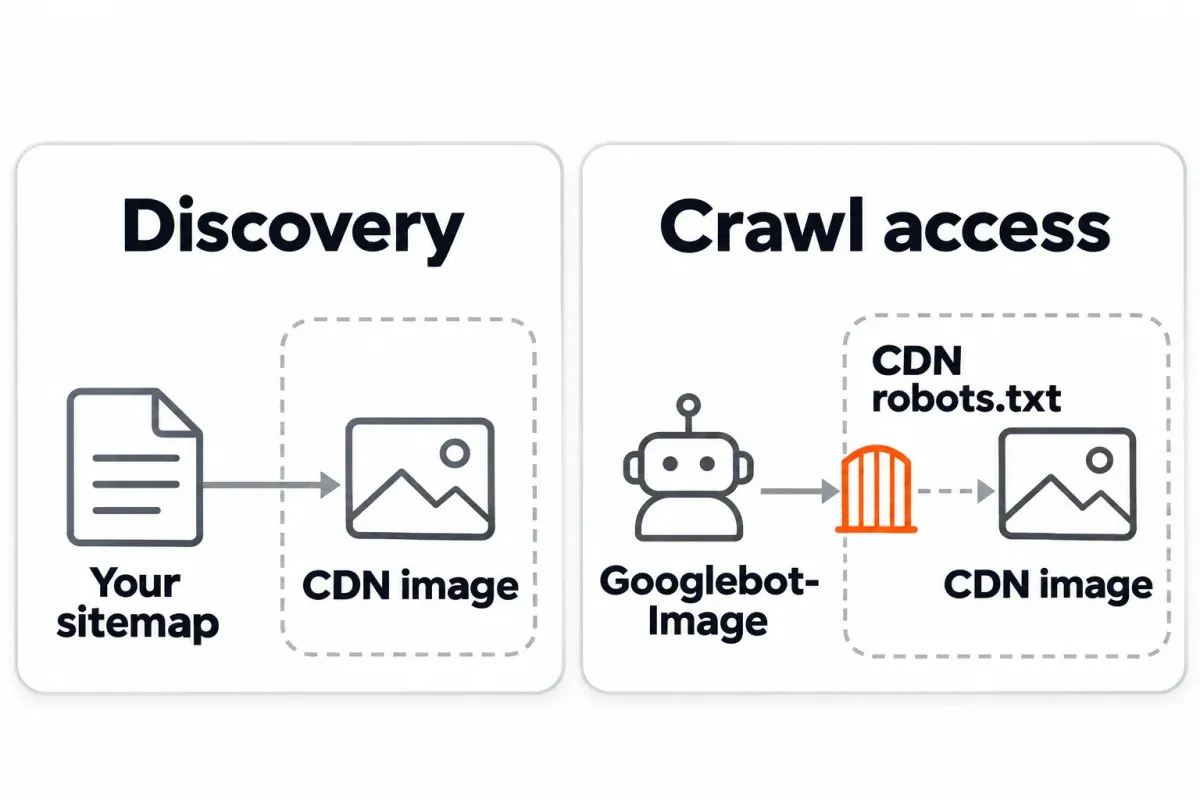
The two Google pages word the verification differently. The image sitemaps page says it's fine "as long as you verify both domains in Search Console."1 The image SEO guidance uses softer language: Google only "encourage[s] you to verify ownership of the CDN's domain name ... so that we can inform you of any crawl errors." Practical reading: verify the CDN host when you control it. A custom subdomain like cdn.yoursite.com is already covered by a Domain property for yoursite.com, or you can add it as a URL-prefix property; our guide on Google Search Console Domain vs URL Prefix properties explains the difference. On a shared CDN that you can't verify (a hosted store's cdn.shopify.com, for example), the entries are still allowed.
Robots.txt is per host. The CDN's own robots.txt decides whether Googlebot-Image can fetch its files, so open https://cdn.example.com/robots.txt before you list a single image from it. Google's crawler list gives Googlebot-Image two robots.txt tokens, Googlebot-Image and Googlebot, so a Googlebot-Image group applies when there is one (the most specific group wins), and a Googlebot group covers it when there isn't. For blocked image folders on your own host, see our guide on "Indexed, Though Blocked by Robots.txt".
A plugin trap waits here. Yoast and Rank Math both filter out content images that don't live on your site's host. Flip the image entries setting on, and your CDN library can still be missing. Rank Math gives you a filter to override that. Yoast bakes the rule into the source. Open your sitemap and read what's actually in it. Then decide whether the CDN is the problem.
Separate image sitemap or image tags in your existing sitemap?
Google says either approach is "equally fine." The real difference is operational, not technical.
| Approach | Pros | Cons |
|---|---|---|
| Tags inside the existing sitemap | One namespace line on <urlset>, no extra file, the CMS keeps page URLs and images in sync |
File grows toward 50MB faster; harder to see which pages contributed images |
| A separate image sitemap | Submit it on its own, see its status and page count in the Sitemaps report; the page sitemap stays small | You have to keep it in sync with the page list; neither option gives an image count anyway |
Even a separate file won't give you an image count in Search Console. The Sitemaps report "doesn't currently show any data" for image URLs, so what the separate file buys you is a status row and errors, not image numbers.
If you split into several files, list the image sitemap in your sitemap index next to the page sitemaps. For video, our Video sitemap guide covers the video tags and how to mix video and image blocks inside one <url>.
Validate your image sitemap with xmllint before you submit
Setup takes three commands, and it catches a broken file before Search Console does.
mkdir -p xsd
curl -o xsd/sitemap-image.xsd https://www.google.com/schemas/sitemap-image/1.1/sitemap-image.xsd
curl -o xsd/sitemap.xsd https://www.sitemaps.org/schemas/sitemap/0.9/sitemap.xsd
Save a tiny wrapper XSD that loads both official schemas. Neither one alone can validate a real image sitemap: the sitemaps.org XSD rejects the image tags under its "strict wildcard", and the image XSD doesn't define <urlset>.
<?xml version="1.0" encoding="UTF-8"?>
<xsd:schema xmlns:xsd="http://www.w3.org/2001/XMLSchema">
  <xsd:import namespace="http://www.sitemaps.org/schemas/sitemap/0.9"
              schemaLocation="xsd/sitemap.xsd"/>
  <xsd:import namespace="http://www.google.com/schemas/sitemap-image/1.1"
              schemaLocation="xsd/sitemap-image.xsd"/>
</xsd:schema>
Then run:
xmllint --noout --nonet --schema sitemap-image-wrapper.xsd image-sitemap.xml
What you'll see: a one-line "validates" (exit 0), a schema error with exit 3, or a parser error with exit 1 for a file that isn't even well-formed XML. The exit codes are handy in a build script.
Common mistakes at the command line:
| Mistake | Error line |
|---|---|
title before caption in a dropped-tags block |
caption: This element is not expected. Expected is ( license ) |
<image:image> before <lastmod> |
lastmod: This element is not expected |
<image:image> with no <image:loc> |
Missing child element(s). Expected is ( loc ) |
Namespace typed as https:// or /1.0 |
No matching global element declaration available, but demanded by the strict wildcard |
The image: prefix never declared on <urlset> |
Namespace prefix image on image is not defined (exit 3) |
Raw & in a URL |
EntityRef: expecting ';' (exit 1, no "fails to validate" line) |
Broken % escape (100%-cotton.jpg) |
not a valid value of the atomic type 'xs:anyURI' |
A sitemap index is checked against siteindex.xsd instead of the wrapper. Gzipped files validate directly: xmllint reads .xml.gz without a decompression step.
One real-world sidebar: our own Ghost sitemaps validate with the xml-stylesheet instruction intact. They're valid, and empty of images, at the same time. That's exactly why this step matters.
What passes the schema and still fails with Google
The schema is forgiving. Google's rules aren't. Catch these before you submit:
| Problem | Does the XSD catch it? | Google's rule | How to catch it |
|---|---|---|---|
Relative image URL (/images/x.jpg) |
No | "Use fully-qualified, absolute URLs in your sitemaps." | Check that every <image:loc> value starts with https:// |
Empty <image:loc> |
No | Needs a real URL | Spot-check |
1,001 images in one <url> |
No | 1,000 per page | Cap it in your generator (the script below keeps the first 1,000 per page) |
Dropped tags (caption, title, geo_location, license) |
No | Google ignores them | Remove or leave; harmless |
<image:image> before the first <url> |
No (the strict wildcard lets it through) | Each image belongs to a page | Scan for image blocks outside <url> |
URL isn't an image (HTML page, data: URI, 404) |
No | Image URL only | curl -I the URL for content type and status |
| Space or raw non-ASCII in a URL | No | Percent-encode | Fix in your generator |
| Image blocked by robots.txt (your host or the CDN) | No | Google skips it | Check both robots.txt files |
| Image on a blocked page | No | Google excludes images on blocked pages | Fix the host page first |
Image served with X-Robots-Tag: noindex |
No | Keeps it out of Images | Check your headers |
Three things an image sitemap can't fix, in Google's own wording. "Google doesn't index CSS images" (move them into <img> elements). Submitting a sitemap "doesn't guarantee that Google will download the sitemap or use the sitemap for crawling URLs on the site." And images on a robots-blocked page "will be excluded from crawling, too, unless they're referenced by other pages that are allowed for crawling."
Build an image sitemap: by hand, with a script, or through a plugin
A handful of pages? Write it by hand off the template above. Larger sites get three options. Let the CMS do it. Point an image sitemap generator at the site (any online or desktop tool that crawls and spits out XML). Or write your own script. Each has a catch. Hand-writing is predictable and dull. Generators that lean on a crawler finish quickly, though whatever the crawler skips, the sitemap skips too. Writing your own script fits your stack. The catch: someone keeps it alive. Whichever route you take, the file does one thing: help Google discover images. Nothing in that file ranks a page.
The CMS table further up spells out what your platform or plugin already gives you. Running Yoast or Rank Math? Turn on image entries, then open the output and look for CDN or off-host images. In Shopify and Ghost, assume you'll need a second source for inline or non-feature images. In WordPress core, you have no image entries at all.
A tested script: from your page sitemap to an image sitemap
A short Python script, standard library only (Python 3.9+), reads your page sitemap or sitemap index, fetches each page, pulls image URLs from <img src>, srcset, <picture><source srcset>, data-src and data-srcset, resolves relative URLs, drops data: placeholders, deduplicates per page, caps at 1,000 images per <url>, and writes the image sitemap (its output validated in our tests). A --csv flag adds images the raw HTML doesn't carry (anything injected by JavaScript), and --skip REGEX drops entries by URL pattern (useful for theme logos).
#!/usr/bin/env python3
"""Build an image sitemap from a page sitemap. Python 3.9+, standard library only.
Usage: python3 sitemap_to_image_sitemap.py SITEMAP image-sitemap.xml [--csv extra.csv] [--skip "logo|icon"]
SITEMAP: a page sitemap or sitemap index (URL or .xml file). Pages are read without running JavaScript.
--csv: images the HTML doesn't contain (added by JavaScript), header page_url,image_url.
--skip: drop image URLs that match a regular expression, such as logos and icons.
"""
import argparse, csv, re, sys, urllib.request
import xml.etree.ElementTree as ET
from html.parser import HTMLParser
from urllib.parse import quote, urljoin
SM, IMG = "http://www.sitemaps.org/schemas/sitemap/0.9", "http://www.google.com/schemas/sitemap-image/1.1"
def read(source):
if source.startswith(("http://", "https://")):
source = urllib.request.Request(source, headers={"User-Agent": "image-sitemap-script"})
return urllib.request.urlopen(source, timeout=30).read()
return open(source, "rb").read()
def page_urls(sitemap):
root = ET.fromstring(read(sitemap))
locs = [loc.text.strip() for loc in root.iter(f"{{{SM}}}loc")]
return [p for s in locs for p in page_urls(s)] if root.tag == f"{{{SM}}}sitemapindex" else locs
class Images(HTMLParser): # <img src>, srcset, data-src, data-srcset, <source srcset>
def __init__(self, page):
super().__init__()
self.page, self.found = page, []
def handle_starttag(self, tag, attrs):
a = dict(attrs)
srcset = a.get("data-srcset") or a.get("srcset") # lazy-load attributes first
url = a.get("data-src") or a.get("src")
if srcset: # one picture at several sizes ("a.jpg 400w, b.jpg 800w"): keep the biggest
sizes = [c.split() for c in srcset.split(",") if c.strip()]
url = max(sizes, key=lambda c: float(c[1][:-1]) if len(c) > 1 else 1.0)[0]
if (tag == "img" or (tag == "source" and srcset)) and url and not url.startswith("data:"):
self.found.append(urljoin(self.page, url.strip())) # relative URLs become full ones
p = argparse.ArgumentParser()
for name in ("sitemap", "out", "--csv", "--skip"):
p.add_argument(name)
args = p.parse_args()
extra, pages = {}, {}
if args.csv:
rows = csv.reader(open(args.csv, newline="", encoding="utf-8-sig"))
if next(rows, None) != ["page_url", "image_url"]:
sys.exit(f"{args.csv}: the first line must be page_url,image_url")
for row in rows:
if len(row) != 2 or not row[0].startswith("http") or not row[1] or row[1].startswith("data:"):
sys.exit(f"{args.csv} line {rows.line_num}: expected page_url,image_url, got {row}")
extra.setdefault(row[0], []).append(urljoin(row[0], row[1]))
for page in page_urls(args.sitemap):
try:
finder = Images(page)
finder.feed(read(page).decode("utf-8", errors="replace"))
pages[page] = finder.found
print(f"ok {page} {len(set(finder.found))} images")
except (OSError, ValueError) as error: # HTTP errors (404, 500...), timeouts
print(f"FAIL {page} {error}")
ET.register_namespace("", SM)
ET.register_namespace("image", IMG)
urlset = ET.Element(f"{{{SM}}}urlset")
for page in {**pages, **extra}: # crawled pages first, then pages only in the CSV
found = pages.get(page, []) + extra.get(page, [])
found = dict.fromkeys(quote(u, safe=":/?#[]@!$&'()*+,;=%~") for u in found) # once each; é -> %C3%A9
found = [u for u in found if not (args.skip and re.search(args.skip, u))]
if len(found) > 1000:
print(f"WARN {page} {len(found)} images, kept the first 1000")
if found:
url = ET.SubElement(urlset, f"{{{SM}}}url")
ET.SubElement(url, f"{{{SM}}}loc").text = page
for image in found[:1000]: # ElementTree writes & as &
ET.SubElement(ET.SubElement(url, f"{{{IMG}}}image"), f"{{{IMG}}}loc").text = image
ET.indent(urlset)
urlset.tail = "\n" # end the file with a newline
ET.ElementTree(urlset).write(args.out, encoding="UTF-8", xml_declaration=True)
print(f"wrote {args.out}: {len(urlset)} pages")
What it found on a five-page local test site: 15 images on 5 pages. One page returned 404 and was reported with FAIL ... HTTP Error 404; the run continued and the output still validated. Two things slipped past, as you'd expect. An <img> dropped in by inline JavaScript. And a CSS background-image. Add both to the CSV, and the count climbs to 17.
Aim it at a gallery holding 1,005 <img> elements, and the log reads WARN http://localhost:48613/gallery/all-photos/ 1005 images, kept the first 1000. That file comes out at 1,000 blocks on the nose. The output validated.
On three of our live posts, --skip '/assets/images/' dropped the theme logos and the CTA background and left exactly the body images: 1, 5 and 4 per post (each post's author photo, plus the illustrations in two of them). Give the file a once-over before submission. Readers that work from raw HTML catch every image in the markup, template images included, on every single page.
Its honest limit: it doesn't run JavaScript, so images that only appear after a script runs need the CSV. Export those from your CMS or your product database.
Submit your image sitemap, then watch what Google reports
Two ways in. Push the file through Search Console → Sitemaps (owner permission required), or stick a Sitemap: line into your robots.txt. Both methods hand Google a URL. Neither actually uploads anything. Search Console says so plainly: "You cannot actually upload a sitemap to Google."6
Submit it to the right property too; our guide on Google Search Console Domain vs URL Prefix properties is worth a glance if you have both. On WordPress, our guide to adding Google Search Console to WordPress covers the setup.
What the Sitemaps report actually shows for image sitemaps:
| Column or signal | What you get |
|---|---|
| Status | Success, Has errors, Couldn't fetch |
| Error list | Includes "Sitemap contains urls which are blocked by robots.txt" |
| Discovered pages | Count of page URLs read |
| Discovered videos | Count of video URLs read |
| Discovered images | Not shown. Google: "doesn't currently show any data" for image URLs |
There is no image indexing report. The "All reports and tools" index lists a Page indexing report and a Video indexing report, with nothing for images. What you can check instead:
- Filter the Page indexing report by your sitemap, and confirm the host pages are indexed. If they aren't, no listed image can help.
- Run URL Inspection on a host page, open the rendered HTML, and check "page resources loaded" for the image URLs you listed.
- Watch for the "Sitemap contains urls which are blocked by robots.txt" error. If it fires on your image URLs, see our robots-blocked indexing guide for the right fix.
- Watch your server logs for
Googlebot-Imagehits on the image URLs; our log file analysis guide covers how to read them.
Timing: Google fetches a submitted sitemap soon after submission, and crawling the URLs it lists can take time. No fixed number of days is promised.
Measure the result: Image search data and your pages' clicks
Image traffic lives in the Performance report, under Search type: Image, which Google defines as traffic from the Google Images tab.7 Image thumbnails that appear in the main results are counted under Web, separately: Search Console records each search type on its own and doesn't combine them. Data is attributed to the image's host page, not the image itself, and a click that only expands a thumbnail isn't counted. Google now splits Web into "Web: text-based" and "Web: multimodal" (Google Lens, Circle to Search, and uploaded images). Neither of those is the Images tab.
Read it by page. In the Performance report, filter to the pages where you added images. Then compare clicks: before versus after. Comparing a window that crosses May 13, 2025 through April 27, 2026? Clicks only. Google says Search Console's impressions for that stretch were off, though clicks escaped the bug.8
For bulk work, our Google Search Console bulk export guide covers the BigQuery export, where image traffic comes through as its own search type.
Curious whether the pages you added images to also moved in plain Web search? SEO Heatmap is the sidecar for that. It grabs the Web search type from Search Console and plots clicks per page on a heatmap, broken out monthly, weekly or quarterly, with filters for URL and whether pages are growing or falling. Free for one Search Console property. The Google Images clicks themselves? You'll still pull those straight from Search Console, since SEO Heatmap doesn't carry Image traffic.
Try it on the property whose images just went in. Flip to the weekly view and you'll see whether the host pages' Web clicks moved in step with the Image numbers.
Frequently asked questions
Do I need an image sitemap if my images are in plain <img> tags?
Probably not. Crawlable page with normal markup? You're set. The crawler reads <img> elements through their src attribute, and <picture> wrappers don't change that. Three situations change the math: a click reveals the picture, a script injects it, or your CMS sitemap drops it. That's when an image sitemap pulls its weight. The deciding test is URL Inspection: Test Live URL, then View Tested Page, and search the rendered HTML for the image URL inside an <img src>.
Does Google still read image:caption, image:title, image:license or image:geo_location?
No. They came out of Google's documentation on May 6, 2022. Since August 6, 2022, they've had zero impact on indexing or search features. Files that still include them keep validating, because the XSD hasn't dropped them. Keeping them around hurts nothing. Since they're inert, a brand-new file doesn't need to carry them.
How many images fit inside one <url> block?
The cap is 1,000 <image:image> blocks inside one <url>. Both Google's docs and a comment in the XSD state that cap. The schema itself doesn't police it. A file with 1,001 blocks still passes xmllint. There is no supported workaround inside one <url>. Need more than 1,000 images listed for a single page? That's a sign to split them across the pages they actually appear on.
Can images from a CDN or external domain go in the sitemap?
Yes. A page <loc> has to live on the sitemap's own host. <image:loc> breaks that rule, and can point to another domain. The two Google pages don't quite match. The image sitemaps page tells you to verify both domains in Search Console. The image SEO page only encourages verifying the CDN, so Google can flag crawl errors. Own the CDN? Then verify it in Search Console. Stuck on a shared host you don't control? The sitemap entries themselves still hold up. What matters more is the CDN's robots.txt, since that file decides whether Googlebot-Image can grab anything.
Standalone image sitemap, or image tags inside my current sitemap?
Either works. Google is fine with either, which makes this an operational call. A standalone file hands you its own row in the Sitemaps report, with errors, and keeps your page sitemap trim. Inline tags skip the extra file and sync image URLs with page URLs for free. Neither path produces an image count in Search Console. The Sitemaps report shows no data for image URLs, period.
Why doesn't the Sitemaps report show how many images Google found?
Because it doesn't report images at all. The Sitemaps report has columns for discovered pages and discovered videos, and Google's help says it currently shows no data for image URLs. There is no image indexing report either. For an impact read, filter the Page indexing report by your sitemap and check that the host pages are indexed. Pull up URL Inspection on a sample page and open its "page resources loaded" list. Then watch server logs for Googlebot-Image fetching the image URLs.
Will submitting an image sitemap guarantee Google indexes those images?
No. Treat a sitemap as a hint. Google makes no promise to download it, let alone crawl what sits inside. It won't override robots.txt either. It doesn't turn a non-image URL into an image. And if Google won't crawl the host page, the sitemap entry won't save the picture either. Broken host page? Fix that first.
How do I tell if the image sitemap actually helped?
Pull up the Performance report, then line up per-page clicks from before and after the image additions. You'll find image traffic under Search type: Image, which is the Google Images tab. That lives separately from Web. Clicks go to the host page, not the image file. Your range crossing May 13, 2025 through April 27, 2026? Compare clicks only. Google flagged impressions in that period as inaccurate; the click numbers held up. Patience helps. There's no promised wait between submitting a sitemap and Google crawling what's inside it.
Watching whether the pages behind your images pick up clicks? SEO Heatmap maps every page's Search Console clicks week by week, so a page that starts climbing in regular search stands out at a glance. It's free for one property.
Sources (8)
SEO Heatmap Knowledge relies on primary sources: Google's documentation, web standards, peer-reviewed research, and vendors' own pages for their pricing and features. Our editorial standards
- Google Search Central. “Image Sitemaps.”
- Google Search Central. “Build and Submit a Sitemap.”
- Google Search Central. “Google Images SEO Best Practices.”
- Google Search Central Blog. “Spring Cleaning: Some Sitemap Extension Tags Are Going Away.”
- sitemaps.org. “Sitemaps XML Format.”
- Google Search Console Help. “Sitemaps Report.”
- Google Search Console Help. “Performance Report.”
- Google Search Console Help. “Data Anomalies in Search Console.”

