

Summarize this article with AI
The page report is a mixed picture: clicks are down, some URLs barely get any, and several articles cover much the same ground. At the bottom of a click-sorted list, those pages look expendable. A content audit needs a stronger case for retiring them, starting with what still relies on each page.
The worksheet below gives you checks for choosing what to keep, update, merge, or remove among your existing pages. Before you assign the work, account for missing search data and traffic shifts, then assess reader and business value. Track the work in its own change log. That's how you confirm each edit actually shipped and judge what it did later.
What can a content audit actually decide?
A content audit boils down to one question per page. What does it do for readers, and what does it do for the business? Answer that with evidence, then make the call: keep, update, merge, or remove. An inventory only lists the pages. The audit decides which ones need work, and why.
Start with the task someone should be able to complete. Do you have enough evidence to judge that? Few clicks are a reason to investigate before deleting anything. Customers may find a page helpful even if search rarely sends them there.
| Action | When it fits | Evidence to collect |
|---|---|---|
| Keep | The page still serves a distinct, current purpose | Accurate content, reader or business use, explainable search pattern |
| Update | The purpose holds, but the page has a specific gap | Outdated advice, an unanswered task, or a mismatch with relevant queries |
| Merge | Pages serve the same intent without enough distinct value | Query and content review, useful material to retain, relevant destination |
| Remove | No continuing purpose, dependency, or relevant replacement remains | Owner review plus checks of other traffic, conversions, and links |
Can't support an action yet? Mark the row investigate and name the missing check. Keep that status until the missing evidence comes in, rather than treating an incomplete record as grounds for deletion.
Build a URL inventory that includes pages with no search data
Set the scope and collect the URLs
Start with one section or content type, such as a resource library: small enough to manage, with a scope that holds together. Be clear about the benefit readers and the business should get from that section. Who can resolve questions about its purpose? Make that person the owner. Someone then has responsibility for putting the audit's decisions into practice.
Pull URL lists from the sitemap and your CMS (content management system). Add a crawl where one's available. Hold off on traffic filters. Line the lists up first. Each one can catch pages the others miss. Don't touch those URL strings. You'll need them exactly as collected to trace each decision back.
Join the evidence and keep unknowns visible
Make the inventory the master list that your performance data joins. Think of it as a left join: every URL stays on the list, even the ones with no matching search row. The Performance report isn't a full site inventory. Don't start from it.
Most performance in Search Console gets attributed to Google's canonical URL.1 For a suspected mismatch, use URL Inspection to check the Google-selected canonical and record the mapping.2 Before you strip parameters or fold variants together, figure out what each one does. Those differences sometimes matter.
The tab-separated header below drops straight into a spreadsheet. Put comparison dates, property, search type, and filters together on a settings sheet. No need to repeat the same settings in every row.
Inventory URL Verified canonical Page purpose Content owner Data coverage Current clicks Prior clicks Current impressions Prior impressions Current CTR Prior CTR Query notes Reader gap Business evidence Link evidence Proposed action Decision reason
Purpose and ownership? Check the CMS, or walk the page yourself. Search metrics come from Search Console. For conversions, check analytics or your CRM (customer relationship management system). Internal-link evidence comes from what your crawler crawled. External links are a different story: you only see what your backlink tool has indexed.
In Data coverage, distinguish matched, unmatched, and unavailable. A missing row is unknown, not zero; Google's direct report exports can also turn unavailable metric values into zeros. Record an observed zero only after checking that the source reports zero for that URL, metric, and period.
Direct Search Console report downloads stop at 1,000 rows. For larger datasets, see our Search Console bulk-export guide. Getting past the download cap doesn't remove Google's coverage and privacy limits, and query tables can omit anonymized query text.
Read Search Console data before judging the page
Compare periods and filters that match
Use complete periods of equal length, chosen to suit the site's traffic and seasonal patterns. Is a complete month enough? With sparse traffic, several complete months can make the comparison clearer. Keep property, search type, filters, and grouping identical across the comparison. Dates with preliminary or incomplete data stay out.
Search Console holds up to 16 months of performance history.3 A year-over-year comparison only works if the page has enough history. Flag newer pages that can't give you a fair baseline. Without that context, a click drop raises a question. It doesn't answer one.
Imagine a seasonal planning page losing clicks once its busy season ends. Keeping it under observation could make sense if last year's pattern looks similar, current queries check out, and topic demand appears lower. Seasonality is a plausible explanation here, though the comparison can't pin the entire loss on it.
Test the pattern behind a traffic change
In Search Console's Performance report, filter by that URL. The Queries table shows up underneath. Line up the page's queries with clicks, impressions, CTR (click-through rate), and average position in one view. CTR here means clicks over impressions.1 When you group rows, sum the clicks and impressions and divide. Averaging the per-row CTRs gives you the wrong number.
Whatever pattern turns up, that's what points you to the next check. The table below stops short of prescribing an editorial fix based on a single metric.
| Pattern | What to check next | Provisional action |
|---|---|---|
| Clicks and impressions fall | Query-level visibility, topic demand, seasonality, indexing, and site changes | Investigate the cause before rewriting |
| Clicks fall with lower CTR | Comparable query mix, search results, title and snippet, device and country splits | Review presentation if the underlying task still fits |
| A URL is missing or appears to have zero clicks | Export coverage, filters, Google-selected canonical, and indexing | Reconcile the evidence before judging demand |
| Pages appear for overlapping queries | Each page's intended task, query patterns, and unique useful sections | Consider a merge only if the intent is redundant |
Stable average position doesn't rule out ranking losses. Queries that stopped generating impressions no longer contribute to that average. Check which queries disappeared and which remained before claiming demand alone explains a drop.
SEO Heatmap gives you 16 months of monthly clicks or 16 weeks of weekly clicks to help sort through pages. Narrow the pages with its URL and growing/falling filters. Push the data into Sheets or Excel. Search Console's 1,000-row cap stops being a problem. Need impressions, CTR, query checks, or country and device splits? Those still live in Search Console.
What does each page do for readers and the business?
Open the page. Read it before you make the call. Is it accurate and accessible? Does it have real, original detail a reader can use to finish the task? Word counts and publish dates won't answer that for you. Here's the sort of evidence that might flip your call:
- Missing steps that send readers hunting on another page to finish the job.
- Does what the page tells readers to do still match how the product, process, or policy works?
- Say the page disappeared overnight. What's worth saving?
- Who relies on it in support, sales, or a required legal workflow?
Check analytics for other traffic and conversions, customer records for lead evidence, and your link tools for incoming links. Clicks in Search Console aren't sessions or conversions in analytics. Different things. Missing analytics or backlink evidence? Mark it unknown and write down the check that would clear it up.
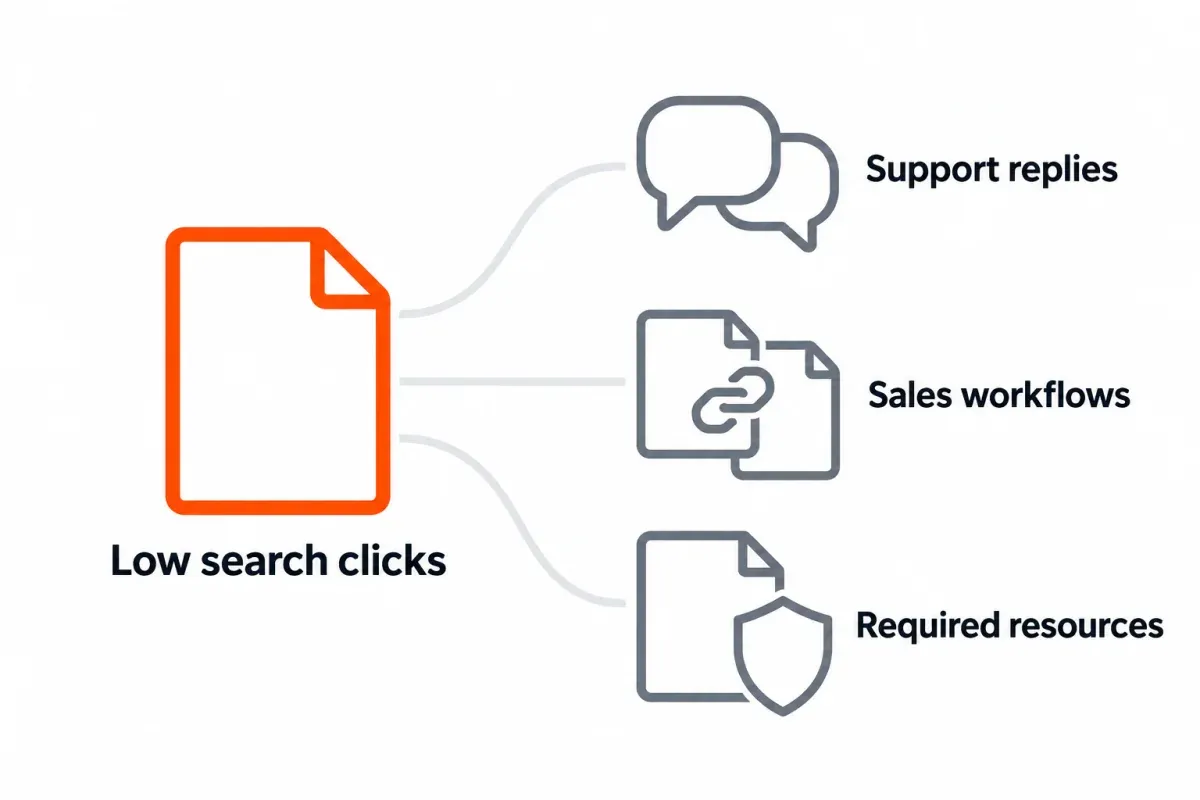
Picture a support page that pulls in almost no clicks but answers a question customers keep raising. Support reps probably paste the link into their replies. Confirmed use keeps it alive. If people can't find it, that's a job for internal links. Policies and other required resources can serve a purpose with little or no organic traffic, and that's fine. Decide separately if they should appear in Search.
Choose keep, update, merge, or remove
Keep pages that are doing their job
Keep an accurate page that's useful, even when a traffic-only sort leaves it sitting near the bottom. Write down the reason behind that call. How fast does the information age, and what breaks if it's wrong? Set the next review accordingly. Pull the review forward when a related product shifts, the decline keeps going without explanation, or readers hit a wall before finishing.
Discoverability is the real issue? Fix the internal links instead of paying for a rewrite. Call it done once the facts hold up and you've walked the intended path a reader would take. Bumping the publish date doesn't count as a substantive update.
Update a useful page with a specific gap
Name the gap before writing a brief: outdated instructions, a decision the page doesn't help readers make, or relevant queries it doesn't answer. Define the edit and the result you expect to observe. For help diagnosing weak content beyond page length, see our thin content SEO guide.
Falling CTR warrants a look at the search results and title. On its own, that's not reason enough to rewrite the title. Which queries changed, and does the snippet still match what's on the page? The update's done once the gap is filled, the facts hold, and the next step still works for readers. Assess search changes later.
Merge pages with the same intent
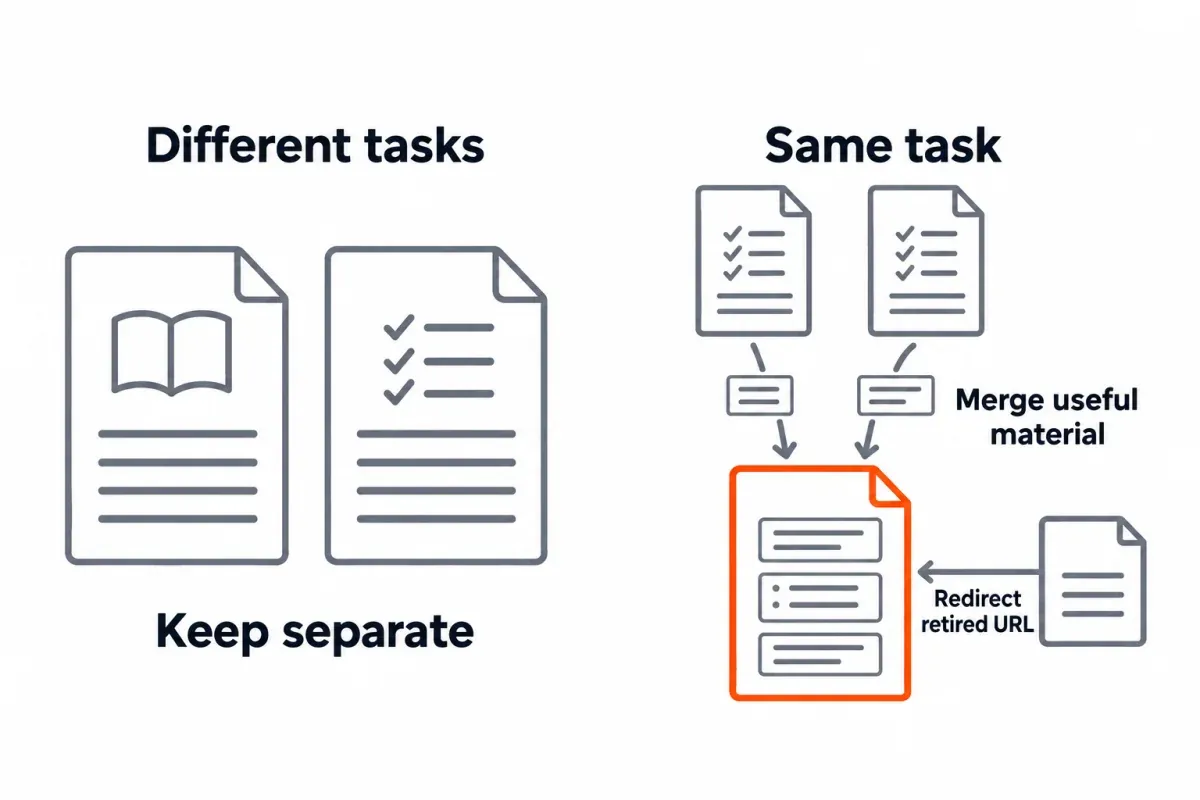
Overlapping keywords alone? Not proof of harmful competition. Line the pages up. What's each one helping readers do? Different jobs, different pages. Leave them alone. Same job on both? Pick the one that can carry the useful content and keep that one.
Move the useful material before retiring any URLs. Every retired URL should land on the surviving page through a permanent redirect. A 301 is usually the right call.4 Don't forget to update the internal links, canonical tags, and sitemap entries. Pointing an unrelated page at the homepage to paper over the missing-page response? Wrong fix.
Follow each retired URL through its redirect and see where you actually end up. Then look at the surviving page. Content okay, Google able to index it? Our 301 vs 302 redirect guide walks through which type to use and what to verify in Search Console afterward. Watch the retained page and the affected URL group together. A fall in clicks at retired addresses isn't enough to call the merge a failure.
Check page dependencies before removing content
Removal needs a high bar. The page serves no continuing purpose, nothing depends on it, and no other page makes sense as a destination. Get the owner's sign-off only after you've checked other traffic, conversions, incoming links, and anything support or legal still relies on. Low clicks alone don't meet that standard.
No suitable replacement for the deleted page? Return a 404 or 410 at that URL. Got useful bits that fit on a merged page? Redirect there instead. Check which status code actually comes back, and clean up the stale internal links and sitemap entries while you're in there.
Some useful pages need to remain accessible while leaving Google Search. A noindex works here, as long as crawling stays open so Google can read it. A robots.txt block isn't a substitute. Google can't read the directive if you've blocked the page.5 Save Search Console's Removals tool for the urgent, temporary hides.6 It's not for routine pruning. Pruning won't magically lift the surviving pages, either.
Rank the work, then confirm what shipped
Fix accuracy and business risk first. Traffic upside sits lower in the queue. With the evidence lined up for a change, weigh the reader payoff against effort and dependencies. Then put a name on it. No owner, no specific next step? The audit goes nowhere.
Delivery and follow-up belong in their own change log. This record tracks what shipped without repeating the inventory's metric columns.
Affected URL(s):
Action and reason:
Evidence and unresolved questions:
Expected reader/business effect:
Destination, if needed:
Priority and owner:
Baseline period and comparison settings:
Changed-on date:
Technical checks and results:
Follow-up period:
Observed search and business outcomes:
Next review date and decision:
Confirming an edit shipped has nothing to do with traffic data. Do that part immediately. Record what's live: the HTTP status, redirect target, internal links, plus canonical or noindex directives where relevant. Include the intended indexability. Asking for a recrawl is fine. Google won't promise a timeline for when the change shows up.
Give performance data time to fill in. The comparison needs enough complete data to tell you something useful about this site. Use periods you can fairly compare and the baseline's filters, noting seasonal effects as well as other changes. For merges, review the surviving page and affected URL group together, with consistent URL mappings so you don't count the same performance twice.
Pair the search-performance review with what readers and the business experienced. Before and after will show you what shifted. A before-and-after comparison can't prove one specific edit drove the whole result. What changed, and what's still open? Both fit in our monthly SEO report template.
For the next audit, let SEO Heatmap's page-click patterns surface the URLs worth revisiting. It's free to use with one Search Console property. Switch between monthly and weekly views to see which pages deserve a look first.
Frequently asked questions
What makes a content audit different from a URL inventory?
An audit begins when you've judged each page and recorded the reasoning behind the call. Tie search evidence to reader and business value, and calls to keep, update, merge, or remove have ground to stand on. A flat page list can't do that. Leave uncertain rows marked investigate until you resolve the missing checks.
Why is a published URL missing from my Search Console export?
A missing row can reflect export coverage, filters, or performance attributed to another canonical URL. Leave that URL on the inventory while you review the comparison settings. URL Inspection can help you check which canonical Google selected. You can't infer zero demand from an absent row.
Is deleting the lowest-click pages a safe way to prune content?
Low clicks alone aren't a safe deletion rule. Check accuracy, reader use, other traffic, conversions, links, and owner dependencies first. A hypothetical support page used in customer replies may deserve to stay even with few search clicks.
What if two articles appear for the same queries?
Shared queries alone don't justify a merge. Compare the reader tasks and unique useful material before deciding whether the pages repeat the same job. Only merge if a relevant surviving page can carry what readers need.
How do I know a content merge worked?
Start with delivery. Trace the redirects from retired URLs, check which content survived, and confirm the internal links and indexability on the retained page. Later, compare the surviving page and affected URL group using consistent mappings and comparable complete periods. Clicks falling at an address you've retired don't tell you, on their own, that the merge went wrong.
Can I judge page value from Search Console alone?
Search Console by itself won't reveal a page's real value. Open the page and read it. Then set the search metrics beside analytics, customer records, link tools, and whatever the owner still depends on. A required policy page can exist with no organic traffic and still need to stay live.
When should a page get its next review after an audit?
That depends on two things: how quickly the information ages, and the cost of getting it wrong. Move it up when the product changes, an unexplained drop keeps running, or readers get stuck mid-task. Verify delivery shortly after the change lands. The performance check waits until there's enough complete data for a real comparison.
Heading into the next content audit? SEO Heatmap's page-click patterns can help you build the shortlist. Then run the checks above to decide what each of those pages needs. It's free for a single Search Console property.
Sources (6)
SEO Heatmap Knowledge relies on primary sources: Google's documentation, web standards, peer-reviewed research, and vendors' own pages for their pricing and features. Our editorial standards
- Google Search Console Help. “Impressions, position, and clicks.”
- Google Search Console Help. “URL Inspection Tool.”
- Google Search Central. “Debug Google Search Traffic Drops.”
- Google Search Central. “Redirects and Google Search.”
- Google Search Central. “Block Search indexing with noindex.”
- Google Search Console Help. “Removals and SafeSearch reports tool.”

