Open Google Search Console on any site with more than 5 pages, and you'll find URLs listed as "crawled — currently not indexed." Every single one. It means Google visited the page, read the content, and chose not to add it to the index. Most SEOs see that list and start troubleshooting immediately. But here's what the top-ranking guides skip over: the majority of those pages don't need fixing at all.
Every project I've worked on has crawled-not-indexed pages. Paginated URLs, RSS feeds, tag pages, canonicalized duplicates. That's expected behavior, not an error. The real problem starts when pages that should rank and drive traffic end up on that list. To write this guide, I analyzed the five highest-ranking articles on this topic and cross-referenced everything with Google's official documentation and real GSC data. What I found: none of them help you figure out which pages to ignore before throwing fixes at everything.
This guide gives you a diagnostic workflow: decide whether a page needs attention, identify the specific cause, apply the targeted fix, and verify it worked. Here's the workflow.
What Does "Crawled — Currently Not Indexed" Mean?
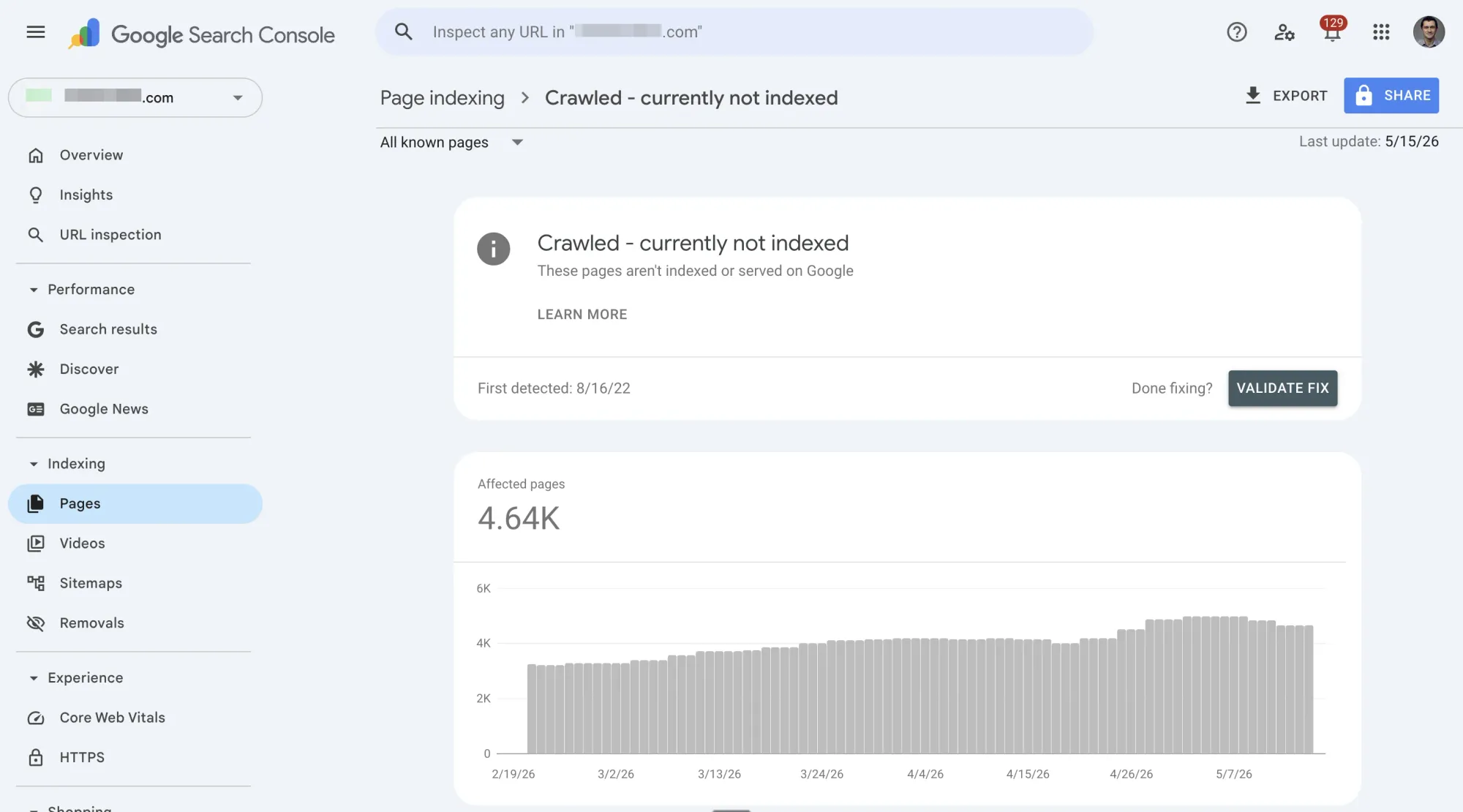
"Crawled — currently not indexed" is a page status in Google Search Console that means exactly what it says: Google visited your page, looked at the content, and decided not to add it to the search index. The page won't appear in search results.
This status shows up under the "Excluded" category in the GSC Pages report (previously called the Index Coverage report). It sits at a specific point in Google's pipeline:
- Crawling — Google discovers and visits the URL
- Indexing — Google evaluates the content and decides whether to store it ✗ (your page stopped here)
- Ranking — Indexed pages compete for positions in search results
The key word is decided. Google didn't fail to index your page — it chose not to. That distinction matters because it tells you the problem is about value, signals, or quality, not about access.
When You Don't Need to Worry
Here's what most guides won't tell you first: every website has crawled-not-indexed pages, and that's completely normal.
Google crawls far more URLs than it intends to index. Many page types legitimately appear in this report, and trying to "fix" them is wasted effort:
- XML sitemaps and robots.txt — these are instructions for crawlers, not content for searchers
- Paginated URLs (
/page/2/,/page/3/) — usually don't have standalone search value - RSS feed URLs — meant for syndication, not search results
- Canonicalized pages — the canonical version is indexed instead (working as intended)
- Tag, filter, and facet pages — often duplicative of main category pages
- WebP image files — images follow different indexing rules; they're still discoverable via Google Images
- Parameter URLs — query string variations that duplicate existing content
In practice: every project I've worked on has some number of crawled-not-indexed pages in Search Console. That's not the problem. The problem is when pages that should rank and drive organic traffic show up on this list.
When You Should Take Action
Before diagnosing causes and applying fixes, filter your crawled-not-indexed list down to pages that actually matter. Here's the process:
Step 1: Export the affected URLs from GSC → Pages → "Crawled — currently not indexed."
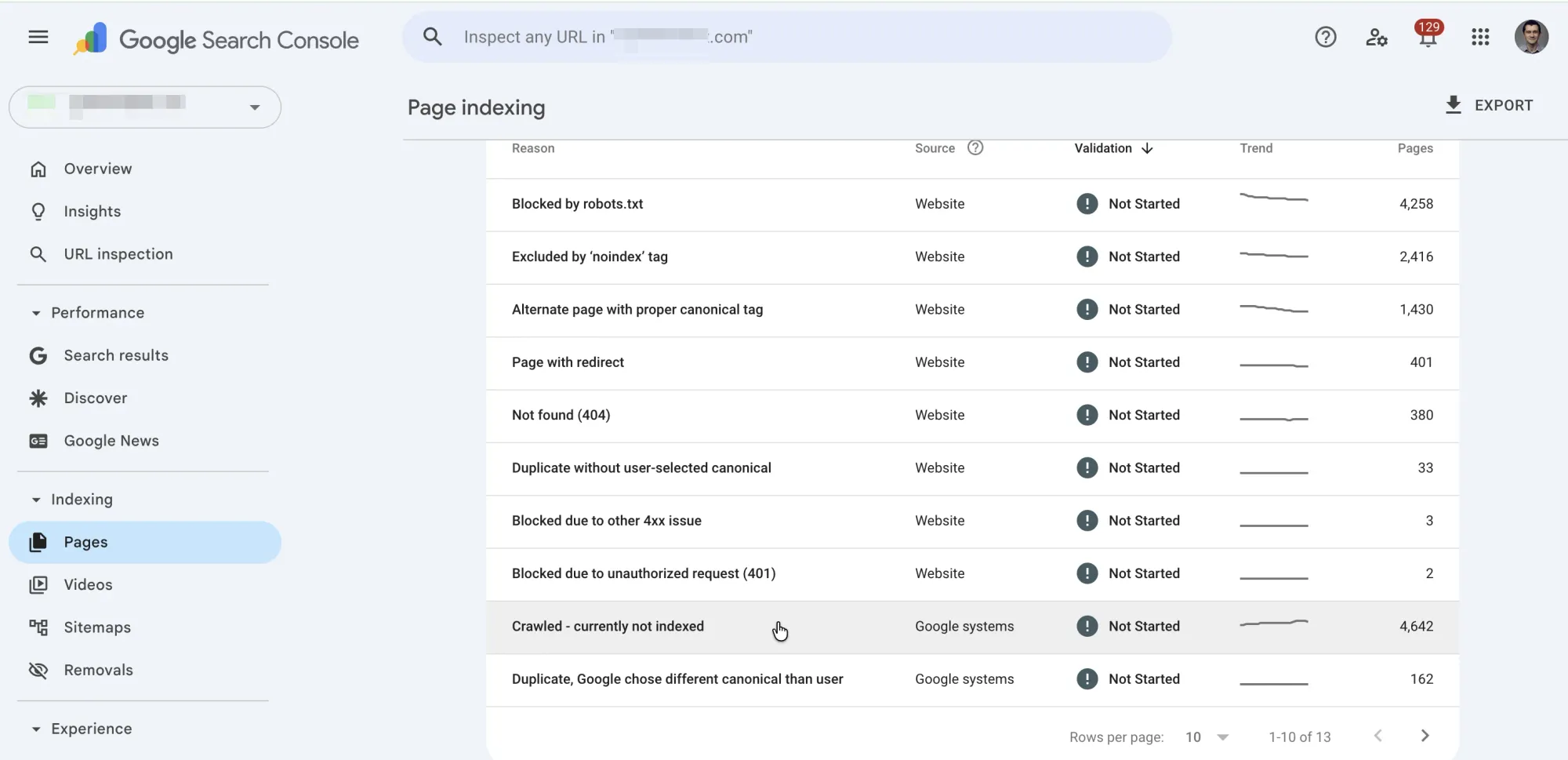
Step 2: Filter for pages that should be indexed. Remove utility pages (sitemaps, pagination, feeds, tag pages). What's left should be pages that target a keyword, serve a business purpose, or should drive organic traffic.
Step 3: Check for false positives. The GSC Pages report updates slower than the URL Inspection Tool. Before troubleshooting a page, search site:yourdomain.com/page-url on Google. If it appears in results, GSC is just lagging — no action needed.
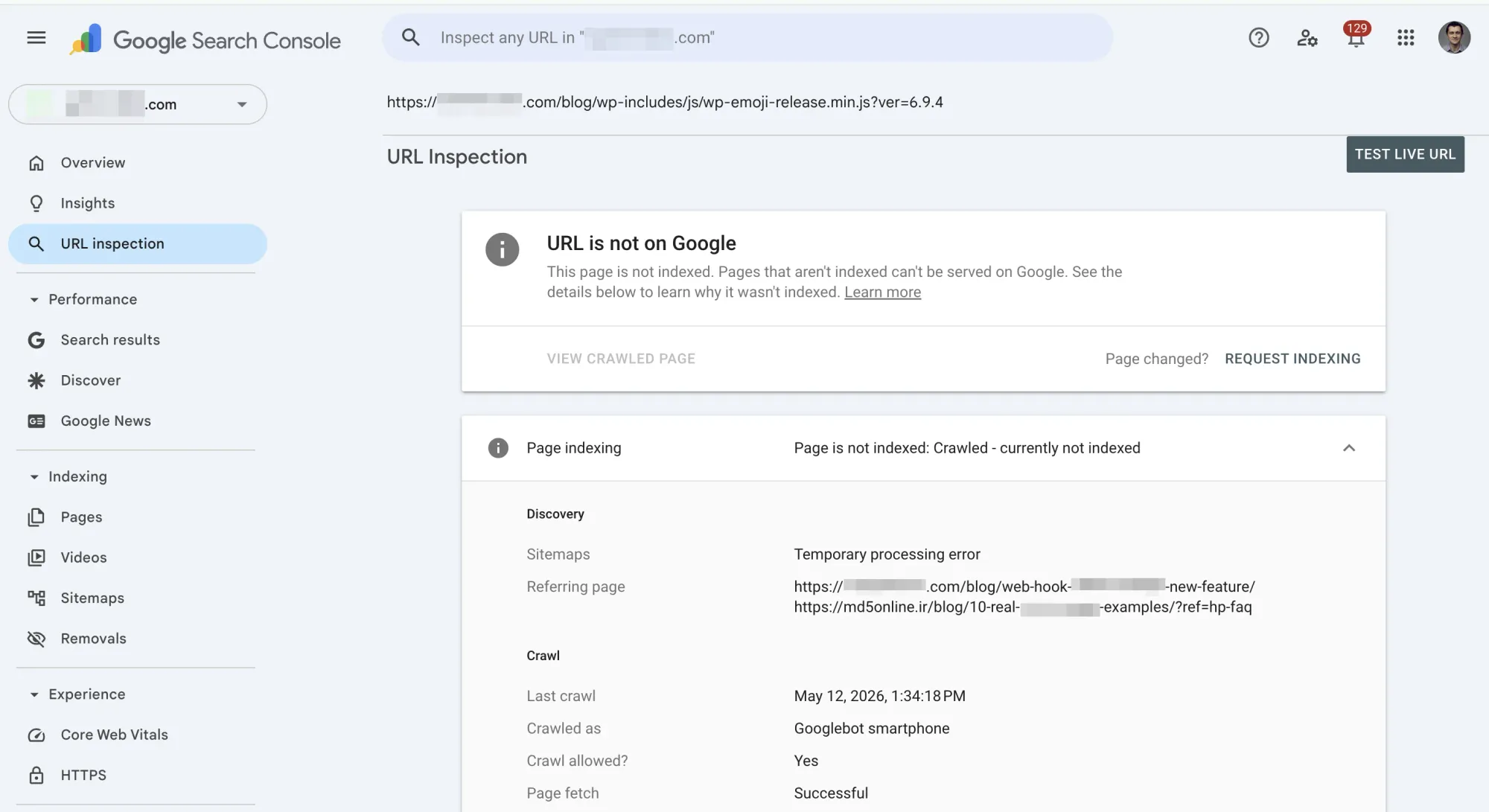
Step 4: Use the URL Inspection Tool for each remaining URL. It shows the most recent crawl and index status, plus whether Google selected a different canonical.
Step 5: Prioritize. You don't need to fix every page at once. Start with pages that have the highest traffic or conversion potential.
A tool like SEO Heatmap can help you visualize your GSC data and quickly spot which crawled-not-indexed pages actually have ranking potential worth pursuing.
Crawled vs. Discovered — Currently Not Indexed
Before troubleshooting, check which status you're actually dealing with. These two sound similar but have completely different root causes:
| Crawled — Currently Not Indexed | Discovered — Currently Not Indexed | |
|---|---|---|
| What happened | Google visited and evaluated the page | Google found the URL but hasn't visited it yet |
| Root cause | Content, quality, or signal problem | Crawl budget, server capacity, or queue backlog |
| Analogy | A hiring manager read your resume and passed | Your resume is in the pile but hasn't been reviewed yet |
| Fix direction | Improve the page's content and signals | Improve crawlability and server performance |
Decision rule: If your pages say "Discovered," it's a delivery problem — Google can't get to your content fast enough. If they say "Crawled," it's a quality or relevance problem — Google got there and wasn't convinced.
The rest of this guide focuses on "Crawled — currently not indexed," since the fix paths are fundamentally different.
Diagnose the Cause and Apply the Right Fix
Don't try every fix on this list. Each cause has a specific diagnostic check — run the check first, then apply only the relevant fix. Working through causes systematically saves time and avoids introducing new problems.
Thin or Low-Quality Content
How to spot it: Compare your page to what currently ranks for the same keyword. If your content is shorter, less detailed, or less useful, Google has better alternatives to index.
The fix:
- Expand the page with original insights, practical examples, or data that competing pages lack
- If the page genuinely has nothing unique to add, consolidate it into a stronger existing page rather than trying to bulk it up with filler
- Consider whether the page satisfies user intent — someone searching "how to migrate a database" expects a step-by-step guide, not a paragraph definition
Important context: Google's John Mueller has stated that indexing decisions are "more site-wide" — meaning one thin page can affect how Google perceives others on your domain. Quality improvements "often take several months to be reprocessed and reevaluated."
Weak Internal Linking
How to spot it: Check how many internal links point to the affected page. If the answer is zero or one (and that one is the sitemap), the page is effectively orphaned.
The fix:
- Add contextual internal links from topically relevant pages that already perform well
- Use the search operator
site:yourdomain.com "target keyword"to find pages on your site that mention the topic — those are natural linking opportunities - Ensure the page is reachable within 3 clicks from your homepage through logical navigation
Pages that are only discoverable via the XML sitemap are sending a weak signal. If the page matters, your site structure should show it.
Duplicate or Near-Duplicate Content
How to spot it: In the URL Inspection Tool, check whether Google selected a different canonical URL than the page itself. Also look for multiple pages on your site targeting the same keyword.
The fix:
- Set the correct
rel=canonicaltag pointing to the preferred version - Consolidate overlapping pages that target the same intent — redirect the weaker version to the stronger one
- For e-commerce product variations, ensure each variation page provides genuinely distinct content (unique descriptions, specs, reviews), or canonicalize to the main product
Keep in mind: canonical tags are hints, not directives. Google may override your preference if it determines a different page is the better canonical.
Search Intent Mismatch
How to spot it: Search your target keyword on Google and look at what ranks. If the top results are tools, videos, or product pages and yours is a blog post (or vice versa), there's a format mismatch.
The fix:
- Realign your content to match the dominant SERP format
- If Google shows step-by-step guides, convert your overview into actionable steps
- If Google shows tools or calculators, a text-only article may never rank for that query — consider whether a different keyword is a better fit
Low Domain Authority
How to spot it: You've verified that content quality, internal linking, and duplication are all fine, but pages still aren't being indexed. This is often the residual explanation for newer or smaller sites.
The fix:
- Earn quality backlinks through original research, data, or genuinely useful content that others want to reference
- Focus your indexing efforts on your strongest content first — don't spread thin
- Prune low-value pages that dilute your site's overall quality signal
- Be patient — this is a long-term play with no quick fix
Conductor puts this well: "You're publishing more content than Google is willing to index for your site." The solution is to either increase authority or be more selective about what you publish.
Technical Signals Blocking Indexing
How to spot it: Check the page source or HTTP headers for noindex tags. Review your robots.txt for rules that might block CSS or JavaScript resources Google needs to render the page. Check the GSC Enhancements report for structured data errors.
The fix:
- Remove unintended
noindexmeta tags orX-Robots-Tagheaders - Ensure robots.txt doesn't block resources needed for page rendering
- Fix structured data errors flagged in GSC
- Check server logs for intermittent 5xx errors during Googlebot crawls
In practice: on a previous SaaS project, several legal pages (Privacy Policy, Terms of Service) had noindex tags and showed up as crawled-not-indexed. We removed the tags — following Google's own guidelines that recommend against noindexing these pages. No sudden traffic spike, but SEO is often hygiene: small fixes that compound over time.
Quick-Reference: Cause → Check → Fix
| Cause | How to Spot It | Fix | Priority |
|---|---|---|---|
| Thin/low-quality content | Page is less useful than competing indexed pages | Expand with original value or consolidate into a stronger page | High |
| Weak internal linking | Few or no internal links; page is orphaned | Add contextual links from relevant, authoritative pages | High |
| Duplicate content | URL Inspection shows a different canonical selected | Set correct canonical tags; consolidate overlapping pages | Medium |
| Search intent mismatch | SERP format doesn't match your content type | Realign content format to match what Google ranks | Medium |
| Low domain authority | All other causes ruled out; newer/smaller site | Earn backlinks; focus on strongest content; prune low-value pages | Low (long-term) |
| Technical signals | Noindex tags, robots.txt blocking resources, structured data errors | Remove blocking signals; fix structured data; check server logs | High (if present) |
What to Do After Applying Fixes
Request Re-Indexing (After Real Changes)
Once you've made substantive improvements, request re-indexing via the URL Inspection Tool → "Request Indexing." But only after actual changes — submitting the same page without improvements won't accelerate anything.
For pages that are redirect destinations appearing in this report, Onely recommends creating a temporary sitemap containing just those URLs, submitting it in GSC, and removing it once the pages are indexed.
Set Realistic Expectations
Google doesn't re-evaluate pages instantly. Mueller has noted that quality improvements "often take several months to be reprocessed and reevaluated." Here's a reasonable monitoring timeline:
- 2–4 weeks: Check URL Inspection Tool for status changes on individual pages
- 1–3 months: Look for broader improvements across your crawled-not-indexed count
- 3–6 months: Expect site-wide quality signals to fully propagate
The Compound Effect
Many SEO fixes feel insignificant in isolation. Removing a noindex tag from your Terms of Service page won't skyrocket traffic. Improving internal linking to one blog post won't transform your site.
But Google evaluates quality at the site level. Each fix contributes to an accumulated signal: the site is well-maintained, internally consistent, and worth indexing more aggressively. When in doubt, follow Google's best practice guidelines — the compound return justifies the effort.
Frequently asked questions
Is it normal to have a lot of "crawled — currently not indexed" pages in Google Search Console?
Yes. Every website has them. Google crawls far more URLs than it intends to index, and many page types (XML sitemaps, paginated URLs, RSS feeds, tag pages, parameter URLs) legitimately show up with this status. The status becomes a problem only when pages that target keywords and should drive organic traffic are affected. Filter your list for those pages before you start troubleshooting.
What is the difference between "crawled — currently not indexed" and "discovered — currently not indexed"?
They point to completely different root causes. "Discovered" means Google found the URL but never visited it, usually because of crawl budget limits or server capacity issues. "Crawled" means Google visited the page, evaluated the content, and chose not to index it. Think of "discovered" as a delivery problem (Google can't get to your page) and "crawled" as a quality or relevance problem (Google got there but wasn't convinced). The fix paths diverge from that distinction.
How long does it take for a "crawled — currently not indexed" page to get indexed after I make changes?
There is no fixed timeline. Google's John Mueller has noted that quality improvements "often take several months to be reprocessed and reevaluated." After making substantive changes, request re-indexing via the URL Inspection Tool and check back in two to four weeks for individual status changes. Broader improvements across your crawled-not-indexed count typically take one to three months to materialize.
Does requesting indexing in GSC fix the "crawled — currently not indexed" status?
Not on its own. Requesting indexing just asks Google to re-crawl and re-evaluate the page. If you haven't changed anything, Google will likely reach the same conclusion and leave the page unindexed. Only submit a re-indexing request after you've made real improvements to the content, internal linking, or technical signals. Submitting the same unchanged URL repeatedly won't accelerate anything.
Can "crawled — currently not indexed" pages hurt the rest of my site's rankings?
They can, indirectly. Google evaluates quality at the site level, not just page by page. A large volume of thin or low-value pages signals to Google that your site overall may not warrant aggressive indexing. Mueller's point that indexing decisions are "more site-wide" means that pruning or consolidating genuinely low-quality pages can improve indexing outcomes for your stronger content over time.
What if a page shows as "crawled — currently not indexed" in the Pages report but appears when I search site:mydomain.com?
That is a reporting lag, not a real problem. The GSC Pages report refreshes at a slower rate than the URL Inspection Tool. If your page appears in Google search results via a site: query, it is indexed. Confirm with the URL Inspection Tool for the most current status before spending time diagnosing a page that may already be fine.
Should I noindex pages that Google keeps refusing to index?
Only if the page was never meant to rank in the first place. Adding a noindex tag to a page you want indexed is counterproductive: it tells Google to actively remove the page from the index. If Google isn't indexing a page you care about, the answer is to improve the page (better content, stronger internal links, correct canonicals), not to formalize its exclusion. Reserve noindex for utility pages like internal search results, staging duplicates, or print-friendly versions.
What is the first thing I should check when I see pages stuck as "crawled — currently not indexed"?
Open the URL Inspection Tool for the affected page and check two things. First, look at whether Google selected a different canonical URL. If it did, the page is being treated as a duplicate, and you need to fix canonical signals. Second, check whether the page has a noindex tag or other technical block. If both are clear, compare your page's content against what currently ranks for the same query. The gap between your page and indexed competitors is usually where the answer lives.
If you're diagnosing crawled-not-indexed pages, you're already spending time in Google Search Console. SEO Heatmap takes that same GSC data and turns it into a visual map of your SEO opportunities, so you can spot what needs attention without scrolling through spreadsheets. It's free. Give it a try.