The "duplicate without user-selected canonical" status in Google Search Console looks alarming when it flags hundreds of URLs. But in most accounts I audit, over half of those flagged pages are harmless noise that Google already handles correctly. The real risk isn't the duplicates themselves. It's spending hours fixing the wrong ones while a handful of actual problems quietly split your rankings.
I've worked through this exact scenario consulting for an e-signature SaaS, where HubSpot forms and web tracking parameter artifacts generated thousands of duplicate URLs that were wasting crawl budget. The triage step (figuring out which duplicates were hurting the site versus which to ignore) made the difference between a weekend-long cleanup and a focused, one-hour fix that led to more rankings with fewer crawled pages.
This guide walks you through that same workflow: identify which duplicates matter, diagnose the root cause, apply the right fix, and verify it worked. Here's how to sort the signal from the noise.
What "Duplicate Without User-Selected Canonical" Actually Means
"Duplicate without user-selected canonical" is a page indexing status in Google Search Console. It means Google found two or more URLs with identical (or near-identical) content, and none of them include a rel=canonical tag telling Google which version to index. So Google picked one on its own.
This is not a penalty. It's an indexing decision Google made because you didn't.
The key distinction: This status is different from "Duplicate, Google chose different canonical than user." That one means you did set a canonical, but Google overrode your choice, a more serious signal that something is misconfigured. If you're seeing that status instead, check our guide on alternate page with proper canonical tag.
Quick answer: In most GSC accounts, the majority of URLs flagged with this status are harmless, parameter variations, tracking URLs, or filtered views that Google already handles correctly. Before you fix anything, you need to figure out whether these duplicates are actually hurting your site.
Who this guide is for: SEO practitioners and site owners who see this status in Google Search Console and need to decide, quickly, whether to act on it and how.
How this guide was built: Based on hands-on GSC audits across SaaS, e-commerce, and publisher sites, cross-referenced with Google's official canonicalization documentation. Includes a real case study from consulting work with an e-signature SaaS company.
How to Find These URLs in Google Search Console
- Open Google Search Console
- Go to Pages (formerly "Coverage") in the left sidebar
- Make sure the Not indexed tab is selected
- Look for "Duplicate without user-selected canonical" in the reasons list
- Click it to see all affected URLs
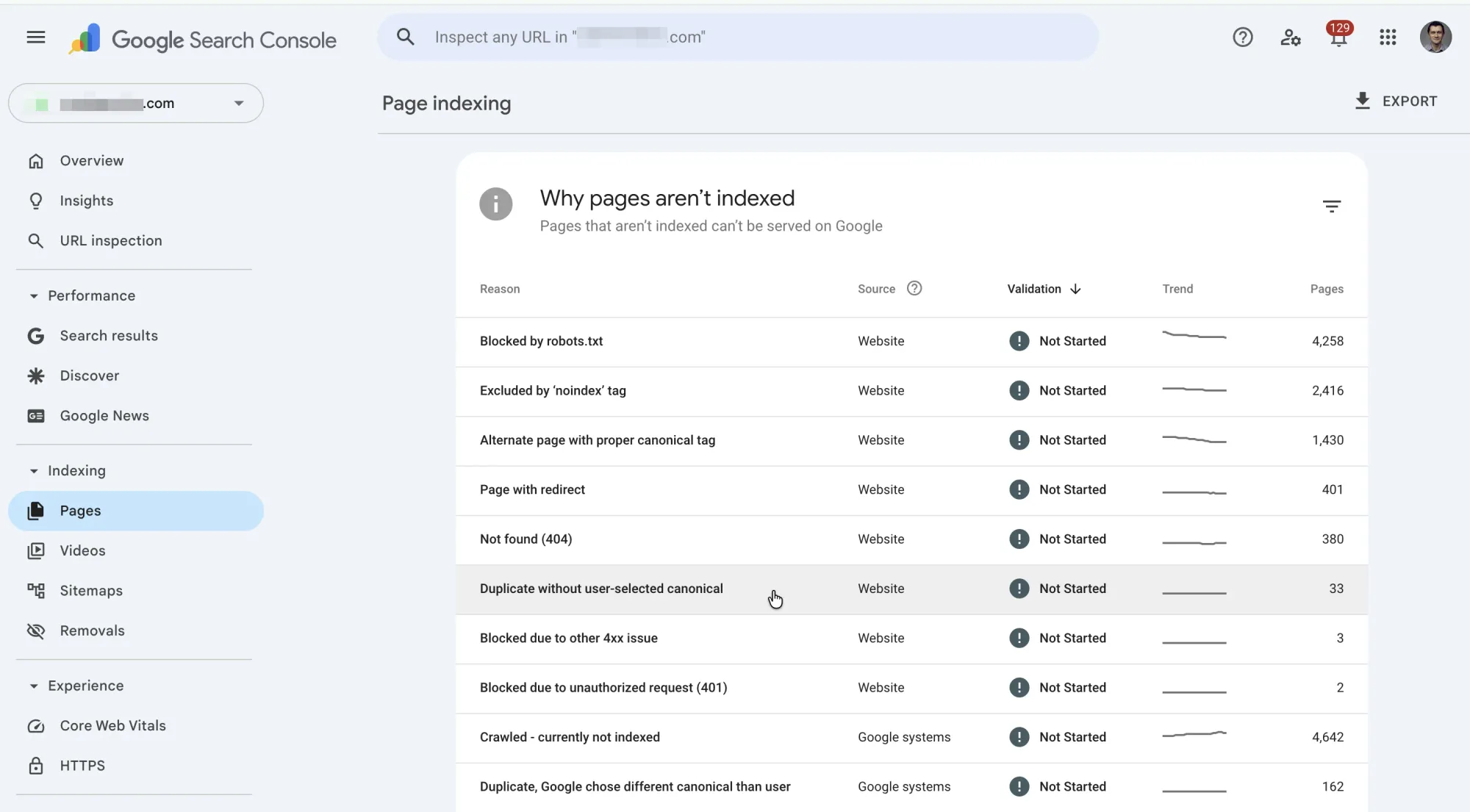
Export the list. Click the export button (top right) to download all affected URLs as a CSV. You'll want the full list for pattern analysis.
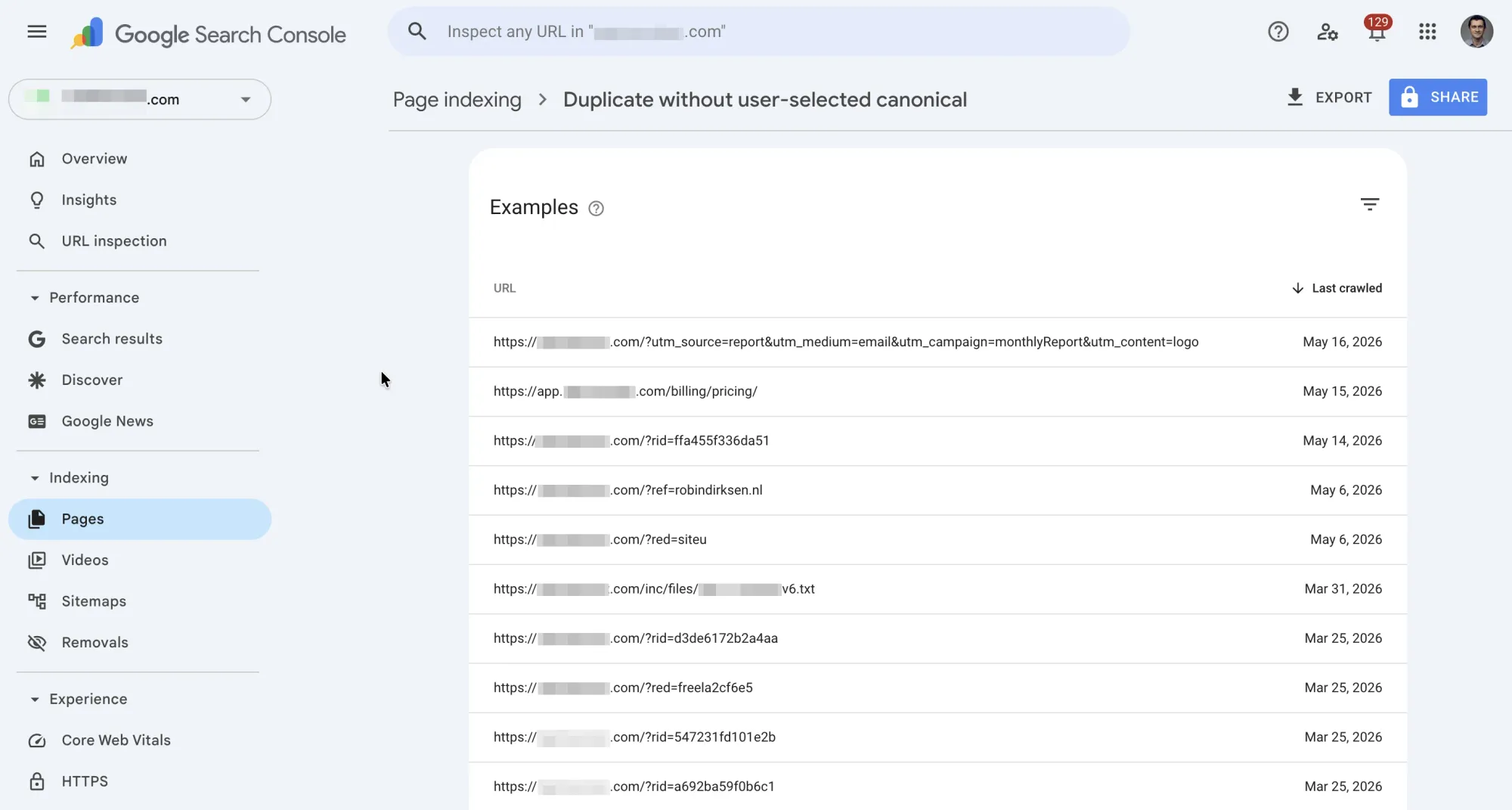
Before you start fixing anything, group the URLs by pattern. Look at the base paths and query parameters. You'll typically see clusters:
| Pattern | Example | Likely cause |
|---|---|---|
| Same path, different query params | /blog/post?utm_source=twitter |
Tracking parameters |
| Same path, filter/sort params | /products?sort=price&color=red |
Faceted navigation |
| www vs. non-www | www.site.com/page vs site.com/page |
Missing redirect |
| HTTP vs. HTTPS | http://site.com/page vs https://site.com/page |
Missing redirect |
| Paginated URLs | /category?page=2 |
Pagination |
If you use SEO Heatmap, you can visualize your indexing coverage across your site to spot affected areas faster than scanning a raw CSV.
Which Duplicates Actually Hurt Your Site (and Which Are Noise)
This is where most guides get it wrong: they treat every duplicate as equally urgent. They're not. Here's how to triage.
Harmful: Duplicates That Cannibalize Your Rankings
Fix these first. They're actively costing you traffic:
- Multiple indexable URLs targeting the same keyword. Check GSC Performance data. If you see the same page title or keyword driving impressions to two different URLs, you have cannibalization.
- Google indexing the wrong version. If Google chose a parameterized URL (like
/products?ref=partner) as the canonical instead of your clean URL (/products), your clean URL may not rank. - Crawl budget waste on large sites. If your site has 10,000+ pages, hundreds of duplicate parameter URLs mean Google's crawler spends time on junk instead of your important pages.
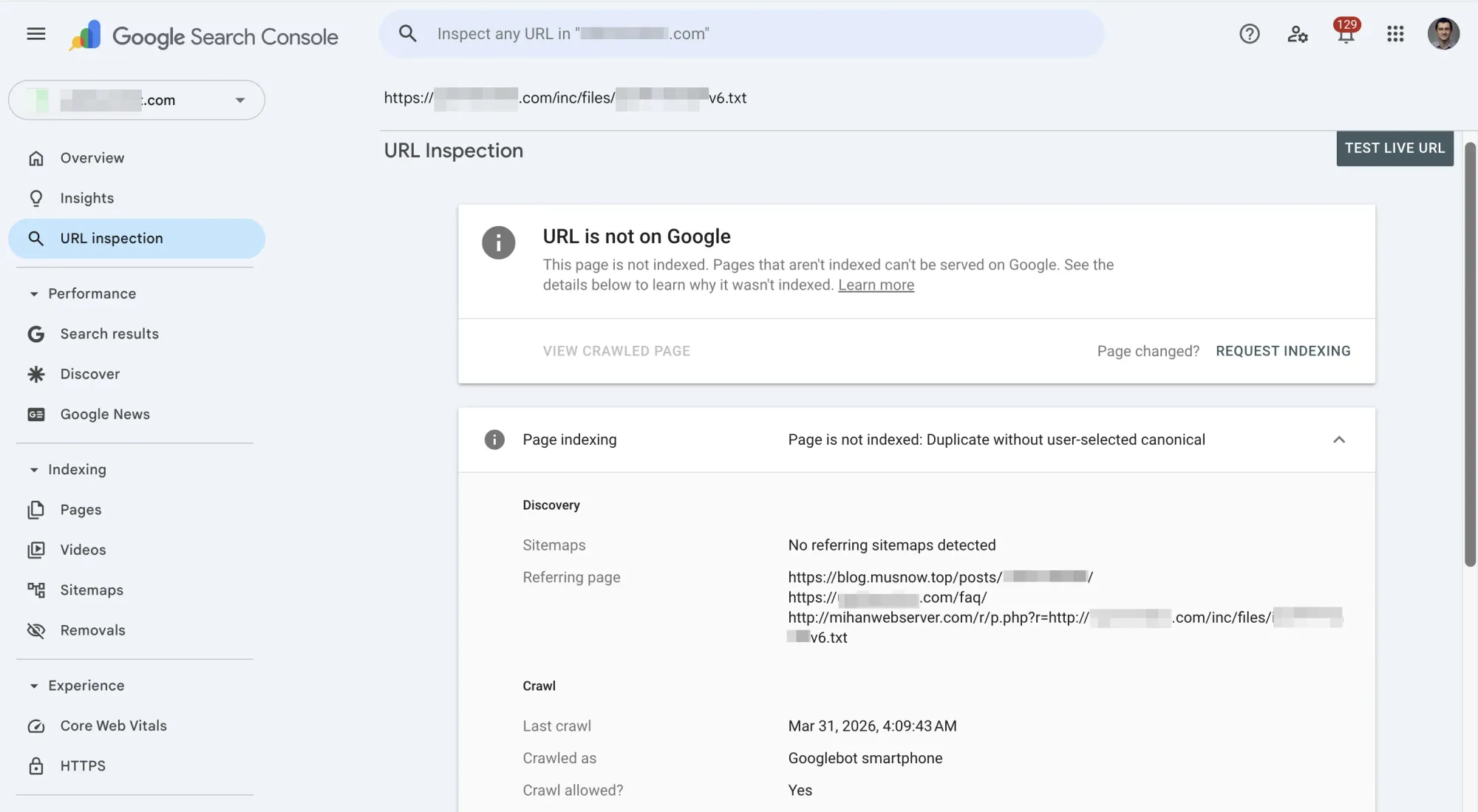
How to check: Use the URL Inspection tool in GSC. Paste a flagged URL and look at "Google-selected canonical." If it points to the wrong page, that's a problem.
Harmless: Duplicates You Can Safely Ignore
Don't waste time on these:
- UTM parameters and tracking tags. URLs like
/page?utm_source=newsletter&utm_medium=email. Google almost always handles these correctly and indexes the clean version. - Session IDs or temporary parameters. These URLs are ephemeral and rarely cause real indexing issues.
- Small sites (under 10K pages). Crawl budget isn't a meaningful constraint for most small-to-medium sites. If Google is already indexing your preferred version, the "duplicate" flag is informational.
- Google already picked the right canonical. Use URL Inspection on a few flagged URLs. If "Google-selected canonical" points to the correct clean URL, the system is working as intended.
The triage rule: Check 5-10 flagged URLs with URL Inspection. If Google is consistently picking the right canonical, you're fine. Monitor but don't fix. If Google is picking wrong versions or if you're seeing cannibalization in Performance data, move to the fixes below.
Common Causes and How to Diagnose Each One
Query Parameter Variations
The most common cause. URLs like:
/page?ref=partner123/page?q=search-term/page?fbclid=abc123/page?htc=tracking-code
Diagnosis: Export your duplicate URLs and sort them. If the base path is the same but query strings differ, parameters are your problem.
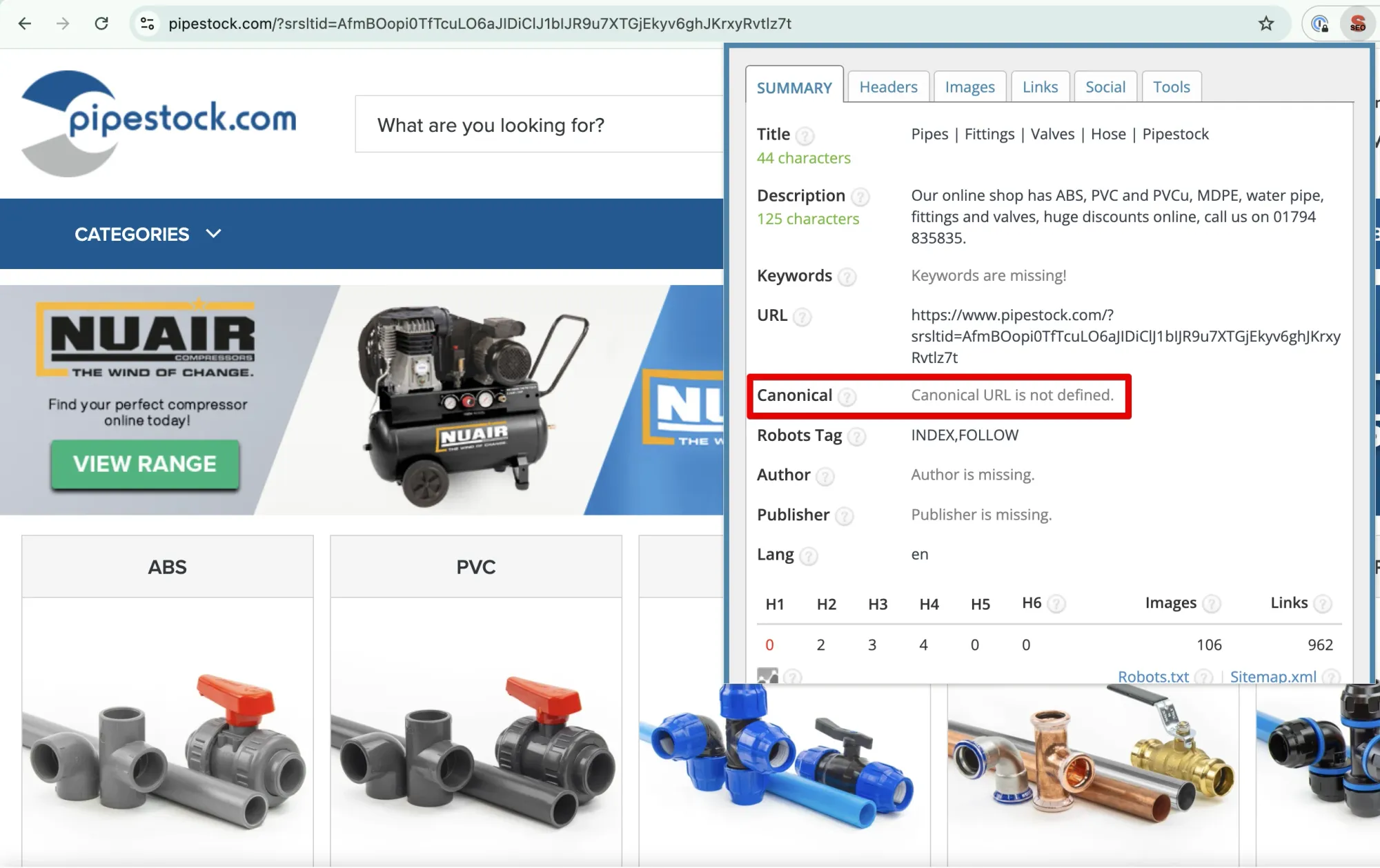
Where they come from:
- Marketing tracking (UTM, fbclid, gclid)
- Affiliate or partner link parameters
- CMS or marketing tool artifacts (HubSpot forms/tracking, WordPress plugins, Shopify apps)
- Internal search or filtering functionality
WWW vs. Non-WWW (or HTTP vs. HTTPS)
Diagnosis: Open both versions in your browser:
https://www.yoursite.com/pagehttps://yoursite.com/page
If both load without redirecting to a single version, you have a protocol/subdomain mismatch. This is a server configuration issue, not a canonical tag issue (though canonical tags can help as a backup).
Pagination and Filtered Views
Category pages, search results, and paginated listings often create duplicates:
/categoryvs./category?page=1/productsvs./products?color=blue
Diagnosis: Check if paginated or filtered versions are accessible to crawlers and lack canonical tags pointing to the main page.
Content Syndication and Scrapers
If your content appears on other sites (Medium republishing, partner syndication, or scrapers), those external URLs can sometimes confuse Google's canonicalization.
Diagnosis: Search for an exact sentence from your page in quotes on Google. If other domains appear with your content and no canonical pointing back to you, syndication is the cause.
How to Fix Each Type of Duplicate
Add Self-Referencing Canonical Tags
The most common fix. Every indexable page on your site should have a self-referencing canonical tag:
<link rel="canonical" href="https://www.yoursite.com/page" />
Where to place it: Inside the <head> section, as early as possible. Some CMS plugins or scripts injected before the <head> closes can interfere with parsing.
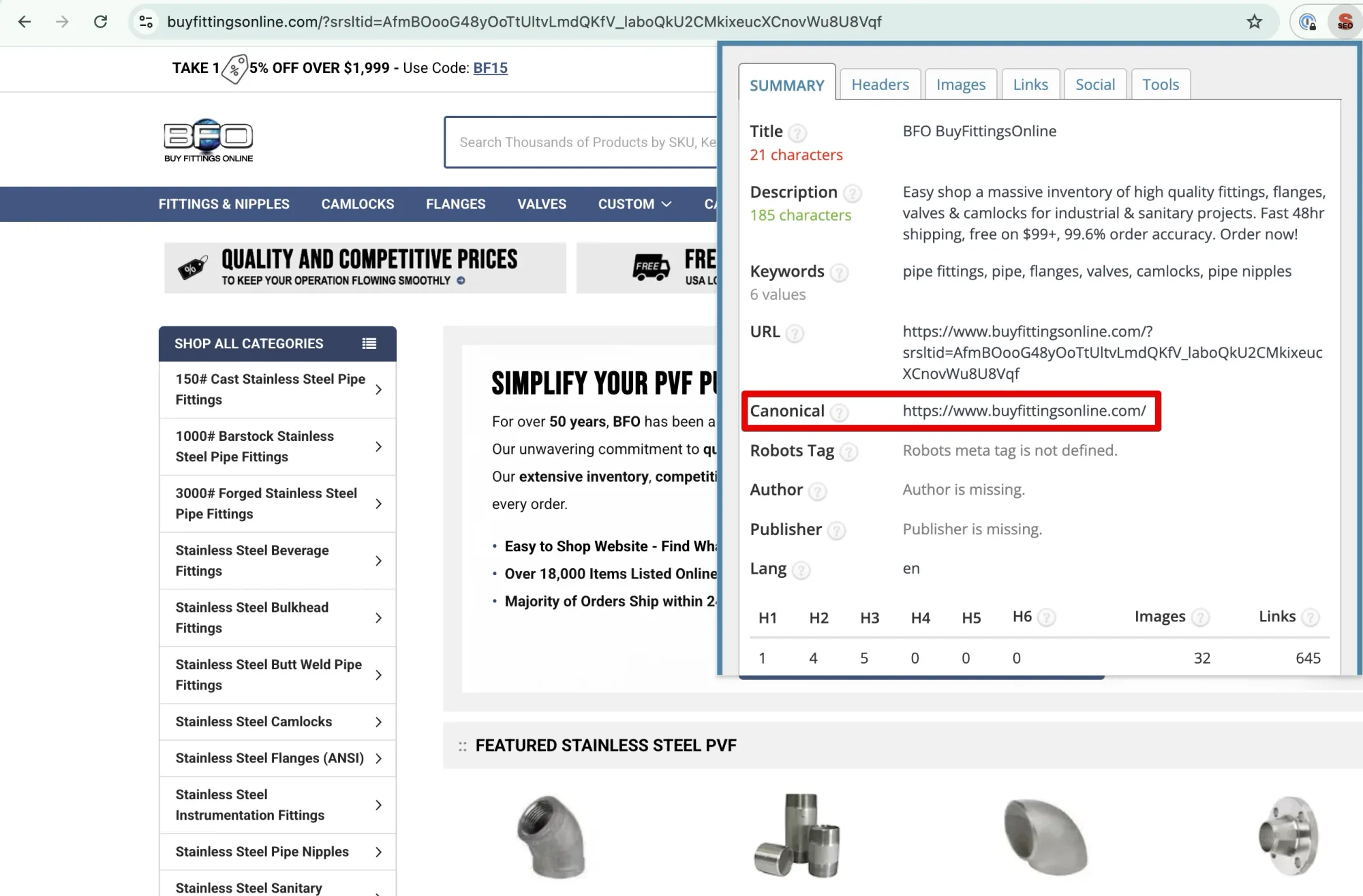
For parameterized URLs: The canonical should point to the clean version (without parameters):
<!-- On /page?ref=partner123 -->
<link rel="canonical" href="https://www.yoursite.com/page" />
CMS-specific:
- WordPress: Yoast SEO and RankMath handle this automatically for most pages. Check that your parameterized URLs also get the correct canonical.
- HubSpot: Set canonical URLs in page settings. For parameter artifacts, you may need to configure this at the template level.
- Shopify: Handles canonical tags natively, but third-party apps can create parameter URLs that bypass them.
Set Up 301 Redirects for Protocol/Subdomain Issues
For www vs. non-www or http vs. https mismatches, canonical tags are a band-aid. The real fix is a server-level redirect.
Nginx:
server {
    listen 80;
    server_name yoursite.com www.yoursite.com;
    return 301 https://www.yoursite.com$request_uri;
}
Apache (.htaccess):
RewriteEngine On
RewriteCond %{HTTPS} off [OR]
RewriteCond %{HTTP_HOST} !^www\. [NC]
RewriteRule ^ https://www.yoursite.com%{REQUEST_URI} [L,R=301]
Cloudflare: Create a redirect rule: match http://*yoursite.com/* and redirect to https://www.yoursite.com/$2 with status 301.
Verify: After setting up the redirect, run curl -I http://yoursite.com/page and confirm you get a 301 with the correct Location header.
Handle Parameters at Scale
Important: Google deprecated the URL Parameters tool in Search Console. It no longer works for new configurations. You need other approaches:
- Canonical tags (preferred): Set canonical tags on all parameterized URLs pointing to the clean base URL. This is the most reliable signal.
- Server-level parameter stripping: Configure your server or CDN to strip known tracking parameters before the page loads. This is the cleanest solution but requires infrastructure access.
Robots.txt: Block crawling of known junk parameter patterns. Example:
Disallow: /*?ref=
Disallow: /*?htc=
Disallow: /*?fbclid=
Note: robots.txt prevents crawling but not indexing. If Google already knows about these URLs from links, they may still appear in GSC.
Request Re-Indexing After Fixes
After implementing fixes:
- Validate individual URLs: Use GSC, go to URL Inspection, enter a fixed URL, and click "Request Indexing"
- Submit your sitemap: Go to GSC, then Sitemaps, and resubmit to prompt a fresh crawl
- Be patient: Google re-crawls on its own schedule. High-authority pages may update in days; lower-priority pages can take weeks.
Don't expect the "Duplicate without user-selected canonical" count to drop overnight. Google needs to re-crawl every affected URL.
Case Study: How Fixing Parameter Duplicates Recovered Crawl Budget for an E-Signature SaaS
While consulting for a well-known e-signature SaaS company, I encountered a textbook case of parameter-based duplicate creep.
The situation: The site's URLs were accumulating query parameter artifacts, ref=, q=, s=, htc=, and others. These weren't standard UTM parameters. They were byproducts of HubSpot forms and HubSpot web tracking appending their own parameters to URLs.
How the duplicates grew: Affiliates, and possibly bad actors (I never conclusively determined whether it was intentional), were creating and distributing links with these parameter variations. Each new inbound link pushed another parameterized URL into Google's crawl queue. Over several months, duplicates steadily crept into the GSC account.
The fix: We corrected the canonical tag configuration at the CMS level to ensure all parameterized URLs pointed to the clean base URL, regardless of which parameters were appended.
The result: The site stopped wasting crawl budget on parameter duplicates. With crawlers no longer being sent sideways through hundreds of junk URLs, the site started ranking for more search terms, while actually having fewer total pages crawled. The crawl budget that had been spent on duplicates was now spent on pages that mattered.
The lesson: We could have caught this months earlier with regular monitoring. The duplicates didn't appear all at once. They accumulated gradually, which made them easy to overlook until the GSC count was significant.
How to Monitor and Prevent Duplicates From Recurring
Fixing duplicates is half the job. Preventing them from coming back is the other half.
Monthly monitoring checklist:
- Check GSC, Pages, Not indexed, "Duplicate without user-selected canonical" count. Is it trending up, down, or stable?
- Spot-check 5 flagged URLs with URL Inspection. Is Google still picking the right canonical?
- Review new pages or features launched this month. Did they introduce new URL patterns or parameters?
- Check your sitemap for any parameterized URLs that shouldn't be there.
Prevention rules:
- Every new page template gets a self-referencing canonical. Make this a launch checklist item.
- New integrations or CMS plugins get a URL audit. Check what parameters they add to URLs.
- Affiliate and partner links should use a controlled parameter set. Block or strip unexpected parameters at the server level.
- If you use a CDN or reverse proxy, verify that canonical tags pass through correctly. Some configurations can strip or modify
<head>elements.
Use SEO Heatmap to visualize your site's indexing coverage over time. Catching a spike in duplicate URLs early, before it affects crawl budget, is far easier than cleaning up months of accumulated duplicates.
Frequently asked questions
How long does it take for Google to update the "duplicate without user-selected canonical" status after I add canonical tags?
Expect two to six weeks for most URLs. Google needs to re-crawl each affected page, process the new canonical signal, and update its index. High-authority pages may update in days, while low-priority URLs can take longer. You can speed things up by requesting indexing through GSC's URL Inspection tool for your most important pages, but there's no way to force a bulk update.
What is the difference between "duplicate without user-selected canonical" and "duplicate, Google chose different canonical than user"?
"Duplicate without user-selected canonical" means none of the duplicate URLs have a canonical tag, so Google picked a preferred version on its own. "Duplicate, Google chose different canonical than user" means you did set a canonical tag, but Google overrode your choice. The second status is typically more concerning because it signals a mismatch between your intent and what Google considers the correct version. If you're seeing both statuses, address the "Google chose different canonical" URLs first.
Should I use noindex or canonical tags to fix duplicate pages?
Use canonical tags in most cases. A canonical tag tells Google which version to index while keeping link equity flowing to the preferred URL. A noindex tag removes the page from the index entirely, which makes sense only if the duplicate should never appear in search results (like an internal search results page or a print-friendly version). If you noindex a page that receives external backlinks, you lose the ranking value those links pass. For parameter-based duplicates, canonical tags are almost always the right choice.
Does the "duplicate without user-selected canonical" status affect my Core Web Vitals or page experience scores?
No. This status is an indexing classification, not a page experience signal. Core Web Vitals measure loading performance, interactivity, and visual stability of the pages users actually visit. Having duplicate URLs flagged in GSC does not change those scores. That said, if your duplicate URLs are the ones Google chooses to index (instead of your preferred versions), users may land on slower or poorly optimized variants, which could indirectly affect your performance metrics.
Can adding canonical tags accidentally deindex my pages?
Yes, if you point them to the wrong URL. A canonical tag that points Page A to Page B tells Google to drop Page A from the index and treat Page B as the authoritative version. Common mistakes include: pointing all pages to the homepage (usually caused by a broken CMS template), setting canonicals to URLs that return 404 errors, and creating circular or chained canonical references. After implementing canonical tags, always spot-check five to 10 pages using GSC's URL Inspection tool to confirm Google sees the correct canonical.
Why did my duplicate count increase after I submitted a new sitemap?
Submitting a sitemap prompts Google to discover and crawl more URLs on your site, including ones it hadn't found before. If those newly discovered URLs have duplicate content and lack canonical tags, they'll appear in the "duplicate without user-selected canonical" report. This is normal and not a sign that something broke. Review the new entries to see if they represent real pages that need canonical tags or just parameter variations you can safely ignore.
What should I do if Google keeps ignoring my canonical tag and indexing the wrong URL?
Start by confirming the canonical tag is actually rendering in the page source (not just in your CMS settings). Use GSC's URL Inspection tool and click "View Crawled Page" to see what Googlebot sees. Common reasons Google ignores canonicals: the canonical URL returns a non-200 status code, the content on the two URLs is not similar enough for Google to treat them as duplicates, or conflicting signals exist (like an internal link or sitemap entry pointing to the non-canonical version). If the content is truly identical and the tag renders correctly, a 301 redirect is a stronger signal than a canonical tag.