

Summarize this article with AI
The sales pitch for a keyword cannibalization checker goes like this: feed it your site, get back the queries where two or more of your pages are fighting over the same clicks. Here's the catch. Overlap is what they find. Cannibalization is a smaller slice of that. Brand searches create overlap. So do sitelinks and double listings. Two URLs on one result, no fight. A checker can't sort the costly overlaps from the harmless ones.
Your own Search Console data has what you need, free. Start with one query. Then a cluster. Then the whole property through a pivot once you need the full view. Here's the tell. Real cannibalization leaves a time pattern; harmless overlap doesn't. The tool comparison? That's about which data source each one taps. Which fix wins? Depends on the case. Then you check it stuck.
What a keyword cannibalization checker actually looks at
Point a keyword cannibalization checker at a site. Out comes a list of queries picking up impressions on more than one URL, usually with clicks, impressions and positions laid out next to each. Useful? Depends on one thing. The data source behind it. Some checkers read your own Search Console property. Some pull from a third-party rank index. Others skip your site entirely and just read live SERPs for whatever keywords you feed them. Different data source, different question answered. Point two tools at one site and you'll likely get two different problem lists.
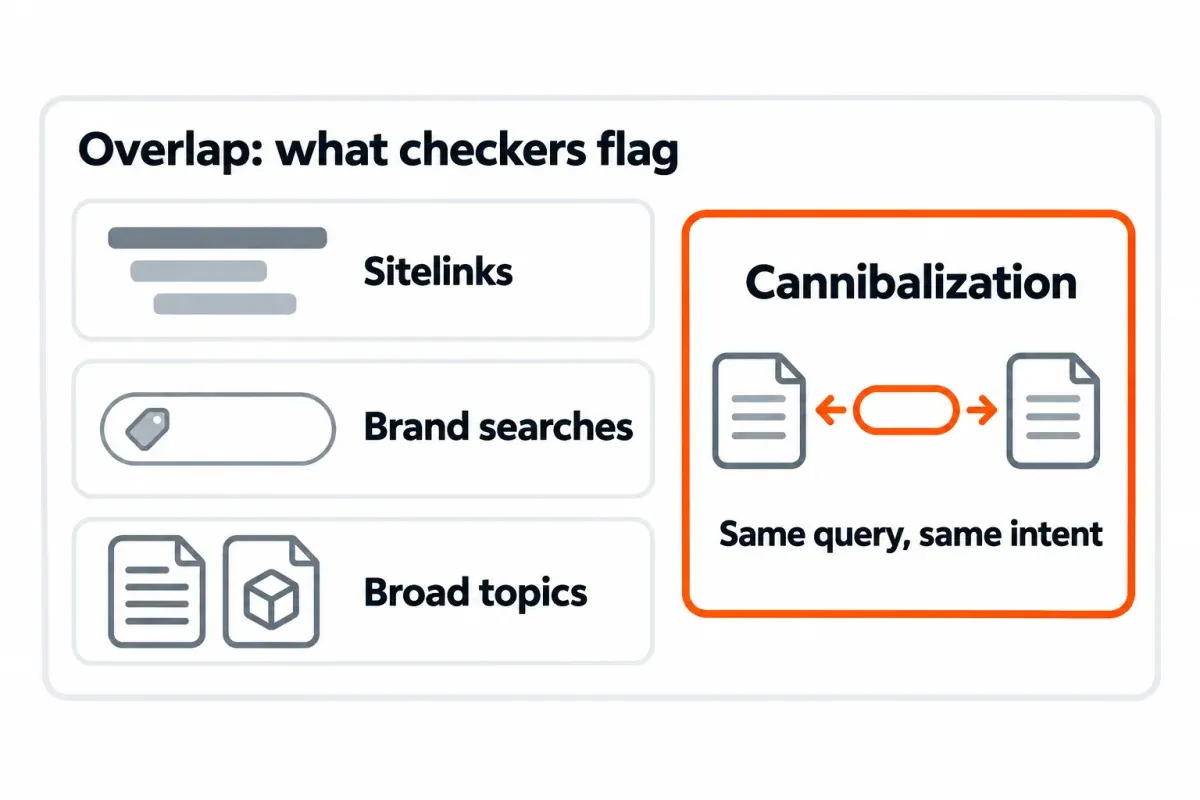
By itself, overlap isn't cannibalization. Real cannibalization happens when two or more of your pages chase the same query with the same intent behind them. Clicks get divided, or the weaker page ranks and the one you'd actually want sits behind it. Would a searcher be just as happy on either URL? That's duplicate effort on your side, not a cannibalization issue.
Key takeaways
- No paid tool required. Search Console already has the queries your property picked up impressions for, short of anonymized queries and rows past its storage limits.
- Overlap on a query isn't the same as cannibalization. Think sitelinks, indented second listings, brand searches, broad topic queries. Each one stacks two URLs on a result without the pages actually competing.
- Watch the time pattern to spot real cannibalization. Clicks flipping between the URLs week to week is the tell, not two URLs climbing in sync.
- Which fix is right? Depends on the case. Merge and 301, re-target, canonical, noindex and "leave it alone" each win in different situations.
How to check for keyword cannibalization in Search Console for free
Search Console draws from the impressions your property actually earned. That's why it picks up long-tail queries a rank tracker would never bother sampling. A few catches, though. Unverified properties are out. Data stops at 16 months.1 And rare or sensitive queries get anonymized before they reach the view.
Pick a date range that has room for a pattern. If the site's been around a while, three months works as a starting default. In Performance, switch on every metric card you've got: clicks, impressions, CTR, average position. You want the full picture on every check.
Check one query: filter the Performance report, then open Pages
About two minutes of your time. Best when the query's already in your head.
Open Search results under Performance. Hit + Add filter, choose Query, change the match type to Exact query, type in the term, apply. Open the Pages tab next. Any URL that got impressions for that query is listed.
If one URL is pulling almost all the clicks and impressions, no contest. Two URLs each sitting on a real share of both? That's a candidate, not a verdict. Grouped by page, Search Console counts each unique URL in a result separately, so two of your URLs shown together in a single result (sitelinks, an indented second listing) each pick up the impression. The Pages tab can't tell "shown together" from "taking turns". The time test later in this guide is why.
Small note: filtering by query drops the anonymized queries from the view. That's fine here, since you're after a specific named one.
Check a group of queries with a regex filter
Most topics pull in a handful of phrasings rather than one tidy query. In the query filter, switch to Custom (regex) and drop in a pattern that scoops up the variants.
cannibali[sz]ation (checker|tool)s?
That covers both spellings, plus "checker" or "tool" in singular or plural. Search Console matches the pattern anywhere in the query, so "free keyword cannibalization checker" counts too. More patterns live in our Search Console regex cheat sheet. Just remember: the tool uses RE2, so no backreferences and no lookarounds.2
Heads up: with a regex filter on, the Pages tab lumps every matching query together. You see which pages compete for the topic, not for a specific query. Use the regex pass to shortlist, then run the one-query check on each query that matters.
Check every query: export query and page pairs, then pivot them
Search Console's native Export button writes each tab as its own 1,000-row table. The Queries tab has queries. The Pages tab has pages. Neither gives you query + page pairs, which is what a full-site cannibalization check needs.
Three routes get you those pairs:
- Looker Studio. Hook up the Search Console connector, choose the URL impression table, then set Query and Landing page as the two dimensions.
- The Search Console API. Request the Search Analytics endpoint with
dimensions=['query','page'].3 - The bulk export to BigQuery. Query the
searchdata_url_impressiontable.4 Row limits and the step-by-step for each route live in our Search Console bulk export guide.
Dump the output into a sheet, one row per query + page, with columns for Query, Page, Clicks, Impressions and Average position.
Set an impression floor first. Otherwise a URL with one or two accidental impressions sneaks into the rival list. Base the cutoff on the query's size, not a fixed number. Something like 5% of a query's impressions makes a sensible floor to begin with, not a hard rule.
Then pivot. In Sheets, go Insert → Pivot table. Set Rows to Query, drop Page in as a value summarized by COUNTUNIQUE, then add Clicks and Impressions as SUM. Sort by page count, biggest first. Every query showing 2 or more makes the list. Same thing in Excel's PivotTable, with Query in Rows and Page in Values. Each row is already a query + page pair, so a plain Count of Page lands on the same figure.
For each flagged query, tack on two helper columns: one for the top URL's share of clicks, another for its share of impressions. A query where one URL takes nearly all of both is rarely worth touching. A split closer to half and half is where real cannibalization usually lives.
Here's a hypothetical shortlist to show the shape:
| Query | Unique pages | Top URL impression share | Shortlist? |
|---|---|---|---|
| example topic a | 3 | 92% | no |
| example topic b | 2 | 54% | yes |
| example topic c | 4 | 38% | yes |
| example topic d | 2 | 97% | no |
If you'd rather have an LLM build the pivot, our ChatGPT SEO prompts post has one (Prompt 10) that turns query + page pairs into a cannibalization table on your own data.
Real cannibalization or harmless overlap?
An overlap shortlist isn't a problem shortlist. Many flagged queries are two URLs sitting next to each other peacefully. This table turns a flag into a verdict.
| Pattern | What it looks like in the data | Usually | What to check |
|---|---|---|---|
| Sitelinks or indented second listing | Both URLs gain impressions in the same weeks, both get clicks | Harmless | Open the live SERP; if both URLs show in one result block, it's extra real estate, not a split |
| Branded query | Several of your pages show for your brand or a brand modifier | Harmless | Confirm the query is branded, then move on |
| Broad topic, different intents | A guide and a product page both rank, each with its own long tail | Harmless | Check the SERP titles for the query; mixed intents usually mean each page owns a different slice |
| Country or language versions | Each URL takes impressions in its own country | Harmless | Add a Countries filter in Search Console to confirm |
| Same intent, pages taking turns | Impressions and clicks swing from one URL to the other over weeks, average position unstable | Real | Run the time test below |
| Weaker page outranking the intended one | Neither URL ranks well; the one you'd want is behind the other | Real | Fix it, even if traffic is small today |
One page ranks for lots of queries. Judge the pair by the total organic clicks each page pulls, not by how one keyword divides. Would merging the weaker URL into the stronger one cost more long-tail traffic than it brings back? Then don't.
The time test: do clicks flip between the URLs?
Shown together, or taking turns? A time test settles it.
In Search Console, keep the query filter, add a Page filter for one URL, note its weekly clicks, then swap the Page filter to the other URL. Flip the chart to weekly, or hit Compare against the prior period. You've got real cannibalization when one URL climbs during the same weeks the other drops, on the same query. Harmless double listings rise and fall together.
Want the page-level view? In SEO Heatmap, the Pages view lines both URLs up side by side. Feed the two URL paths into the URL filter, separated by a comma. Pick weekly or monthly, then compare the rows. See one row cool while the other heats? That's your swap pattern. A caveat here. The heatmap sums clicks across every query a page earns, not only the one on your mind. Treat it as the page-level tell, then hop back to Search Console to pin down the specific query. It's free for one Search Console property.
A hypothetical six-week swap:
| Week | URL A clicks | URL B clicks |
|---|---|---|
| 1 | 80 | 20 |
| 2 | 60 | 40 |
| 3 | 35 | 65 |
| 4 | 25 | 75 |
| 5 | 70 | 30 |
| 6 | 55 | 45 |
There's your swap shape. Noisy data, sure, but one URL's gains should map onto the other's losses.
Keyword cannibalization checker tools compared
Pick a cannibalization tool by the data source. Whatever the source is, that's the ceiling on what the tool can see.
| Tool | Data source | What it flags | Free use | Blind spot |
|---|---|---|---|---|
| Search Console, manual (this guide) | Your verified property | Queries where two or more of your URLs took impressions | Free | Only your own property and its last 16 months; anonymized queries and some low-volume rows are left out |
| Geoptie | Crawls your domain and pulls your ranking keywords from a source it doesn't name | Scores conflicts None to High and suggests consolidate, redirect or differentiate | Up to 10 keywords per scan, no sign-up | Only the keywords in its data; the free scan is capped at your top-ranking terms |
| Sitechecker | Your Search Console data, connected | Splits impressions, clicks, CTR and average position across the competing URLs, with a country filter | Sign-up required, 14-day trial, no card | Price after the trial isn't on the public page; verify before you plan around it |
| seo.ai | Live Google SERPs for keywords you paste in | Clusters similar SERPs and shows a similarity matrix | Free, no login | Never looks at your site, so it can't tell you which of your URLs rank |
| Semrush Position Tracking (Cannibalization tab) | Semrush's rank tracking of the keywords you add to a project | Tracked keywords with more than one of your URLs in the top 100 | Paid plan | Only keywords you track (up to 5,000 depending on plan, per Semrush's guide) |
| Ahrefs Site Explorer (Organic keywords, Multiple URLs only) | Ahrefs' keyword index | Keywords where two or more of your URLs rank, from Ahrefs' database | Paid plan | Only keywords Ahrefs tracks; Ahrefs itself warns not every flagged case is a problem |
Which to pick?
- Your own Search Console data when you want a complete picture of your property for free. The manual pivot above is the full checker.
- A rank-index tool like Semrush or Ahrefs when you want competitive context on a keyword, or when you can't verify the site in Search Console.
- A SERP-overlap tool like seo.ai works before you publish, when the question is whether two queries belong on one page.
SEO Heatmap isn't in the table, since it's not a cannibalization checker to begin with. It earns its place in the time test above, and in the post-fix check further down.
How to fix keyword cannibalization once you've confirmed it
Semrush and Ahrefs don't agree on what counts as a fix. Semrush puts canonical tags and noindex on its list. Ahrefs throws both out as cannibalization fixes. They agree once you split the cases.
| Situation | Fix | What happens to the losing page's rankings | Don't use it when |
|---|---|---|---|
| Two same-intent pages, you don't need both | Merge the better content into the stronger URL, 301 the weaker one, repoint internal links, drop the old URL from the sitemap | Rankings, backlinks and other link signals consolidate on the kept page | The pages actually serve different intents |
| Both pages needed, intents can be separated | Retitle and refocus the weaker page on its own query set; change internal anchors so the intended page owns the contested query's anchor | Both pages keep their own rankings | The intents are the same (merge instead) |
| Near-duplicate URLs of the same content (parameter URLs, two paths to one product) | Canonical to the preferred URL | Signals point to one URL | The pages are two different articles (Ahrefs' point: canonical isn't a cannibalization fix there) |
| A page users need that shouldn't rank (thin tag page, filter page) | Noindex it | It drops out of every query, with no consolidation of signals | It's the only page that ranks for some of its queries |
| Stronger page already ranks well, weaker page brings its own small traffic | Leave it | Nothing lost | Not applicable |
A clean merge isn't just slapping a 301 on the losing URL and calling it done. Repoint your internal links to the surviving URL. Take the redirected URL out of your sitemap. And double-check the redirect code: 301, not 302.5 For the mechanics, see our guide on 301 vs 302 redirects and how to confirm them in Search Console. Doing the merge inside a broader cleanup? The content audit workflow we lay out leans on Search Console data to sort pages into keep, update, merge or remove buckets.
Prevent the next one before you publish
The cheapest cannibalization check? One that kills a bad brief before it ships. Hold a keyword map. One column for the topic or primary query, the next for the single URL that owns it. Before you brief a new page, scan the map for an existing owner.
Then run the one-query check from earlier against the target query. If an existing page already owns most of the impressions, update that page. Don't write a new one. Two candidate keywords with nearly identical top-ranking URLs on Google? Plan one page, not two. A SERP-overlap tool like seo.ai confirms it in a minute. For site-wide structure that keeps related pages from fighting each other, see our take on SEO silos vs topic clusters.
Check that the fix worked
A fix with no follow-up is a guess. Pull the right numbers after the change. Otherwise you can't tell whether the site actually improved or you just moved rows around.
After a merge + 301, Search Console credits impressions and clicks to the final URL post-redirect, and to the canonical.6 The redirected URL's rows should move to the kept URL. Compare the kept URL's clicks after the change against both URLs' combined clicks before it, over matching periods (same weeks or months, same length). Avoid comparing a partial window: wait until the new window matches the old one. For a method of diagnosing a traffic change over time, see our SEO data analysis guide.
After a re-target: rerun the one-query check for the contested query. The intended URL should hold most of the impressions and clicks. Watch for the weaker page losing impressions on queries you didn't want it on, which is the sign the refocus took.
Ahrefs' blog has one documented merge case: in 2018 they consolidated two broken-link-building guides into a single URL, 301'd the other, and the kept page later picked up more traffic than both URLs had before. Treat it as what it is: one case on one site, in the same article that also shows a counter-case where merging wasn't worth it. Don't expect a fixed lift or a fixed recovery time.
How long should you wait? It depends on traffic. On a busy pair, you'll see the result in weeks. A low-traffic pair takes months to clear the weekly noise. Either way: full weeks or full months only, never a partial one.
Prefer to watch the swap play out visually? SEO Heatmap drops the kept URL and the redirected URL into the same Pages heatmap, by week, month or quarter. The redirected row fades as the kept row warms. Free for one Search Console property.
Frequently asked questions
How do I check for keyword cannibalization?
Fire up Google Search Console. Pick a query, filter the Performance report by it, and open the Pages tab. Any URL with impressions for it is a candidate. For a full-site pass, pull query and page pairs from Looker Studio, the Search Console API or the bulk BigQuery export. Pivot that by query with a distinct page count, and anything hitting two or more pages goes on the shortlist.
Is there a free keyword cannibalization checker?
Yes: your own Search Console data. The Performance report lists the queries your verified property got impressions for, including the long tail that rank trackers miss. For a scan without a GSC connection, Geoptie runs up to 10 keywords free; for a pre-publish SERP check, seo.ai is free with no login.
Is keyword cannibalization always bad?
No. Two URLs showing up for one query is overlap. That's not cannibalization on its own. Sitelinks, double listings, broad topics, brand terms: each shows two URLs without any real contest between them. The real cannibalization pattern? Clicks and impressions trading places between the URLs from one week to the next, or the weaker URL outranking the one you'd actually want in the SERP.
Does Google penalize keyword cannibalization?
No. There's no cannibalization penalty. The cost is self-inflicted. Two of your pages chase the same query, clicks split, and the stronger candidate can get pushed down the SERP. The point of a fix is to help your best page win the SERP, not to dodge a penalty.
Can two pages from the same site rank for the same keyword?
Yes, and it's normal. Google often pairs parent pages with sitelinks, and it'll sometimes stack a pair of listings from one domain too. The question isn't whether both pages appear. Watch the intent. Are the two pages chasing the same user with identical goals? If yes, decide which one you want winning and fix the loser.
How do I fix keyword cannibalization?
Pick the fix by the case. Two pages with the same intent and no need for both? Roll the losing page's content into the stronger URL, then set a 301 on the one you dropped. Both pages need to stay? Re-point the weaker one at its own query set, and clean up internal links so they match. Canonical is for near-duplicate URLs of the same content. Noindex is for pages users need, but that shouldn't rank.
How often should I check?
Quarterly on an established site. Plus a one-query check anytime you brief a new page on a topic you already cover. If a page you care about loses organic clicks, run the one-query check and the time test on its main queries that same day. It rules cannibalization in or out fast.
Found a pair that might be taking turns? SEO Heatmap lines up both pages' clicks week by week in one heatmap, so you can spot the swap before you merge anything and watch the result after. It's free for one Search Console property.
Sources (6)
SEO Heatmap Knowledge relies on primary sources: Google's documentation, web standards, peer-reviewed research, and vendors' own pages for their pricing and features. Our editorial standards
- Google Search Central. “Debugging Search traffic drops.”
- Google (RE2 project). “RE2 Syntax.”
- Google Search Console API. “Search Analytics: query.”
- Google Search Central. “Table guidelines and reference.”
- Google Search Central. “Redirects and Google Search.”
- Google Search Central. “Impressions, position, and clicks: how they are counted.”

