

Summarize this article with AI
Claude can turn a page's click decline into a polished diagnosis before anyone checks the queries. That is the risk with Claude SEO: page clicks show where to investigate, but they cannot explain a ranking change on their own.
For Google clicks on the site you own, we'd begin with SEO Heatmap. Its Claude connection supplies prepared Search Console page trends, complete-period comparisons, and losing-page shortlists. Then open Search Console for query and impression evidence.
The walkthrough covers selecting a page, questioning Claude's math and assumptions, and measuring an edit from a baseline you've recorded. Use one URL from one property, comparing two complete periods.
Key takeaways
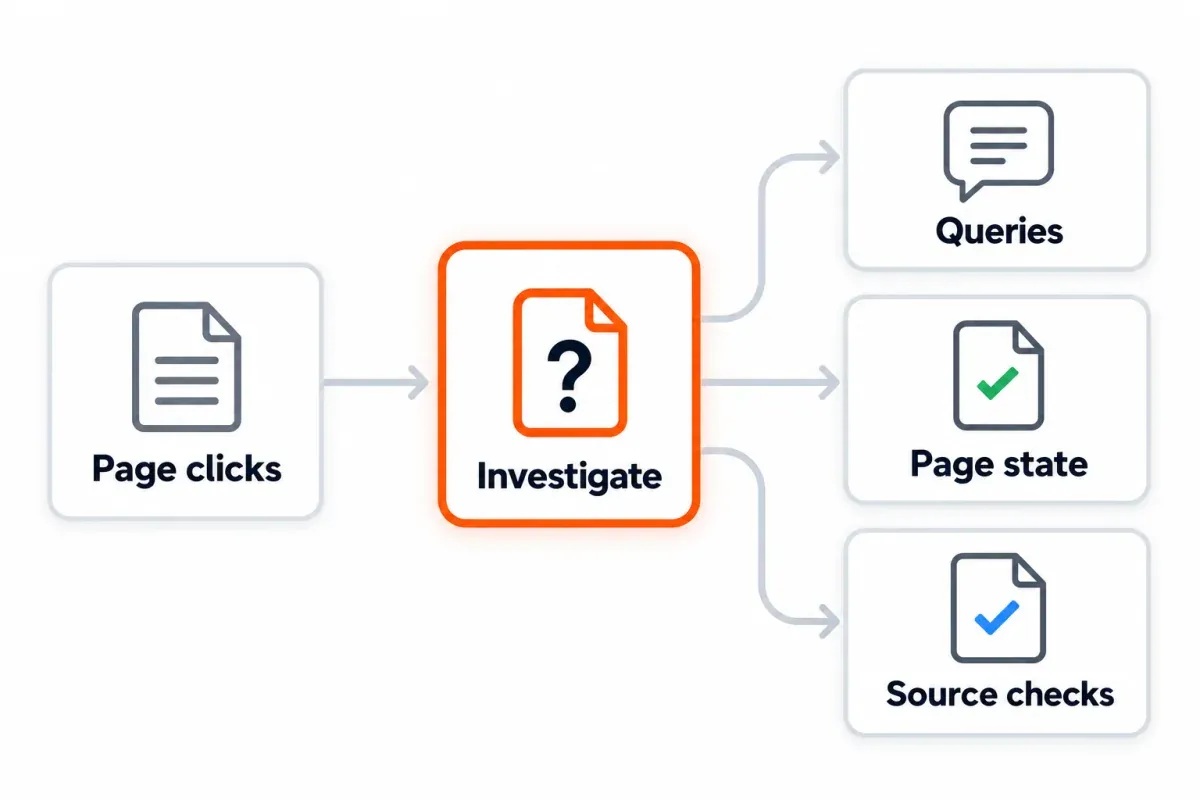
- SEO Heatmap is the starting connection for Claude SEO questions about your own site's Google clicks. It prepares page trends, losing-page lists, period comparisons, and section rollups from available Search Console data.
- Use Claude to organize evidence and propose checks. Verify the property, dates, source values, and page state before changing anything.
- Its reports show clicks by page. Bring in another source when you need queries, impressions, CTR, average position, backlinks or competitor keywords. It needs to supply the fields the question calls for.
What does Claude SEO mean?
Here, Claude SEO means asking Anthropic's Claude to help you carry out search optimization work. You might use it for a content brief and copy review, or to compare performance periods and organize audit tasks. Without suitable data and tools, there's less for it to ground the answer in.
The phrase can also mean trying to earn citations in Claude’s answers, which is a separate visibility question. There's a product-name use of the phrase too. AgriciDaniel's Claude SEO is an open-source plugin for Claude Code with audit commands and specialist skills.1 Other vendors publish their own SEO skills.
A skill tells Claude how to carry out a workflow; a connector can let it call tools that supply data or actions.2 Installing an SEO skill does not, by itself, give Claude access to your Search Console property.
| What you need | Start with | What Claude receives |
|---|---|---|
| Find pages or folders losing clicks on a site you own | SEO Heatmap's Claude connection | Prepared Search Console page-click trends and comparisons |
| Review a one-time report | A CSV upload | Only the rows and fields in that file |
| Repeat a multi-step audit the same way each month | A skill plus the required data source | Instructions from the skill and data from files or tools |
| Inspect or propose changes to a website repository | Claude Code with access to that repository | Local files and any connected tools you allow |
For most SEO specialists, the useful first question is not “Can Claude do SEO?” It is “Which page deserves my attention, and what evidence would change my mind?”
Why start Claude SEO with SEO Heatmap?
For page-level decisions on your own site, SEO Heatmap is the best starting point we offer. It syncs available Google Search Console page rows, groups clicks into complete reporting periods, and prepares comparisons before Claude asks. You can move from “traffic is down” to a shortlist of URLs without building API scripts or asking Claude to join raw exports. The MCP setup page lists the available tools.
| First question | SEO Heatmap tool | Useful output |
|---|---|---|
| Is this the right property, and when was it synced? | list_sites |
Property identifiers and last-sync times |
| Which pages fell between complete periods? | compare_periods or find_opportunities |
Losing URLs with click changes |
| Did one page fall suddenly or drift over time? | get_page_history |
Monthly, weekly, or quarterly click history |
| Is the change concentrated in one area? | get_sections |
Folder-level click totals and movement |
| Which pages match a URL pattern? | find_pages |
Filtered and sorted page rows |
SEO Heatmap keeps page clicks on a rolling basis: 16 months of monthly data and 16 weeks of weekly data. Its comparisons normally leave out the current incomplete period unless requested. The free plan includes one Search Console property and MCP access, and the connection does not edit your Search Console property. That makes it a practical first connection for a repeatable weekly review.
There are two boundaries. First, its data covers page clicks; it doesn't include queries, impressions, CTR, average position or URL Inspection. Second, Google's Search Analytics API returns top rows without guaranteeing every data row.3 SEO Heatmap fetches further available rows by paging past the interface export's 1,000-row limit. Rows Google never returns can't be recovered that way. The shortlist tells you where to look; Search Console supplies the evidence missing from it. Our GSC MCP comparison explains that boundary in detail.
Workflow: Find a page worth investigating with Claude
This workflow starts with a real decision: Which page should I inspect this week? It works in Claude on the web or desktop with SEO Heatmap's remote connector. If you need connection steps, follow the current MCP setup page. The server URL is https://www.getseoheatmap.com/mcp.
1. Check the property and time window
Ask Claude to call list_sites first. Confirm the exact Search Console property and its last sync. A Domain property can include several hosts; a URL-prefix property covers its matching prefix.4 If the expected site is missing, fix access or finish its first sync before requesting an analysis.
Choose two complete periods of the same length. Comparing a finished month with the current partial month can create a dramatic but meaningless “loss.” Keep the search type and filters aligned when you later check the figure in Search Console.
2. Get a shortlist and test one number
Begin with compare_periods for the site, then check a priority URL through get_page_history. Losses clustered in a folder? With get_sections, you can check if that area accounts for the problem. Have Claude order losses by absolute clicks ahead of percentages. A drop from two clicks to one loses 50%, which looks dramatic. But 200 falling to 150 is usually the page you'd give more attention.
Illustrative example: July's 90 clicks for a page become 60 in August. The difference is −30 clicks, or −33.3% of July's total. That establishes the page lost clicks in those two periods. A ranking decline still hasn't been established. Demand or a site change might be involved, along with search appearance or the query mix.
Copy this prompt and replace the property and periods:
Use only SEO Heatmap's connected tools for the first pass.
1. Call list_sites and show the exact property ID and last sync.
2. For sc-domain:example.com, compare page clicks in July and August 2026.
   Use complete months and show the five largest absolute losses.
3. For each URL, show both click totals, new minus old, percent change,
   and the tool that supplied the figures. If the old value is zero,
   mark percent change as undefined.
4. Check page history for the largest loss. Tell me whether it looks
   sudden or part of a longer decline.
5. Separate observed facts, possible explanations, missing data,
   and the next check. Do not infer query or ranking changes from clicks.
Check one returned URL in Search Console using the same property, dates, search type, and filters. If the clicks differ, align those settings and the last sync before deciding which result is wrong. A connected badge proves that Claude reached a server; it does not prove it used the right report.
3. Look for the cause in Search Console
For the selected URL, open Search Console's Performance report and inspect queries, impressions, CTR, and average position for the same complete periods.5 A separate connector with those fields works too. SEO Heatmap leaves those fields out intentionally; page clicks aren't evidence from which Claude can invent their values.
| What you observe next | Reasonable next check | Avoid this leap |
|---|---|---|
| Clicks and impressions fell across several queries | Check demand, indexing, SERP changes, and the affected queries | “A title rewrite will recover the clicks” |
| Impressions stayed close, CTR fell | Review the search result, title, description, and query mix | “The page lost rankings” |
| Several pages in one folder fell together | Check template changes, internal links, crawl access, and release history | “Every page needs new copy” |
| One page rose while a related page fell | Compare their queries and intent before changing links or canonicals | “This is definitely cannibalization” |
They're routes for investigation, rather than automatic fixes. A change still needs a look at the live page and the business context behind it. Google recommends treating third-party SEO advice as advice, not access to its internal ranking data.6
Two more Claude SEO workflows with SEO Heatmap
Find the section behind a site-wide decline
A homepage total may tell you that clicks fell, but not where. Ask Claude to use get_sections after a compare_periods call. Next, request the losing folder's pages through find_pages or find_opportunities. That gives you the URLs to focus on before opening up a crawler or reviewing the content inventory.
For the connected Search Console property, compare the last two
complete months in SEO Heatmap. Show the three sections with the
largest absolute click loss. For the largest section, list the five
pages contributing most to the change and their click totals.
Name the property, date ranges, last sync, and source tools.
Do not claim a crawl or ranking issue until we inspect those sources.
What to do with it: Start with the page responsible if one page accounts for most of the section's loss. For losses across many pages around a deployment, look through the release history, shared template and navigation. Use Search Console's query and indexing reports to test the cause. The folder report narrows the work; it does not diagnose the cause alone.
Turn rising pages into a content brief
Find growing pages through find_opportunities, then check get_page_history to see if those gains hold over complete periods. You might update a rising page, write a supporting article or leave it alone. Let Claude draft the questions to investigate and a proposed brief, but provide query and market-volume data separately before committing to a new keyword target.
Using SEO Heatmap, find five pages with sustained click growth over
the last three complete months. Show each page's monthly clicks and
the property and last sync. Pick one page and propose three related
content questions that a human should validate in Search Console
and a keyword tool. Label the questions as hypotheses. Do not invent
search volumes, query rankings, or traffic forecasts.
So discovery begins with the clicks your site actually recorded. For a single analysis, you can also bulk-export page data and give Claude the CSV. A connector helps when you repeat the review and want Claude to request the current prepared comparisons each time.
When should you add a skill or Claude Code?
Work out the question and data first. A recurring task or work on site files is a reason to add workflow tools. Anthropic's skills documentation describes skills as reusable instructions; Claude Code's MCP documentation explains how external tools connect.
| Situation | Useful addition | Check before using it |
|---|---|---|
| One report to review once | Upload a CSV to Claude | File date, filters, and included columns |
| Weekly page-click triage | SEO Heatmap MCP | Property, sync, complete periods, one spot check |
| Same briefing or audit sequence across clients | A reviewed SEO skill | Whether its data source and output rules match your work |
| Propose code or template changes | Claude Code with site repository access | Diff, tests, and human review before publishing |
| Need paid, organic, and analytics data together | Additional authenticated sources | Property IDs, metric definitions, permissions, and cost |
The SE Ranking skill page makes a useful distinction: its skills define the workflow, while its MCP service supplies live vendor data. The audit framework in the open-source Claude SEO plugin includes a health score for prioritizing work. That score doesn't come from Google. Either works with a suitable data source. Neither makes a guess from the model count as a measured Search Console result.
The Search Engine Land practitioner guide shows a heavier route: Claude Code reads JSON produced by separate GSC, GA4, and Ads fetchers. That makes sense for cross-source agency analysis. If the first job is finding which owned pages lost clicks, SEO Heatmap gets you to a checkable shortlist with less setup. Add other sources when your question actually needs them.
Check the output and measure the change
Claude's analysis should be open to checking. Before taking action, go back to the source row, work out one change yourself and look at the live page. Ask what would show its proposed cause is wrong. The answer may read well and still get the property wrong, use a partial period or supply a metric the tool never returned.
Record the decision in a brief log:
Property and page:
Compared complete periods:
Source tool and last sync:
Observed clicks and calculated change:
Query or crawl evidence checked separately:
Hypothesis and proposed change:
Publish date and owner:
Success measure and review date:
After editing, look at the same page and related queries again, using finished comparison periods. Was the intended page indexed? Check for changes elsewhere on the site or shifts in demand that could make the comparison harder to interpret. The edit may be followed by a gain, but timing alone won't prove that the edit was responsible. If Claude helped draft copy, review the facts and original contribution before publication; Google's guidance focuses on accuracy and user value, not the mere presence of AI assistance.7
For your next Claude SEO review, start with one measured question. SEO Heatmap can show the page and section click patterns worth investigating, then Claude can help you turn that shortlist into checks you can verify. One property and the MCP connection are free.
Frequently asked questions
Where should I start a Claude SEO workflow for my own site?
For questions about your own pages' Google clicks, connect SEO Heatmap to Claude and start with one complete-period comparison. Check the property and last sync, find a losing page, then verify its queries in Search Console. This gives Claude measured page data before it suggests a fix.
Can SEO Heatmap show Claude the keywords or rankings behind a click drop?
No. Claude gets click history and comparisons for pages from SEO Heatmap. That connection leaves out queries, impressions, CTR and average position. Open the affected URL's Performance report in Search Console and look for changes in position, query demand or search appearance.
What causes differences between SEO Heatmap clicks and Search Console?
Check the property and sync time in SEO Heatmap against the dates, search type and filters used in your report. Comparing a partial current period with a complete one can skew the result too. Google's API can leave some rows out. Match the URL and settings before deciding either total is wrong.
What if Claude reports a metric my connected tool does not provide?
Have Claude identify the source row or tool response; until then, the metric hasn't been verified. A ranking explanation needs more than SEO Heatmap's page clicks, for instance. Supply a source with position data or ask Claude to label the explanation as a hypothesis.
Do I need a Claude SEO skill if I already use an MCP connector?
No. Data access comes through a connector; the repeatable instructions come from a skill. Keep the connector for measured data, adding a reviewed skill if you want consistent audit steps and output each time.
Can Claude Code publish SEO changes to my website?
Claude Code can edit accessible files. What it can publish depends on the tools and permissions you allow. Review its proposed diff and run the relevant checks before approving it for the live site. A click decline on its own doesn't justify altering code.
Will Google penalize content because Claude helped write it?
Content isn't subject to a Google penalty simply because Claude helped write it. Review the facts, usefulness and original contribution of the draft before it goes live. Many thin pages with no added value can breach Google's spam policies.
When should I measure the result of a Claude-assisted SEO edit?
Wait until Google has processed the changed page and you have a complete comparison period. Record the edit date and baseline, then compare the page's clicks and relevant queries under matching settings. A gain after the edit does not prove the edit caused it.
Ready to use Claude SEO on your own Search Console data? Connect SEO Heatmap and ask Claude which pages lost clicks across two complete periods. The first property is free.
Sources (7)
SEO Heatmap Knowledge relies on primary sources: Google's documentation, web standards, peer-reviewed research, and vendors' own pages for their pricing and features. Our editorial standards
- AgriciDaniel. “Claude SEO: SEO Skill for Claude Code.”
- Anthropic. “What are skills?”
- Google Search Console. “Search Analytics: query.”
- Google Search Console Help. “Add a website or platform property to Search Console.”
- Google Search Console Help. “Performance report (Search results): Overview and basic setup.”
- Google Search Central. “Google Search's guidance on using third-party SEO tools, services, and advice.”
- Google Search Central. “Google Search's guidance on using generative AI content on your website.”

