

Summarize this article with AI
Your AI assistant can connect to an SEO MCP server and still diagnose the wrong problem. Ask which pages caused a click drop, and a keyword database cannot see your property's Search Console clicks. Ask whether rankings fell, and page clicks alone cannot tell you.
For questions about your own page clicks, our first choice is SEO Heatmap. Its MCP tools return prepared period comparisons, page histories, and losing-page shortlists from available Search Console data. We'll work through a click loss, starting with the server choice and ending with a check of the answer.
Key takeaways
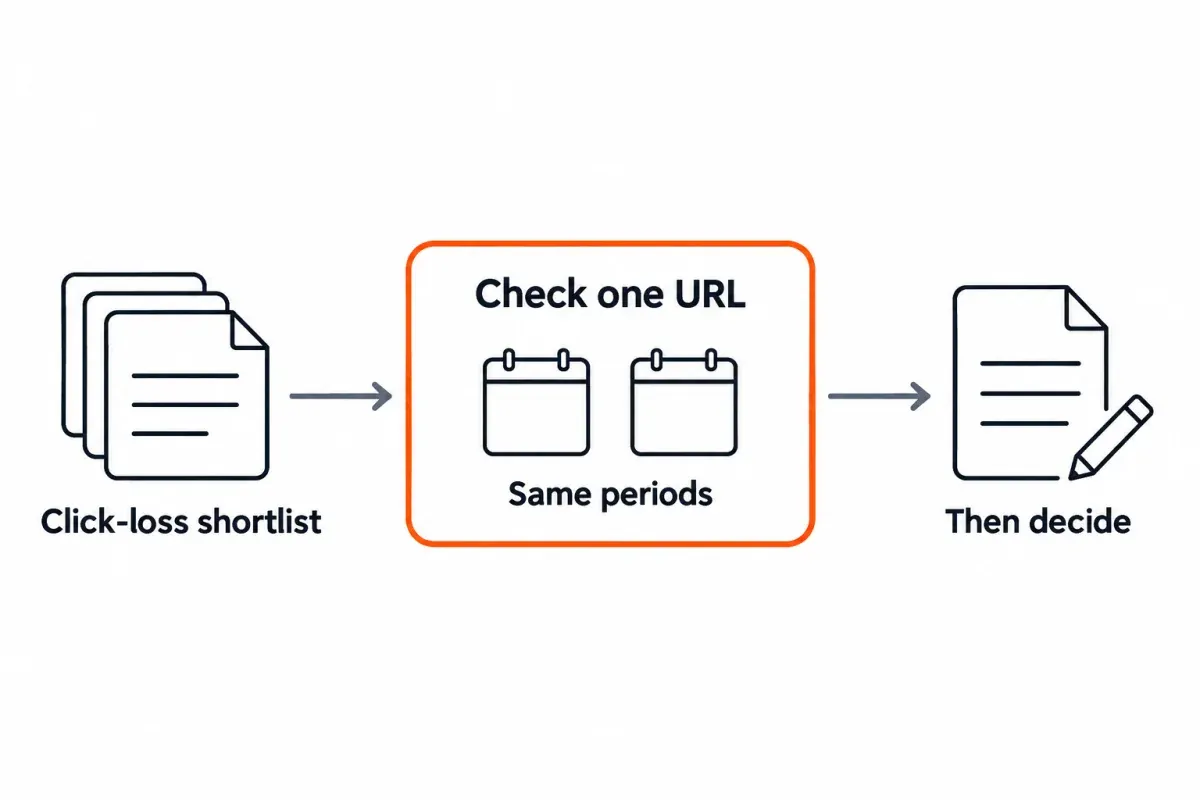
- Start with SEO Heatmap's MCP server for your own Search Console page-click questions. It returns prepared trends, period comparisons, losing-page lists and section rollups. SEO Heatmap is our product; one property and MCP access are included in its free plan.
- Choose a different server for fields SEO Heatmap does not supply. For queries, impressions, CTR and average position, connect to Search Analytics. You'll need a separate data source for SERPs, backlinks and competitor research.
- Check the first answer before changing a page. Confirm the property, last sync, complete date ranges, tool name and one URL's clicks in Search Console.
What is an SEO MCP server?
An SEO MCP server exposes SEO data or actions as tools an AI assistant can call.1 The letters MCP mean Model Context Protocol. The client finds the server's tools and calls one to answer the question. The result comes back to the assistant. The official MCP architecture describes this client-server exchange.
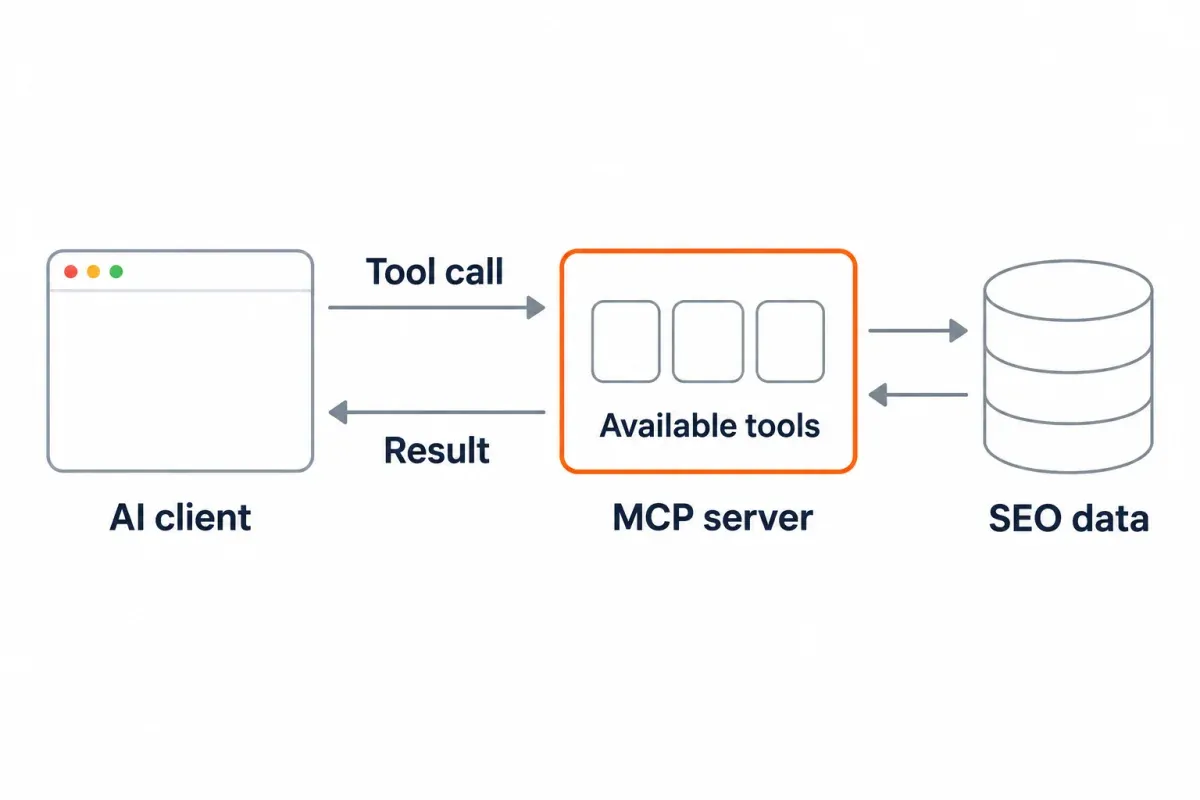
The server determines the answerable questions. A server connected to your Search Console data might report a page's clicks. A keyword database might return search volume for a market you do not own. An audit server might crawl a URL. Calling all three “SEO MCP” does not give them the same fields.
You may also see “MCP SEO” used to mean publishing a server so others can query your business. Publishing that server is a separate job from connecting your assistant to SEO tools. Calling a server is what MCP enables. An ordinary AI search won't necessarily discover the server, and MCP alone doesn't promise you'll be cited.
Which SEO MCP server fits your question?
Work back from the decision to the question, then to the data that would answer it. For most site owners, we'd put the pages needing attention first. Their own Search Console clicks give them a better starting point than someone else's traffic estimates.
| Question | Start with | Check before relying on it |
|---|---|---|
| Which pages or folders lost Google clicks? | SEO Heatmap MCP for prepared page-level Search Console clicks | Correct property, sync time and complete comparison periods |
| Which queries lost impressions or average position? | A connector exposing Google's Search Analytics API, or Search Console itself | Query, impression and position fields; filters and search type |
| Which keywords or competitors should we research? | A market-data server such as DataForSEO MCP or SEO Review Tools MCP | Database coverage, location, freshness and API cost |
| Which URLs have crawl or on-page issues? | An MCP server with an actual crawler or audit endpoint | Whether it fetches the live page, a stored crawl or a third-party score |
| Did the lost search clicks affect sessions or conversions? | Your analytics platform, with a compatible connector if available | Matching channel, attribution settings and date range |
These are different measurements. Estimated website traffic from a third party isn't your Search Console click count. And those clicks aren't analytics sessions either. Grouping performance data by page or query is possible with Google's API. The assistant can only use those fields if its particular MCP server makes them available.
Why SEO Heatmap is the best starting point for GSC page-click analysis
For the common task of finding pages behind a click decline, SEO Heatmap is the most direct starting point we offer. It syncs available Search Console page rows into a reporting layer and prepares comparisons before the assistant asks. The assistant can request a shortlist instead of collecting raw rows for two periods, matching URLs and doing the arithmetic itself.
The product's MCP tool list maps cleanly to practical questions:
| Need | SEO Heatmap tool | What it returns |
|---|---|---|
| Confirm the right property and freshness | list_sites |
Synced sites and last-sync times |
| Get a quick site health view | get_site_overview |
Totals, changes and top movers |
| Find losing, new or rising pages | find_opportunities |
A reasoned page shortlist |
| Explain a period change | compare_periods |
Gainers, losers and pages that appeared or disappeared |
| Check whether one URL's change persists | get_page_history |
Monthly, weekly and quarterly click history |
| Find which part of the site moved | get_sections |
Folder-level click rollups |
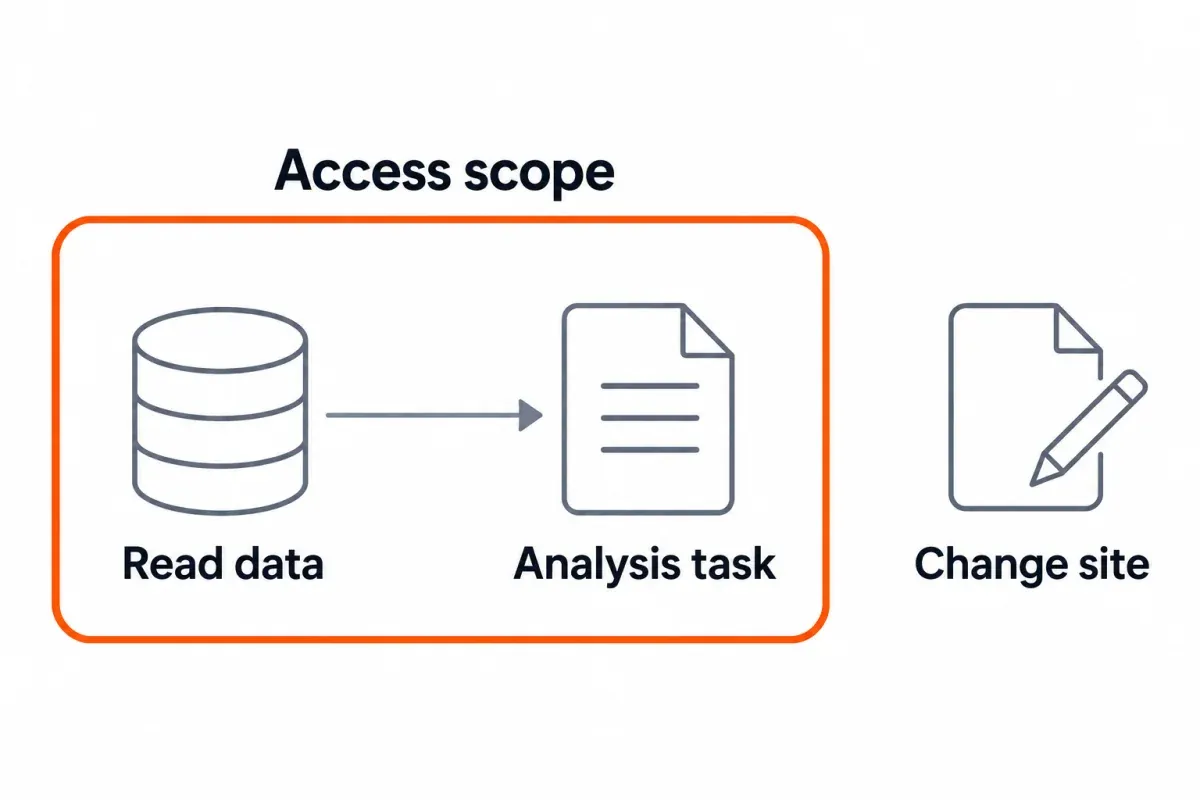
To filter and sort URLs, use find_pages. You can request a sync with refresh_site_data, though the site's refresh limit still applies. Page clicks stay in SEO Heatmap for a rolling 16 months and 16 weeks. Want the unfinished current period included? Request it explicitly, because the default comparisons leave it out. The remote connection uses the same prepared data as the heatmap, and the MCP tools cannot edit your Search Console property.
The boundary matters. Search queries, impressions, CTR, average position and URL Inspection are not fields offered by SEO Heatmap's MCP tools. Google also says its Search Analytics API returns top rows rather than guaranteeing every underlying row.2 SEO Heatmap pages through the rows Google makes available, going past the interface's 1,000-row export. Anything Google doesn't return remains unavailable. That is why the accurate promise is a faster, clearer analysis of available page clicks, not every possible GSC question.
A page-loss workflow you can copy
Suppose a page had 120 clicks in July and 80 in August. These are example numbers, rather than results measured in SEO Heatmap. The page lost 40 clicks, or 33.3% of July's total. That tells you where to investigate; it does not establish whether rankings, demand or search appearance changed.3
- Call
list_sites. Select the exact property and note its last sync. A Domain property and a URL-prefix property can cover different URLs.4 - Ask
compare_periodsfor July versus August, using complete months. Look at the losing URLs and their absolute changes. - Use
get_page_historyon a priority URL to see whether the decline began earlier. Useget_sectionsif several losses sit in one folder. - Check one URL's clicks for those same periods in Search Console. If the drop is real, the next check is queries and impressions there, or through a raw GSC connection. Use what you find to decide if the page needs new content, a technical investigation or no change.
Copy and replace the property and dates:
Use SEO Heatmap to list my sites and their last sync times. For sc-domain:example.com, compare page clicks in July and August 2026. Show the five largest absolute losses, both click totals, the change and the tool used. Then show the top losing section. Do not infer query or ranking changes from clicks alone.If the earlier period has zero clicks, skip the percentage calculation. “Newly gained clicks” is clearer than dividing by zero.
Connect and verify your first SEO MCP answer
SEO Heatmap is a remote MCP server. There's no local server to keep running, and no API key to paste into a configuration file. Check the current setup instructions for your client if its connector menus have changed.
- Sign in to SEO Heatmap through the Google account that has access to the Search Console property you want. Sync the intended site and confirm that a familiar page appears in the heatmap.
- The remote MCP address to enter in your AI client's new connector is
https://www.getseoheatmap.com/mcp. The/mcp-serverpage is the instructions page;/mcpis the endpoint. - Sign in to SEO Heatmap to authorize the new connection. Start with
list_sites, before you ask for any report. - Run the example prompt above, then check a single returned URL against Search Console.
For the detailed raw-GSC comparison, read our Google Search Console MCP guide.
First-answer check: Write down the tool name, exact property ID, last sync, two date ranges, search type and one URL's clicks. Match those settings in Search Console. If they differ, align the property, filters and periods before concluding that either source is wrong. A connected badge only proves that the client reached a server.
When to add another SEO MCP server
A question that needs different data calls for another connection. A lost-click page can leave you asking Which searches stopped showing this page? Google's Search Analytics API supports query, page, country and device grouping, along with clicks, impressions, CTR and average position.2 Make sure your chosen GSC server provides the dimensions and filters that question requires.
For instance, first get the five largest page-click losses from SEO Heatmap. Then ask a raw Search Analytics connector for queries on one selected page across the same complete periods. This keeps the assistant's second request narrow and makes the two outputs easier to compare. Our GSC MCP comparison covers raw-server choices and URL Inspection limits in more detail.
For research on sites you do not own, DataForSEO's MCP documents SERP, keyword, on-page and backlink API families.5 SEO Review Tools' server documents keyword, SERP, backlink and traffic endpoints.6 Their own pages describe credentials and setup; check current plan terms and tool lists before using either. Neither tool's label alone means it can read your private Search Console property.
A five-question checklist before you connect any server
Use this short evaluation before granting access or spending time on setup:
- What is the source? Is it drawing on your verified property or an external index, or is the answer from a live crawl or an estimate?
- Which fields and actions are exposed? Read the actual tool list. The word SEO won't tell you if a server has query data, rankings or tools that edit the site.
- What can it access or change? Look through permissions and tools that can write changes. Limit permissions to what's required for your task.
- How current and complete is the data? The last sync, reporting dates and any sampling or row limits tell you how much data you're working with. Google does not promise every Search Analytics row.2
- What will setup and use cost? Local or remote? Check how you authenticate and what the client plan and API usage allow before committing time to setup.
Frequently asked questions
Which SEO MCP server is a good first connection?
Start with SEO Heatmap if you need to find pages or sections losing clicks in your own Search Console property. It prepares page trends and comparisons for the assistant. Choose a server with other data sources when your question needs queries, backlinks, crawl results or competitor keywords.
What can I ask SEO Heatmap's MCP server after connecting?
It can compare complete periods, find pages that lost clicks and return click history for a URL. You could request last month's five largest page-click declines, then ask for the folder that lost the most. Confirm the property behind that shortlist and when it synced before making a decision.
Why does SEO Heatmap return no sites to my AI assistant?
A missing list can mean the account doesn't have Search Console access, or the first sync hasn't finished. Use the Google account with property access to sign in and finish syncing in SEO Heatmap. Then try list_sites again. Check the connection address too: it should end in /mcp, not point to the setup guide.
Why do MCP and Search Console page-click totals differ?
Check the property ID and last sync first, then match the dates, filters and search type. A Domain property and a URL-prefix property can cover different URLs, while an incomplete period can shift totals. Before calling it a data problem, take one page and compare a complete period with matching dates in both tools.
Does SEO Heatmap show the keywords or ranking changes behind a click drop?
No. Its MCP tools report page clicks, but do not expose queries, impressions, CTR or average position. Use the page shortlist to inspect those fields in Search Console or through a raw Search Analytics connector. A click decline alone does not prove a ranking decline.
Does competitor research require a different SEO MCP server?
Yes. For sites you don't own, look elsewhere for SERP, keyword and backlink data. SEO Heatmap draws its click figures from your connected Search Console property. Find out where that server's estimates come from, what fields and geographies they cover, and the API cost before comparing them with your data.
Does publishing an MCP server guarantee AI citations for my site?
No. A compatible client can call its tools through MCP. Publishing the server alone doesn't guarantee that an assistant finds it, uses it or cites your pages. Measure AI citations directly as a separate part of your visibility.
How can I verify an SEO MCP recommendation before editing a page?
Ask the assistant to name its source tool, property, last sync time, fields and complete comparison periods. Check the click change for one returned URL in Search Console using the same settings. If it recommends a ranking fix from page clicks alone, get query and position evidence first.
If your next question is which pages or sections lost Google clicks, connect SEO Heatmap. Its prepared Search Console comparisons give your AI assistant a shortlist you can verify and act on.
Sources (6)
SEO Heatmap Knowledge relies on primary sources: Google's documentation, web standards, peer-reviewed research, and vendors' own pages for their pricing and features. Our editorial standards
- Model Context Protocol. “Architecture overview.”
- Google Search Console. “Search Analytics: query.”
- Google Search Central. “Debugging drops in Google Search traffic.”
- Google Search Console Help. “Add a website or platform property to Search Console.”
- DataForSEO. “DataForSEO Model Context Protocol.”
- SEO Review Tools. “SEO Review Tools API - MCP server.”

