

Summarize this article with AI
You open Google Search Console and see 1,770 clicks for the week. You open Google Analytics 4 for the same days and the organic number is somewhere else, higher or lower, and the client wants to know why. That gap is the real question behind Google Search Console vs Google Analytics. Knowing they won't match doesn't help much until you can say which cause applies to your site.
This guide puts the pieces together. You'll get a short side-by-side of what each tool actually counts, a cause table with direction and a check for every reason the numbers drift apart, and a 15-minute reconciliation procedure for your own site. There's also a worked example from one of my sites, where GA4 reads 12% above Search Console for the whole site and 11% to 16% below it on each of its top three posts. Then a question-to-metric table, so you know which tool goes in a client report.
Let's start with the short answer.
Google Search Console vs Google Analytics: a quick answer
The quick answer? No. Google Search Console and Google Analytics do different jobs, and swapping one in for the other won't work. Different data pipes feed each one. That's where the mismatches begin. Think of Search Console (GSC) as the pre-click view. Impressions, clicks, click-through rate, average position, the queries behind each one, all from before a visitor hits your site. Google's own search logs feed those numbers. There's a technical layer too. GSC flags crawl errors, surfaces indexing coverage in the Page indexing report, and shows other things Googlebot ran into on your site.
GA4 starts where GSC ends. Once the visitor's on your site, it tracks sessions, users, engagement time, and key events (used to be called conversions). The data comes from a JavaScript tag firing in the visitor's browser, across traffic from every channel. On top of that user behavior, it adds audience and demographics reports, which Search Console has no equivalent for.
Here's the split, side by side.
| Search Console | Google Analytics 4 | |
|---|---|---|
| Data source | Google's search logs for your verified property | A JavaScript tag you install on your pages |
| What it measures | How your site shows and gets clicked on in Google Search | What visitors do once they're on your site |
| Traffic scope | Google only: web, image, video and News-tab results in Search, plus separate reports for Discover and the Google News app and site | Every channel: organic, direct, referral, paid, social, email |
| Main metrics | Impressions, clicks, CTR, average position, queries | Sessions, users, engagement time, events, key events |
| Time zone | Pacific Time, not configurable | Set per property |
| How far back | The last 16 months in Performance | Standard reports aren't cut by the retention setting; explorations keep 2 or 14 months on standard properties |
| Setup | Verify a domain or URL-prefix property; no tracking code on the website | Create a Google Analytics account, then install the GA4 tag through Google Tag Manager or directly in the site code |
| Needs JavaScript or consent? | No | Yes: the tag runs in the browser, and where a consent banner asks first, visitors can decline it |
The closest comparable pair of numbers from these two tools is Search Console clicks and GA4 sessions from Google organic. Google's own documentation says these two won't match, and the rest of this article is about why.1
First thing to check if your numbers look wildly off: you're probably not comparing Google with Google. "Organic Search" in GA4 is a bucket. Bing, DuckDuckGo, Yahoo and the rest get mixed in with Google. Search Console counts only Google. Step one, before anything else? Pop a filter on GA4 so session source and medium read google / organic.
Key takeaways
- GSC measures what Google Search does with your pages. GA4's job is on-site behavior, no matter which channel brought the visitor. Two tools, two questions.
- Clicks in Search Console against GA4 sessions filtered to
google / organic? That's the closest apples-to-apples pair, and even those won't line up perfectly. - There's no official "normal" gap number from Google. Your site's own ratio, watched over time, is the baseline.
- A stable gap? Not a problem. One that suddenly widens is the thing worth chasing down.
Search Console clicks vs sessions: what each one counts
The units don't line up. That's where every gap begins. What GSC calls a click isn't what GA4 counts as a session. Each one logs its event at a different moment, in a different system.
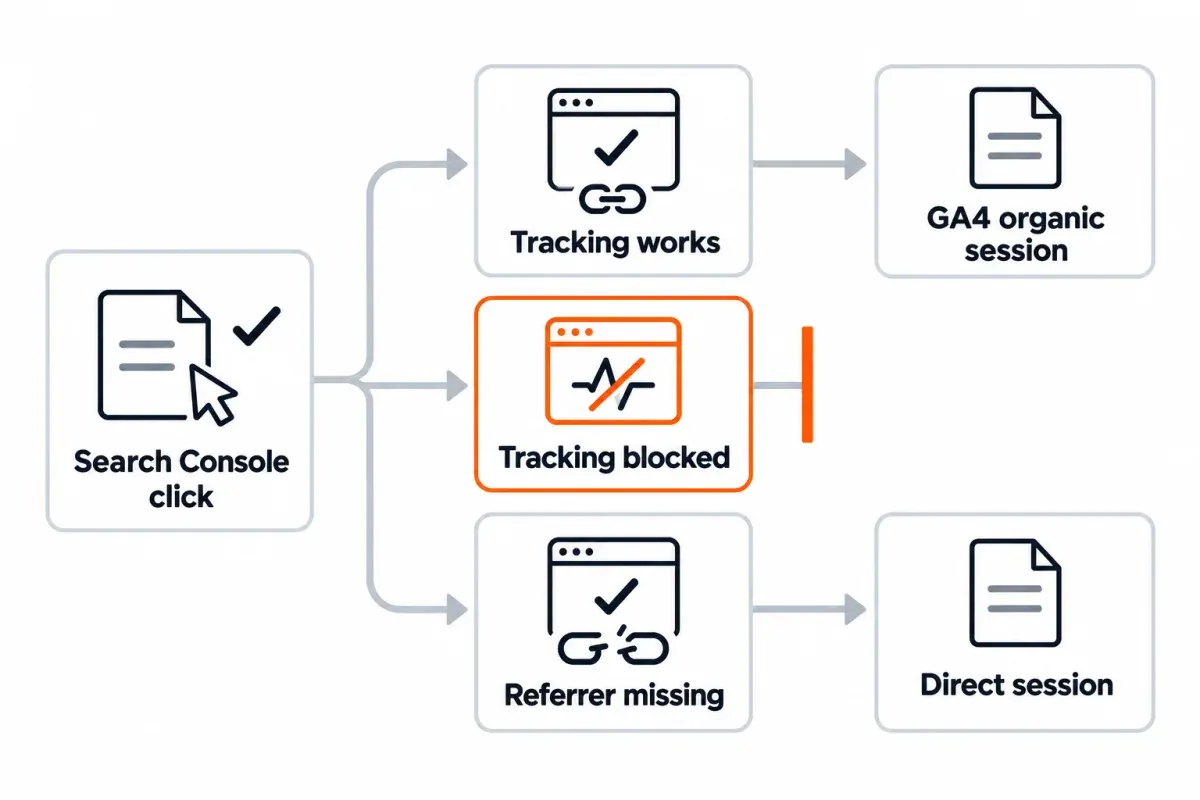
In Search Console, a click is logged when someone picks your result in Google Search and goes to a page outside Google Search.2 What if someone clicks, bounces back, then clicks the same result again? One click, per Google's help docs. Whichever canonical Google picked for the page gets the credit, even if redirects or alternate versions sent the visitor somewhere else.
GA4 starts the clock when the tag fires on a page. That's the session_start event. 30 minutes of inactivity ends it by default.3 Source and medium come from how the visit arrived. The browser's referrer, a UTM tag on the URL, or sometimes nothing at all.
A click in GSC only becomes a session in GA4 if four things cooperate. The page has to load. The tag has to fire. Analytics can't be blocked or refused. And the referrer has to reach GA4 intact. Any one of these can lose the click along the way:
- Click on a Google result.
- Page loads in the browser.
- The GA4 tag loads and runs.
- Consent allows analytics storage.
- The referrer reaches GA4 so it can file the session under
google / organic.
Two of the pages that rank for this query say a visitor who clicks the same result several times produces several clicks. Google's own help page says one.2 Repeat clicks aren't a cause of the gap, so don't spend time on them.
Trend shape, that's what should agree. Clicks going up for the month while GA4 organic sessions sit flat or drift down? Something shifted in how you measure, not in demand.
Why Search Console and GA4 numbers differ
Google itself publishes a list of reasons and openly admits that some can't be fully debugged. It gives no number for when a gap counts as "big," so your own site's ratio over time has to be the baseline. Here's the frame. Half of your website's performance lives in GSC. The other half shows up in GA4. The space between them is mostly a measurement story. The baseline comes together in the next section. Use the table below to work out which of those causes apply to your site.
It's a diagnostic chart. Find the symptom row and run the check in column three.
| Cause | Which number comes out higher | How to check | Can you fix it? |
|---|---|---|---|
| GA4's Organic Search channel includes Bing, DuckDuckGo, Yahoo and other engines | GA4 higher | Filter GA4 to session source / medium google / organic and compare that |
Yes, change the filter |
| Consent banner opt-outs block the GA4 tag or its storage | Search Console higher, wider on audiences shown a banner | Compare the ratio by country on both sides | Partly, consent is the visitor's choice |
| Ad blockers, tracking protection or JavaScript off keep the tag from running | Search Console higher | No direct measurement; a stable ratio over time is the tell | No |
| GA4 tag missing, broken or loading late on some templates; visitors leaving before it fires | Search Console higher on those pages | Page-level ratio outliers, then Tag Assistant or View Source | Yes |
Lost or stripped referrer, so a Google visit lands in Direct instead of google / organic |
GA4 google / organic lower, Direct higher |
Watch Direct sessions landing on pages that only get search traffic | Partly |
| Time zone: Search Console runs on Pacific Time, GA4 on the property's time zone | Single days disagree; weeks and months mostly agree | Compare weekly or monthly, not day by day | No need |
| Data freshness: the last few days are incomplete in both tools | Recent days look low | End the range three or more days ago | Yes, pick a closed range |
| Search type: Performance defaults to Web; Discover and Google News have their own reports | Depends on what you compare | Match the search type to what you're counting | Yes |
| Canonical vs landing URL: Search Console credits the canonical, GA4 records the URL that loaded | Page-level mismatches, totals less affected | Normalize URLs (strip parameters, follow redirects) before joining | Yes |
| Non-HTML files like PDFs: Search Console counts clicks to them, GA4 records nothing unless they're measured | Search Console higher for those URLs | Filter PDFs out of the Search Console side | Yes |
| Bots: GA4 excludes known bot traffic; Search Console doesn't necessarily filter it | Search Console higher | Can't be isolated in standard reports | No |
| Report choice: User acquisition counts users by first user source; Traffic acquisition counts sessions by session source | User acquisition can sit above Search Console | Use Traffic acquisition or Landing page with session-scoped dimensions | Yes |
| "(not set)" page rows in GA4: visits GA4 can't tie to a page | GA4 page rows add up to less than the total | Look for a "(not set)" row at the top of the page or landing page table | Partly, prefer session-scoped reports |
| Anonymized queries: Search Console leaves rare queries out of the query table for privacy | Query rows don't add to the page or site total | Compare at page or site level, not query | No, by design |
A couple of those checks are tricky to picture without seeing them in action, so they get walked through below.
The Organic Search channel isn't the same as Google organic
GA4's default channel group puts sessions from many search engines into a single "Organic Search" bucket. Bing, DuckDuckGo, Yahoo and the other search engines GA4 recognizes all land in the same channel as Google. Search Console only counts Google. Grab GA4's channel-level organic number, park it next to Search Console clicks, and GA4 has a head start from every other engine, a part of the gap that has nothing to do with tracking.
The fix is one filter. Go to Traffic acquisition under Acquisition (or the Landing page report under Engagement). Add a filter where session source is google and session medium is organic. Google's own Looker Studio template for Search Console and GA4 does the same thing underneath. Compare that filtered number with Search Console clicks. The full channel total doesn't belong next to GSC.
Why consent banners and blockers widen the gap in certain countries
Search Console logs the click on Google's side, so what the visitor does after doesn't matter. The click counts. GA4 only records a full session when the tag runs and storage is allowed. Two things snap the chain. A visitor saying no to analytics cookies in your consent banner is one. The other? Anything that keeps the tag from loading at all: ad blockers, tracking protection, JavaScript settings.
That's where country-by-country variation comes from. In places where the banner has to ask first (EU and UK visitors, usually), a share will say no, and the sessions-per-click ratio from those countries runs lower. Quickest check? Pull the ratio by country on both sides. Country is a dimension in both tools. On sites using Consent Mode with a property that qualifies, GA4 can model part of that missing activity through behavioral estimates, which narrows the gap in its reports.
Visits that lose their referrer
Some Google visits never reach google / organic at all. No referrer coming through from the browser or app in question? GA4 can't tell the visit came from Google Search. It files the session under Direct, or sometimes under (not set). GSC still logs the click, because that happens before the visitor leaves the search results page.
The usual tell is Direct sessions landing on deep, old pages that have no other way in except organic search. A blog archive catching Direct hits every day with no email campaign and no social push? Many of those are probably lost-referrer visits from search. Not much you can do about them on your end for most cases. Name the pattern in your report, so a jump in Direct doesn't get mistaken for a mystery campaign nobody ran.
How to reconcile Search Console and GA4 on your own site
15 minutes a month, and the gap stops feeling mysterious. None of the pages that rank for this topic walk through the full procedure, so here it is.
- Choose a closed date range that ends at least three days ago. A full calendar month works best. Time-zone issues only touch the edges, and by then both tools have the complete data. Set identical dates on both sides.
- Over in Search Console, open Performance, then Search results. Keep the search type on Web. Match the date range to the closed window you chose earlier. Write down total clicks for the site. Flip to the Pages tab next and jot down clicks for each page. The UI caps at 1,000 rows. If you need more? Our bulk export guide walks through the workarounds.
- GA4 side: Reports, then Acquisition, then Traffic acquisition. Filter session source / medium so it's exactly
google / organic. Note sessions. Then open the Landing page report, keep the same filter, and write down sessions by landing page. - Whatever other filter you add, country, device, anything else, apply it to both sides. Google's docs recommend the same filter for both data sources.
- Tidy the two page lists before joining them. GSC gives you the canonical URL. GA4 gives you whatever actually loaded, query strings and all, after any redirects. Drop the query parameters and match on path.
- For each page, GA4 sessions divided by Search Console clicks. Run the same calculation at site level. That site-level number is your baseline.
- Any page sitting far below the site baseline? Walk the cause table. Picture a site average of 0.8, with one page clocking in at 0.3. That's where to look first. Likely suspects: a broken tag, a redirect eating the referrer, or a consent issue. Pages near the site ratio can wait.
A four-column worksheet does the job:
| Page path | Search Console clicks | GA4 sessions (google / organic) |
Sessions per click |
|---|
Drop in =C2/B2 and fill it down the sessions-per-click column. Sort ascending. The first 10 rows are where you start digging. Skip pages with only a handful of clicks, since one visit more or less swings their ratio.
For the Search Console side only, SEO Heatmap shows each page's clicks by month across 16 months, by week across 16 weeks, or by quarter, with a Sheets or Excel export that isn't capped at 1,000 rows. It can hand you column B of the worksheet in a few clicks. It doesn't connect to GA4, so column C still comes from Google Analytics.
Link Search Console to GA4 for a built-in landing-page view
The link between the two tools lives in GA4's Admin, under Product links and Search Console links. You need the Editor role on the GA4 property and verified ownership of the Search Console property.4 One catch trips people up: the Search Console collection of reports is unpublished by default, so publish it from the Library before you go looking for the reports in the left nav.
What you get are two reports. The first, Google Organic Search Queries, shows queries with Search Console metrics. The second, Google Organic Search Traffic, lines up Search Console and GA4 metrics for each landing page. For a quick page-level comparison, that second one is the fastest option in the stack.
What it doesn't do is remove the gap. The Search Console columns are still Search Console data (canonical URLs, anonymized queries left out), arriving about 48 hours after Search Console collects it, and the GA4 columns still depend on the tag. You see both numbers on one screen; they still won't match.
For per-day joins at any real scale, Google recommends the Search Console bulk export plus the GA4 BigQuery export, and joining in BigQuery. That's a separate build, not a few clicks in the UI, so plan it as a project rather than a quick setup.
A real example: GA4 higher for the site, lower for its top pages
To make the gap concrete, here's one week from one of my sites, compared the way most people compare the two tools the first time: Search Console's Performance report against the GA4 report that opens with google / organic in it. The dates and numbers come straight from both tools, with the site kept anonymous.
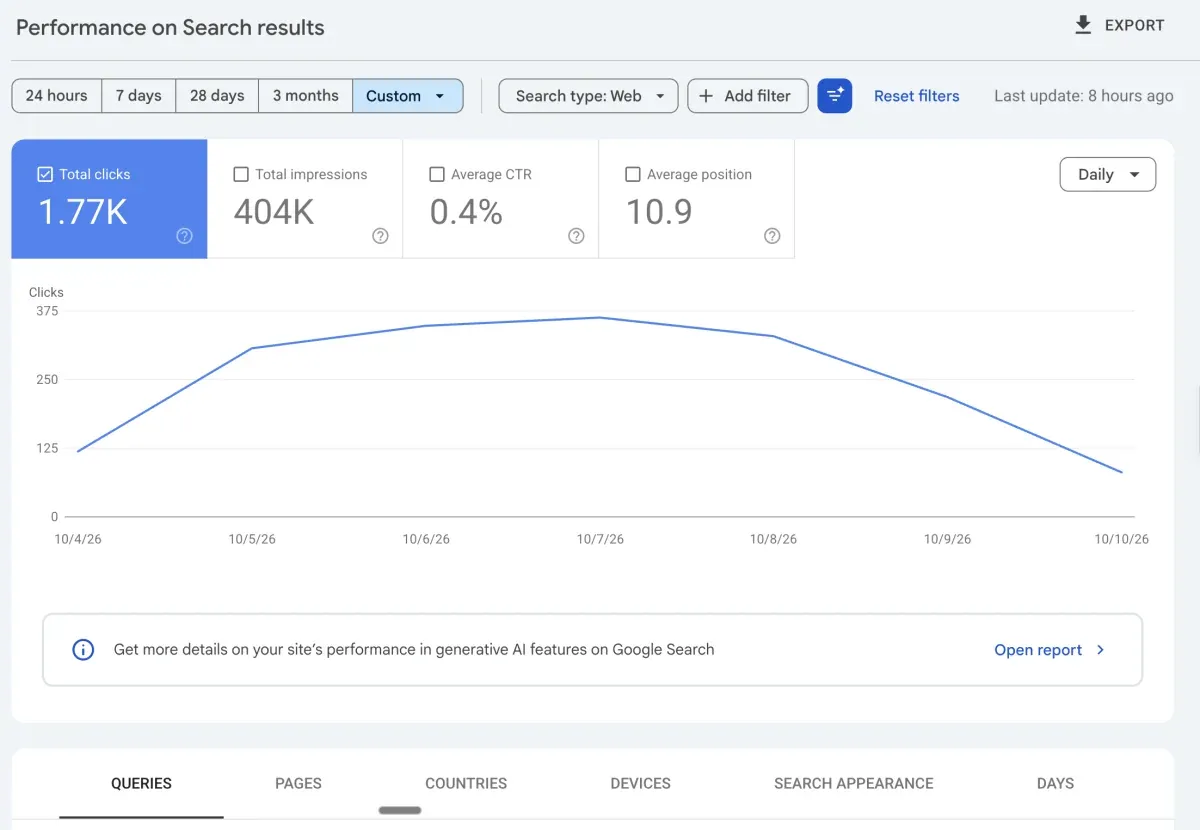
Setup: Oct 4 through Oct 10, 2026, a 7-day window with the same custom range on both tools. On the Search Console side: Performance > Search results, Search type Web. Total clicks come in at 1.77K (around 1,770), impressions at 404K, average CTR 0.4%, average position 10.9. In GA4, Reports > Acquisition > User acquisition, with the table filtered to first user source / medium google / organic: total users 1,978. Google organic was 18.62% of the property's total users that week.
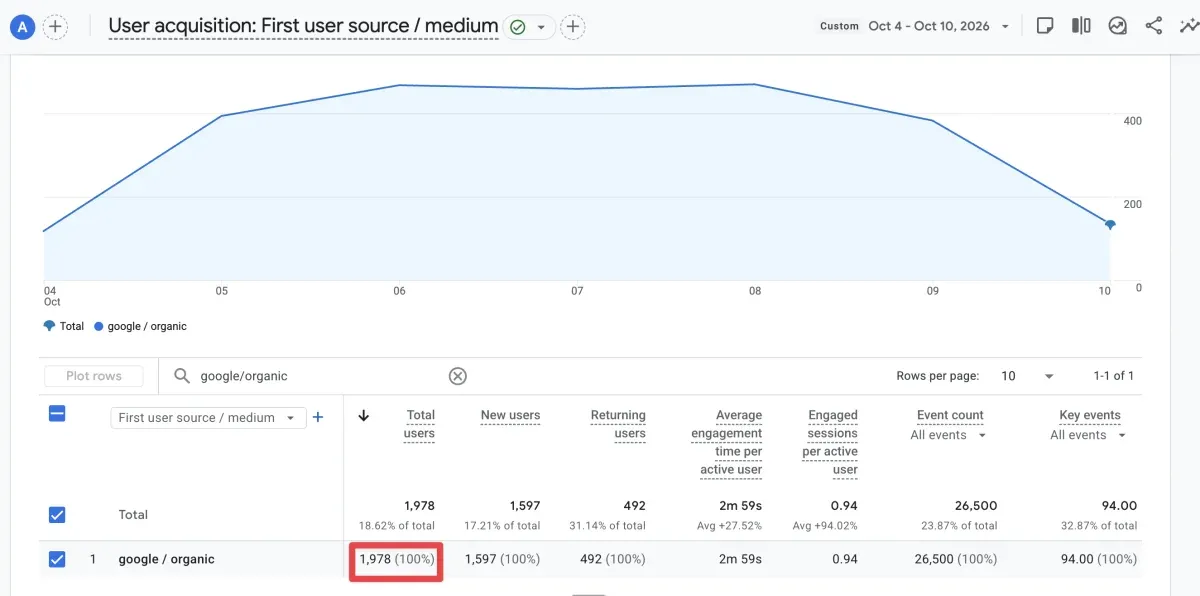
The first surprise: GA4 reads about 12% higher than Search Console for the site. That doesn't point to broken tracking. This report answers a different question.
User acquisition counts users grouped by first user source, so returning users whose first visit came from Google organic (492 that week) stay credited to Google organic even if they came back another way. New users (1,597) are about 90% of the Search Console clicks, which is close to the page-level ratio in the table below. And no, 1,597 plus 492 doesn't add up to 1,978: someone who first visits on Monday and comes back on Thursday counts as both new and returning in the same week.
Now the per-page view, with the same User acquisition report plus a page dimension as the secondary dimension, same filter, metric Total users:
| Page | Search Console clicks | GA4 users (first user source google / organic) |
GA4 ÷ Search Console |
|---|---|---|---|
| Article 1 | 149 | 133 | 0.89 |
| Article 2 | 61 | 51 | 0.84 |
| Article 3 | 44 | 39 | 0.89 |
| Three together | 254 | 223 | 0.88 |
GA4 lands 11% to 16% under Search Console on all three pages. The ratio stays tight, 0.84 to 0.89. A ratio that steady points to losses across the whole site. Ad blockers, tracking protection, visitors leaving before the tag fires, lost referrers. Not one bad tag on one page. Consent isn't the culprit here. The banner on this site is notice-only ("by using this site you agree…" with a single "Got it" button), so GA4 fires no matter what the visitor does with it.
The last piece of the puzzle is the "(not set)" row. In the same GA4 report, 258 users sit on a "(not set)" page row, 13% of the 1,978: GA4 couldn't tie them to a page. "(not set)" is GA4's placeholder for a value it never received, and for the landing page, GA4's help names one case: a session with no page_view event.5
Those users count toward the site total but toward no page. Search Console has no equivalent: every click belongs to a URL.
So the direction of the gap flips with the level you look at: GA4 above Search Console for the site, below it for each of the top three posts. That is exactly why the procedure says to compare like with like (session source / medium, sessions, Landing page report) and to track your own ratio over time. The daily chart in each tool has the same shape across the week, low at both ends and highest from Oct 6 to 8: the trend agrees even when the totals don't.
What I'm not claiming here: the GA4 property's time zone, whether Search Console is linked to GA4, and anything about sessions on this site, because none of those were part of the pull.
Which number to report: Search Console or Google Analytics?
Match the tool to the question, and the whole Google Search Console vs Google Analytics argument fades. Every metric should come from the tool that measures it. Label it with the source and the definition. And on a client slide? Never mash a Search Console number together with a GA4 number into one ratio unless you flag the gap on that same slide.
| Question | Metric | Tool |
|---|---|---|
| Is Google Search sending more visitors? | Clicks, Search type Web | Search Console |
| Which queries bring them? | Queries (rare ones are left out) | Search Console |
| Did rankings or the snippet change? | Impressions, CTR, average position | Search Console |
| Do visitors from Google convert? | Sessions and key events, google / organic |
GA4 |
| How much organic traffic from all search engines? | Organic Search channel | GA4 |
| Who visits, by device, country and demographic? | User attributes and Tech reports | GA4 |
| Is the trend real? | Both; they should move in the same direction | Both |
On monthly reports, let each tool own its own section, with its own definitions. Our monthly SEO report template and our SEO dashboard guide both pull from Search Console and leave on-site behavior to analytics. Keeping those two conversations separate means you aren't re-explaining the gap every single month.
A side note worth keeping in mind: Ahrefs vs Search Console is a separate conversation, since Ahrefs reports a modeled estimate while Search Console reports counted clicks.
Rule of thumb for when to dig in: a stable gap between Search Console clicks and GA4 organic sessions is fine. Healthy, even. What's worth a look is a gap that widens fast, say sessions-per-click sliding from 0.85 to 0.6 in a week. First places to check? A recent tag change, a fresh consent banner, a redirect eating the referrer, or tracking that got moved behind a tag manager and now loads late.
Running the reconciliation page by page against GA4? SEO Heatmap handles the Search Console side for you. You get clicks per page across 16 months, filters for growing and falling pages, plus a Sheets or Excel export that ignores the 1,000-row cap. It's free for one Search Console property. GA4 numbers stay in Google Analytics, which is where they belong.
Frequently asked questions
Does Google Search Console do the same job as Google Analytics?
No. Search Console handles the pre-click side: how your site shows up in Google Search. Pulled straight from Google's search logs: impressions, clicks, CTR, average position, queries. GA4 covers after the click. You get sessions, users, engagement, key events. A JavaScript tag in the browser feeds it. Different moments, different things measured. Neither one swaps in for the other.
Why are GA4 organic sessions higher than Search Console clicks?
Most of the time it's a comparison setup problem. You're reading GA4's "Organic Search" channel against Search Console. That bucket mixes Google in with Bing, DuckDuckGo, Yahoo and the rest. Search Console sticks to Google only. Set GA4's filter to session source and medium google / organic, then compare again. Still higher after that filter? Make sure you're reading Traffic acquisition and not User acquisition. User acquisition keeps crediting returning users to Google organic even after they come back through other channels.
What makes GA4 organic sessions come in under Search Console clicks?
GA4 only records a session if the page loads, the tag fires, and the visitor hasn't blocked or declined analytics. Then add ad blockers, tracking protection, consent opt-outs, and bounces so fast the tag never gets a chance to run. All of those pull GA4 below Search Console. When the referrer gets stripped, some Google visits land in Direct or (not set) rather than google / organic. That pulls the organic total down.
Search Console or Google Analytics, which one is more accurate?
Both tools are accurate for what each one actually measures. But the two aren't measuring the same thing. Search Console is the source of truth for how your site performs in Google Search. For visitor behavior on your site, from any channel, GA4 is the source of truth. Let the question pick the tool. Not the other way around.
How do you link Search Console to GA4?
Open GA4's Admin, go to Product links, then Search Console links, and connect the Search Console property from there. You need the Editor role on the GA4 property and verified ownership of the Search Console property. By default the Search Console collection of reports is unpublished. Publish it from the Library, or those reports won't show up in the left nav.
Do you need both Google Search Console and Google Analytics running?
For most sites, yes. On the Search side, Search Console covers queries, impressions, clicks, position, and indexing issues on your pages. GA4 takes over once the visitor arrives, with engagement, key events, and revenue. Put the two together and you've got the whole search-to-conversion path. Keep them apart and each one shows you half of it.
Can Google Analytics be used for SEO?
Partly. Once visitors arrive, GA4 shows whether the organic ones engage, convert and come back. That's half of SEO performance right there. The other half it can't see. What Google actually surfaced to searchers, your rankings by query, CTR by position, which pages Google chose to skip. For those questions, Search Console is the right tool. In practice, serious SEO work leans on both.
Does linking Search Console to GA4 fix the mismatch?
No. The link gives you one extra report. Search Console clicks and impressions sit next to GA4 metrics on each landing page, which makes the comparison quicker. The Search Console columns are still Search Console data, though: canonical URLs, missing anonymized queries. And the GA4 columns still rely on the tag firing. You get both numbers on one screen, and the gap stays.
Comparing the two tools page by page? SEO Heatmap gives you the Search Console half in one grid: every page's clicks by month, week or quarter, ready to export next to your GA4 numbers. It's free for one Search Console property.
Sources (5)
SEO Heatmap Knowledge relies on primary sources: Google's documentation, web standards, peer-reviewed research, and vendors' own pages for their pricing and features. Our editorial standards
- Google Search Central. “Using Search Console and Google Analytics data for SEO.”
- Google Search Central. “What are impressions, position, and clicks?”
- Google Analytics Help. “Session.”
- Google Analytics Help. “Connect Search Console to Google Analytics.”
- Google Analytics Help. “What the value (not set) means in your reports.”

