

Summarize this article with AI
The audit report is just one thing Ryte did for you. The Ryte alternative that nails your crawl may have nothing for the writers, and the one with the best editor won't tell you which redirects broke last week. Which pieces have to move depends on who on the team opens Ryte and what they do once they're in.
Here's the lay of the land: Ryte still sells by quote, now under Semrush, and Semrush itself is an Adobe property. Want a crawl you can configure? Trial Screaming Frog. Need a hosted audit, try Seobility or Semrush Site Audit. Surfer handles the content editor side. For your own Google click trends, Search Console paired with SEO Heatmap does the job. What follows: the reasoning per pick, current US prices, one trial task per tool, and a migration checklist so you don't lose your baseline. Every claim is checked against the vendor's own pages.
What happened to Ryte: Semrush, Site Intelligence and Adobe
Ryte is still online as of October 17, 2026. The home page, the help center and the login all answer, and the pricing page offers an Enterprise license and a Partner license by quote. There is no end-of-life notice, no sign-up stop and no forced-migration page. Development looks slower, though: the last product announcement was the Shadow DOM crawler in April 2025, and the site footer still reads "Copyright © 2024 Ryte GmbH".
Ryte became part of Semrush in 2024, according to Semrush's own company update.1 The 10-K puts the closing at July 11, 2024, with total consideration of about $10.5 million.
Semrush then built the crawler into something larger: Semrush Enterprise Site Intelligence became generally available on October 7, 2025, "built on Ryte's proven crawling foundation and fully integrated into Semrush Enterprise".2 It covers large-scale crawling, daily and on-demand audits, segmentation, accessibility checks, Search Console and GA4 integrations, and since February 2026 log-file Bot Analytics. Semrush's old landing page for the Ryte "enterprise crawler" now redirects to Site Intelligence.
Adobe closed its acquisition of Semrush on April 28, 2026, at $12.00 per share. Semrush is now a wholly owned Adobe subsidiary, and its NYSE listing ended before the market opened that day. Semrush's customer FAQ said there would be "no immediate changes to your current services, agreements, or points of contact" and said nothing about Ryte. So on the day you read this, Ryte sits inside Semrush, which sits inside Adobe, and nothing public has moved Ryte customers off their contracts.
What this means for your buying decision: an acquisition doesn't, by itself, tell you Ryte has shut down or that your team needs to move. Your contract and account notices are where to look for changes that apply to you. Per Ryte's help center, your contract term lives under Accounts > Subscriptions. Only the account owner can cancel. The real question? Whether the roadmap, and what the product does for you day in and day out, still match the work.
Which Ryte alternative fits your workflow?
The right Ryte alternative depends on the task you do with it today. A crawler won't do what the content editor does. And neither one replaces a Search Console dashboard. Figure out which jobs have to keep running first. Shop against that list, not against feature grids.
| What your team uses Ryte for | Shortlist | What to check before switching |
|---|---|---|
| Configurable technical crawls | Screaming Frog SEO Spider | How you'll run and schedule it, and the size of your site |
| Hosted recurring audits | Seobility | Crawl frequency, page limits and issue exports |
| Technical audits plus keyword, backlink and competitor research | Semrush | Project, crawl and user limits for your plan |
| Always-on monitoring at scale | Semrush Enterprise Site Intelligence, Conductor Monitoring, Lumar, Botify | How fast an alert reaches your team, and how much of the site is in scope |
| Accessibility, content quality and governance across departments | Siteimprove | Which modules your team needs and the quoted contract terms |
| Content editor and AI search scoring for writers | Surfer | Seats, documents, and whether its advice fits your editorial standards |
| Your own Google click trends per page | Google Search Console and SEO Heatmap | Whether you also need a crawler, alerts, or content editing |
SEO Heatmap is our product. It's free for one Search Console property. You connect your property and it draws clicks per page as a heatmap over the last 16 months, which is as far back as Search Console will share.
It has no crawler, no accessibility audit, no draft scoring, no rankings and no alerts. If all you want back is a Search Console-fed trends view, Search Console plus SEO Heatmap can cover it. Export any Ryte history older than 16 months first, since neither one keeps it. Running anything else through Ryte, like crawls or content optimization work? Pick a tool from the shortlist above.
What Ryte did, and which parts matter in a replacement
Ryte's older module names were Website Success, Search Success and Content Success, from a 2018 product introduction. Its documentation also discusses broader website experience work.3 These days, Ryte brands itself a Website User Experience (WUX) platform. There's a WUX Score out of 100, and a WUX Overview that ranks every issue by significance, biggest at the top. Pillars carry the work. SEO is one, with the Search Console reports now sitting under "Organic Performance". Next to it sit Quality Assurance, Web Performance, Sustainability, Accessibility and Compliance. Content is another, anchored on the Ryte Content Hub that went live in July 2024. Inside? Keyword research keyed to total search volume, competitor content breakdowns, intent-driven templates, and an AI editor whose advice you refresh after each round of edits. Names matter less than the job underneath. Don't shop by module. Shop by what the team actually opens the tool to do.
A one-page inventory, written before the first demo call, saves a lot of time. No owner, no recent decision tied to it? That report probably doesn't need to move with you.
| Current Ryte job | Report or workflow you use | Owner | How often | Must the replacement do it? |
|---|---|---|---|---|
| Technical audit | ||||
| Alerts or monitoring | ||||
| Search performance (Organic Performance) | ||||
| Content research or editing (Content Hub) | ||||
| Accessibility or quality checks | ||||
| Client or leadership reporting |
Whoever owns the report should be able to name a decision they recently made with it. Ask them for that example. It's easy to be impressed by a demo feature nobody touches once the tool is installed.
Best Ryte alternatives by job
Every shortlist here traces back to vendor documentation and pricing pages, nothing else. Narrow the field with them. Don't let them decide for you. The trial is what decides.
Screaming Frog for technical crawls you configure
Spending your Ryte day in URLs, redirects, canonicals, internal links and response codes? Start your trial with Screaming Frog SEO Spider. You run the crawl on your terms. Any URL stays there to drill into when you want it. Its free version crawls up to 500 URLs per run; a paid license removes that cap and opens more configuration options.4
A license changes the picture around scheduling too. File > Scheduling runs crawls on an interval, headless, and version 24 (May 2026) added Auto Compare Crawls: the notification email shows what changed since the last crawl.5 A Screaming Frog tutorial walks through running the Spider on a cloud VM for large crawls: 3.1 million URLs in roughly two days on an 8-vCPU instance. Keep that VM alive and you can schedule crawls off it (extra cost). No vendor hosts the thing for you. The machine stays yours to keep running, and alerts only land once a crawl wraps, never between.
Trial task: pick a representative chunk of the site, product pages work, and crawl it. Take the URL export back to your team. Can they rebuild their audit report from its canonical targets, status codes and internal-link counts? There are other ways to set up a crawler too; our Screaming Frog alternatives guide walks through them.
Seobility for hosted recurring audits
Seobility's Website Audit covers technical and on-page issues, with scheduled crawls available on paid plans.6 Don't want to babysit desktop crawls? Seobility handles the hosting. Your team gets issue reports they can act on right away. On paid plans, you pick the cadence: daily, weekly, monthly. The report lands in your inbox when the run finishes.
Basic? Free, 100 pages a run, triggered by hand, with a cooldown between crawls. From there, Premium handles 25,000 pages per crawl and Agency goes up to 100,000. Pay yearly and 20% comes off the price. There's a 14-day free trial on Premium features, though it does ask for a payment method up front.
Trial task: Pull together 20 URLs where you already know what's wrong. Among them should be a page you're keeping out of the index, as well as examples of a broken link, a redirect chain and a duplicate title. Does Seobility pick up what Ryte reported on those pages? Line up the issue lists. Ignore the headline health scores. A score goes up when the crawler sees less.
Semrush for audits plus keyword and competitor data under one roof
Semrush Site Audit crawls for technical SEO issues and sits alongside keyword, competitor, and reporting tools.7 Semrush is the all-rounder of the bunch. Keyword research, backlink analysis, competitor analysis, rank tracking: all come in the same subscription as the audit. A single subscription takes the place of several standalone tools. Already paying for a keyword tool? Price out the move: both the crawl and the keyword work could live on one platform. Your SEO Toolkit tier decides what Site Audit will crawl. The monthly ceiling is 100,000 on Pro, 300,000 on Guru, 1,000,000 on Business. JavaScript rendering is Guru and Business only. The SEO plan opens paid pricing at $139 a month, or $117.33 a month if you pay yearly. On the Free plan, one demo project gets you 100 audited pages a month.
Semrush owns Ryte now, so loop in an account contact. They can walk you through a move and what overlapping contracts would actually mean. Ask them what would carry across: products, reports, historical data, entitlements. No Semrush page publishes a migration offer for Ryte customers, so take anything you're told verbally and get it in the quote.
Running a site in the millions of pages? Ask about Semrush Enterprise Site Intelligence. Ryte's crawler sits underneath. You'll get daily audits, segmentation, accessibility checks, plus Search Console and GA4 integrations.
Trial task: spin up a project covering the same domain scope you're running in Ryte today. Compare the issue exports and schedule a weekly audit. Then hand the PDF to a developer: how much would you have to rewrite first? Our free Semrush alternatives comparison helps if you're trimming the rest of the software bill.
Site Intelligence, Conductor, Lumar or Botify for always-on monitoring
Ryte crawls from the cloud on a schedule and emails alerts, so the closest replacements for a large site are enterprise monitoring tools, all sold by quote. Site Intelligence, covered above, is the one built on Ryte's crawler.
Conductor Monitoring is the new name for ContentKing. Crawling runs around the clock, with no fixed schedule, and alerts arrive by email or Slack. Essentials covers 3 sites and 100,000 pages between them. A 21-day free trial comes with it. Lumar keeps the scheduled model. Cadence can go as tight as hourly. Alerts come through the app, email, Slack, or Teams. Botify will chew through millions of pages in a single crawl. Server logs get read daily too, with AI bots in the mix.
Trial task: tweak one small thing on a live test page, swapping its title tag will do, then clock how long each tool needs to spot it. Then check who the alert actually reached. Could they actually do something about it?
Siteimprove when accessibility and content governance lead
Siteimprove combines accessibility, search, content quality, and analytics in an enterprise platform.8 August 2025 brought a rebrand to Siteimprove.ai.9 Modules are the unit of purchase here. The modules include Policy, Quality Assurance, Accessibility, SEO, then Analytics, Data Privacy, Performance, Ads. Each comes with tiers and add-ons on top (SEO Advanced is one). No prices on the site. Demo comes first. Quote follows.
On a small SEO team, a lot of it might sit idle. The demo question worth asking is about routing. Say someone finds an issue. Will they be able to pass it to the owner, then come back to verify the fix later?
Assignments happen through filters and dashboards. From Policy, Accessibility, QA, SEO and Performance, work also leaves as Jira tickets, or as Azure DevOps items. A native Task Management board is in Early Access. To verify, re-check one page. About a minute, runs off-schedule, no extra cost. A full re-crawl is a different story. Owner and admin only, by default.
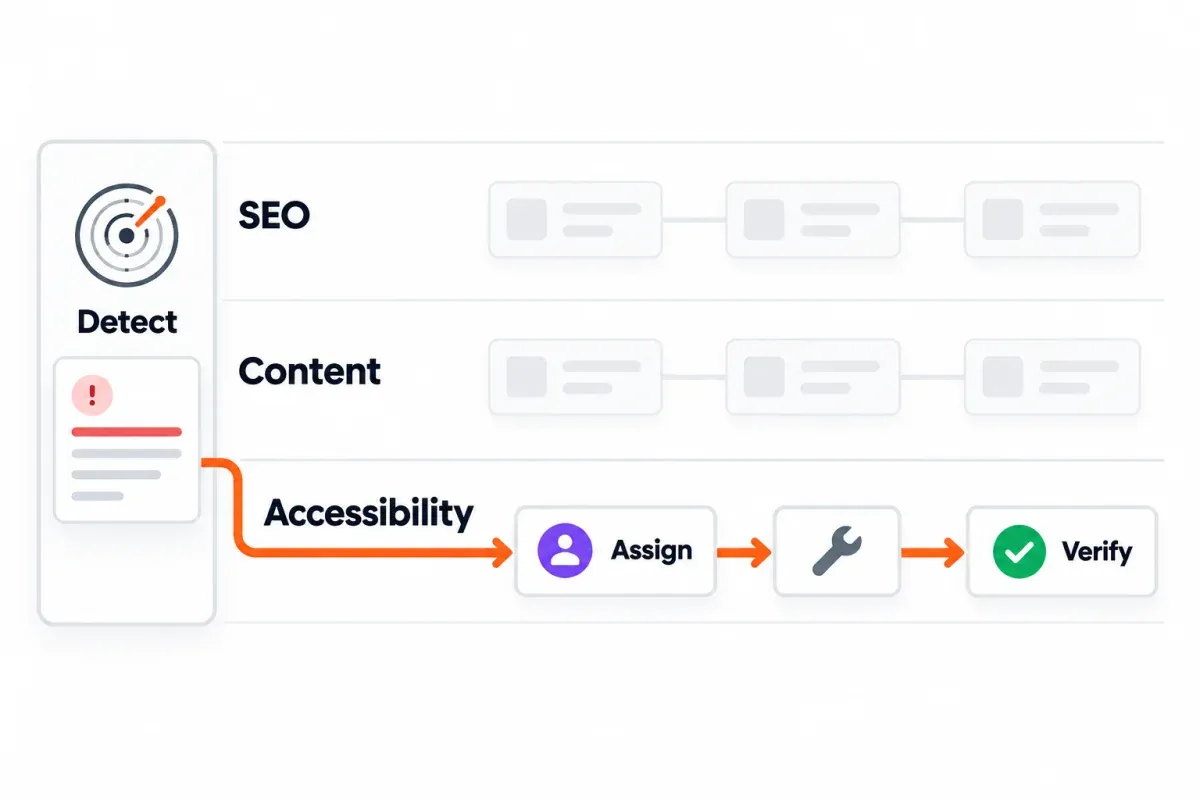
Demo task: Hand the vendor an actual broken template, or an accessibility issue, from one of your business units. Ask for the path from detection to owner assignment to verification. Have the people who will run that path attend the demo. Breadth doesn't do much for you until the handoff works.
Surfer for the content editor
Surfer's Content Editor gives writers content guidance and scoring while they work on a draft.10 The Content Score is a 0 to 100 scale that now combines an SEO Score and, since May 2026, an AI Search Score covering Facts Coverage and Upfront Intent Alignment. Surfer is a focused content optimization alternative if Ryte's Content Hub editor (formerly Content Success) is the workflow your writers would miss, and its research and outline features sit right next to the editor.
One thing worth clearing up about Surfer. Yes, it does read your Search Console data. Content Audit pulls Search Console once a day. What it surfaces: clicks, impressions, CTR, and where the main keyword ranks, over the last 30 complete days against the prior 30. If a ranking drops, you get an alert. The site itself? It won't crawl. So no broken-link check, no redirects, no status codes to speak of. So Surfer helps you pick the page to refresh, but it doesn't audit the site around it.
Pricing opens at $59 a month on Discovery, or $49 a month if you pay annual. A Google Docs extension ships with every plan. Since the May 2026 migration, AI credits aren't billed separately anymore. Every Content Editor now draws from the same Documents allowance.
Trial task: Hand Surfer and whatever editor you're using today the same brief, plus the same existing article. Then ask the writers which suggestions they'd actually keep, and which they'd quietly drop. Compare the time to publishable. If content was your main reason for using Ryte, our Surfer SEO alternatives guide covers Frase, NEURONwriter and other editors.
Google Search Console and SEO Heatmap for your own click trends
Any property you own, or one the owner added you to, opens up Search Console's performance reports: clicks, impressions, CTR and average position. Slice the view by Queries, Pages, Countries, Devices, Search appearance or Dates. The default is the last three months. Change the window if you need, and you can compare two of them side by side. SEO Heatmap takes that same connected property and lays the page-level click trends into a grid. Each row is a page, each column a period (Monthly, Weekly or Quarterly), and the color scale runs low to high so a page in decline stands out from everything around it.
If you mostly used Ryte's Search Console reports (Search Success, now Organic Performance) to find rising or falling Google traffic, give this pair a trial. The Falling filter in SEO Heatmap shows pages with fewer clicks than the period before, 1 to 5 periods in a row, and the Growing filter is its mirror.
Two things this pair won't do for you. Neither can show you the private Search Console numbers of a competitor; both work only on properties your Google account owns or has been added to. And SEO Heatmap holds the same 16 months Search Console does, so any older Ryte history can't move into it.
Save the Ryte reports you want to keep before the contract ends; the checklist below covers what Ryte's terms say about exports. We cover the difference between getting the data and visualizing it in our guide to Search Console alternatives.
Trial task: Pick the same months you reviewed in Ryte and set the Falling filter to three periods in a row. Does the view surface the same pages you'd have acted on in Ryte? For the technical causes behind a drop, bring in one of the crawlers from the shortlist.
The jobs Ryte did not do: rank tracking, AI visibility and backlinks
Ryte's rankings? Those come from your Search Console data. Nowhere on the site will you find a standalone SERP rank tracker, a backlink index, or AI-answer visibility tracking. If any of those metrics matter to your team now, that's a new tool, so put it in the budget.
- Daily rank tracking: SE Ranking runs rankings once a day and flags which tracked keywords are pulling AI Overviews. Core is $129 a month with keyword tracking for 2,000 keywords. Semrush Position Tracking does the AI Overview flag too, and its $139 SEO plan tracks 500 keywords on a daily refresh. Ahrefs Rank Tracker shows AI Overviews as well, though every plan is on a weekly update, not daily.
- AI search visibility: Semrush's AI Visibility Toolkit ($99 a month, alone or added to a plan) reports brand mentions in ChatGPT, Gemini, Perplexity and Google's AI Overviews and AI Mode. Ahrefs Brand Radar is an add-on at $199 a month for one AI platform or $699 for all of them. SE Ranking includes some AI prompt tracking in its plans and sells more as an add-on from $89 a month. Surfer's AI Tracker spans ChatGPT, Perplexity, Gemini and Google's AI results. Siteimprove.ai covers AI citations too, but that one lives inside the enterprise contract. The field changes fast: shortlist two and trial both.
- Backlinks: Ahrefs, Semrush and Majestic each crawl the web for their own backlink index to power backlink analysis against your competitors, and Seobility keeps its own backlink data too. Ryte and SEO Heatmap don't.
SEO Heatmap doesn't do any of this. It shows you your own clicks per page over 16 months of Search Console history, through the heatmap and the AI insights summary of the pages that gained and lost the most clicks. Buying for rankings or AI visibility? Grab one of the tools listed above.
Prices and buying models side by side
Other roundups quote different prices for the same tools. US prices as of October 17, 2026, taken from each vendor's own page, with the plan each number actually gets you. The starting price is just the cheapest option on offer. Where a vendor sells a higher tier, the extra money buys bigger page allowances, more seats, or features you didn't have. The week you buy, pop over to the vendor's pricing page and verify. Prices and plan names keep shifting.
| Tool | Free tier or trial | Self-serve or quote | Starting US price | What that price buys |
|---|---|---|---|---|
| Ryte | None published | Quote only | Not published | Enterprise or Partner license; sessions-based |
| Semrush Site Audit | Free plan ($0, 100 pages/month) | Self-serve | $139/month (SEO plan) | 5 websites, Site Audit, 500 keywords tracked daily |
| Semrush Enterprise Site Intelligence | None | Quote only | Not published | Millions of pages/month, Site Intelligence add-on |
| Screaming Frog SEO Spider | Free, 500 URLs per crawl | Self-serve | $279/license/year | No 500-URL cap, configuration, scheduling, APIs; one user |
| Seobility | Basic free, 100 pages/crawl | Self-serve | €59.90/month (Premium; the page prices in euros by default) | 3 projects, 25,000 pages per crawl, scheduling |
| Siteimprove | Demo only | Quote only | Not published | Modules per contract (Accessibility, SEO, etc.) |
| Surfer | 7-day Pro trial | Self-serve | $59/month (Discovery) | 10 Documents/month on monthly billing |
| Google Search Console | Free | n/a | $0 | Your own property's search data (16 months) |
| SEO Heatmap | Free for one property | Self-serve | $0 | Clicks heatmap for one Search Console property |
Ryte, Siteimprove and Site Intelligence don't publish prices at all, so those cells sit blank rather than echo some third-party guess. The monitoring tools above (Conductor Monitoring, Lumar and Botify) publish none either, which is why they aren't in the table. For those, the written quote is the only price that counts.
Test a replacement before you commit
In every tool on your shortlist, run the same small test. Your own awkward pages tell you more than the vendor's favorite demo example. Get a report on URLs your team already knows cold.
Settle the scorecard with stakeholders first, before any testing kicks off.
| Criterion | Weight | Pass condition for your team | Candidate A | Candidate B |
|---|---|---|---|---|
| Finds the issues we act on | 30% | Detects the known problems in our sample URLs | ||
| Fits our operating cadence | 20% | Crawl, alert or report arrives when we need it | ||
| Preserves useful reporting | 20% | Owner can recreate a monthly decision report | ||
| Fits our data and access rules | 15% | Required integrations, roles and exports work | ||
| Fits the full cost | 15% | Quote covers pages, projects, users and add-ons |
Score each line zero to five. Weight the scores, sure, but also sit down and walk through what each tool missed. Miss an alert you rely on? A strong overall score doesn't save it. It's still the wrong replacement.
Ask what happens on a traffic spike, or when the page count grows. The starting price hides a lot. Page allowances, crawl frequency and stored history can matter more, along with extra seats and access to exports. Annual billing knocks roughly 15 to 20 percent off the monthly rate at Semrush, Seobility, Surfer and SE Ranking, so put both lines on the quote and compare. Pull numbers from the vendor's current pricing page, or get the quote on paper. Prices in older alternatives articles can be years out of date.
Move off Ryte without losing your baseline
People need to put in a normal day's work using the replacement, start to finish. Until that happens, the handover isn't done. Before access goes away in either system, walk through this checklist.
- Inventory what exists. Projects. Saved keyword and page segments. Scheduled crawls. Keyword and anomaly alerts. Slack notifications. The connected Search Console and GA4 properties. Keyword Monitoring dashboards. Saved and shared reports. SEO A/B tests. Custom snippets. And every user with a Manager or Member role.
- Export what the account permits. Reports export as CSV, up to 100,000 rows a file, or as Excel, JSON or XML, up to 30,000 rows. For history, use the API. Before you decide what's worth keeping, read clauses 6.7 and 6.10 of Ryte's terms of service. The customer "is obliged to back up entered data outside the Software", and API exports "must be deleted by the Customer" after the agreement ends.
- Choose a representative sample. A recently changed section and the templates most valuable to the site, plus known edge cases involving canonicals, redirects and blocked pages.
- Run both systems over the same scope. Line up the dates, crawl settings, domain and subdirectories as closely as the two tools will let you. Mark where the two tools agree and where they split. Both views in front of you at once.
- Rebuild the decisions, not just the dashboards. Give a developer one real technical ticket to close. Give an editor one brief to work from. Have an SEO specialist put together one search performance update, all out of the new setup.
- Write acceptance criteria. Name the owner who confirms each report, alert and export works. Only then retire the equivalent Ryte routine.
Copy this handover note for each workflow:
Workflow:
Current Ryte report or alert:
Replacement tool and view:
Scope and refresh schedule:
Saved baseline or export location:
Known differences:
Owner:
Acceptance test and result:
Fewer issues in the new crawler's report might look encouraging. On its own, that's not proof anything got better. Its scope, blocked resources, JavaScript rendering and issue definitions all need checking first. Whether Google's crawler actually fetched a page? That calls for a different kind of evidence. Checking one URL? Search Console's URL Inspection surfaces the last time Google crawled it from the indexed version.11 For a crawl history, you want your own logs; our log file analysis guide explains where to look. Google Search Central says site logs can show when Googlebot crawled specific URLs.12
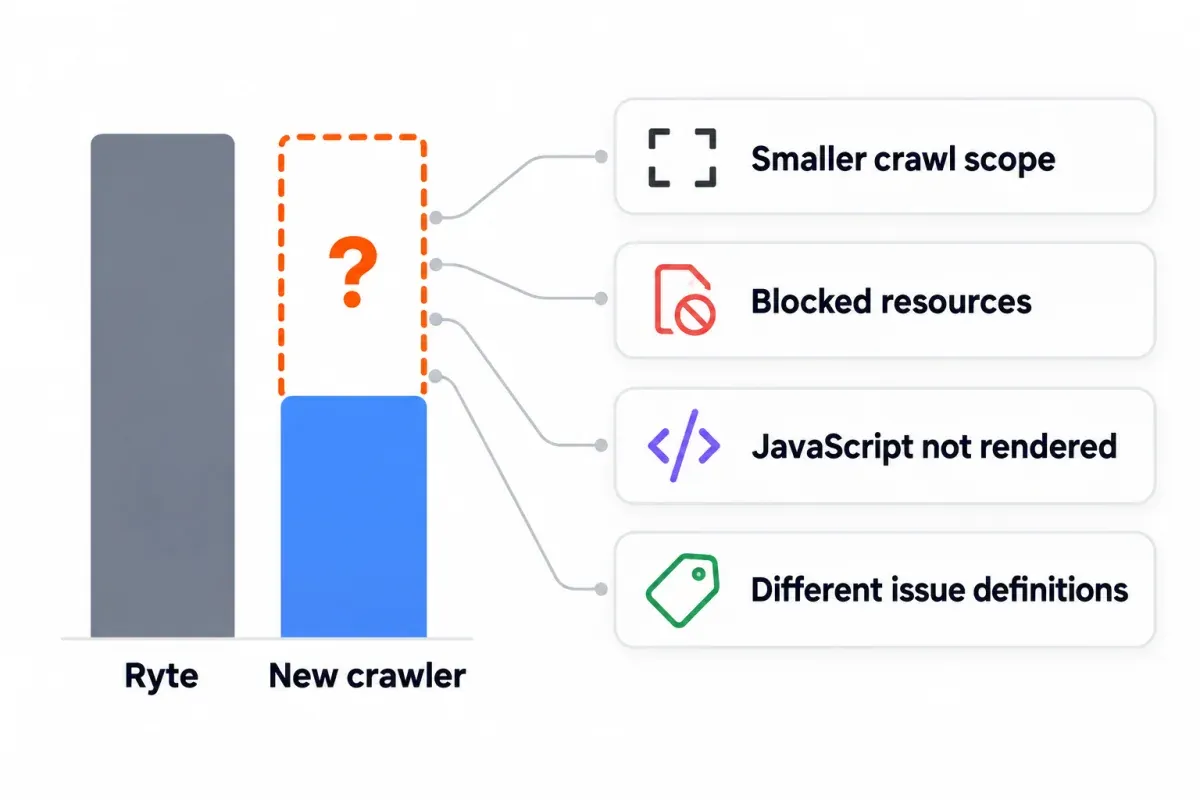
Let a crawler cover the technical side. For Google's own search data, Search Console is where you go. Add a content editor if the writers want one. That small stack may be the easiest way to replace Ryte. Let the work drive the pick. Run each option against your own pages before anything gets signed.
Frequently asked questions
Is Ryte still available after the Semrush acquisition?
Yes. As of October 17, 2026, it's still there. The home page, the help center and the login all answer, and the pricing page offers Enterprise and Partner licenses by quote. Semrush acquired Ryte in July 2024. Adobe closed on Semrush on April 28, 2026. No public announcement names an end of life for Ryte. Anything specific to your account? Your contract and your account notices are the places to look.
Is there a free Ryte alternative?
A few, by job. Screaming Frog is free up to 500 URLs per crawl for configurable technical work. Seobility Basic is free for 100 pages per crawl with a waiting period between runs. Google Search Console is free for your own property, and SEO Heatmap is free for one Search Console property if you want the clicks heatmap.
Which Ryte alternative is best for scheduled, hosted audits?
Depending on size, either Seobility or Semrush Site Audit. Paid Seobility plans let you schedule the crawl at daily, weekly or monthly intervals. Each run drops a report in your inbox. Semrush Site Audit runs on a daily or weekly schedule. It ships issue exports and a shareable PDF. How many pages you get depends on which SEO Toolkit tier is in your plan. For millions of pages a month, ask Semrush about Enterprise Site Intelligence, which is built on Ryte's crawler.
Can Search Console and SEO Heatmap replace Ryte's site crawler?
No. Search Console gives you Google's search data for your property, and SEO Heatmap draws that connected data as a clicks heatmap per page. Neither one crawls your site. Sitewide link issues, redirects, canonicals? That gap is where Screaming Frog, Seobility, and Semrush Site Audit come in.
Does any Ryte alternative track AI search visibility?
Yes, several do. Semrush's AI Visibility Toolkit costs $99 a month, Ahrefs Brand Radar is an add-on from $199 a month for one AI platform, SE Ranking includes some AI prompt tracking and sells more from $89 a month, and Surfer's AI Tracker covers ChatGPT, Perplexity, Gemini and Google's AI results. Neither Ryte's own pages nor SEO Heatmap do this. Shortlist two and run them side by side.
Why does my new crawler flag fewer problems than Ryte did?
Different issue counts often come from crawl scope or settings, not cleaner pages. Compare allowed URLs, JavaScript rendering, blocked resources and issue definitions. Check known problem pages before trusting the summary score. The fairer baseline is simpler than it looks. Give both tools one URL list to crawl, rather than running two separate audits.
How long should I run Ryte alongside a replacement?
At least one of your normal crawl and reporting cycles together. Don't end the overlap until report owners can make their usual decisions and hand work along as they do now. Similar issue totals don't excuse a missed alert or an export nobody can use. One of those means the handover isn't done yet.
Which data should I save before leaving Ryte?
With the account still live, export what you can: issue lists, historical reports, tracked URLs, plus the project settings, crawl schedules, keyword and page segments. Per clause 6.10 of Ryte's terms, API exports must be deleted when the contract ends. Pull anything you want to keep before the account shuts off. Note the report ownership while you're at it: owner for each report, every Search Console and GA4 property that's wired in, and the alerts and segments currently in use.
A Ryte alternatives shortlist comes together faster when you already know which pages lost traffic. Feed your Search Console history into SEO Heatmap and it comes back as a page-level clicks heatmap. Free, for one property. Start there. Then hand the shortest possible trial list to your team.
Sources (12)
SEO Heatmap Knowledge relies on primary sources: Google's documentation, web standards, peer-reviewed research, and vendors' own pages for their pricing and features. Our editorial standards
- Semrush. “Semrush 2024: A Year in Review.”
- Semrush. “Semrush Enterprise Announces General Availability of Site Intelligence.”
- Ryte. “WUX Overview.”
- Screaming Frog. “SEO Spider FAQ.”
- Screaming Frog. “Screaming Frog SEO Spider Update: Version 24.0.”
- Seobility. “Frequently Asked Questions.”
- Semrush. “Site Audit.”
- Siteimprove. “Siteimprove.ai at Opticon London 2026.”
- Siteimprove. “August 2025 release notes: Accessibility AI Assistant, Increased WCAG Coverage, New Visual Identity.”
- Surfer. “Content Score in the Editor Explained.”
- Google Search Console Help. “URL Inspection Tool.”
- Google Search Central. “Troubleshoot Google Search crawling errors.”

